Guide · General
Best Security Cameras for Apartments in 2026
Best security cameras for apartments in 2026: compare install, privacy, monitoring, features and costs, then match a removable camera to your unit.
By the HearSmart research desk · Updated November 22, 2026 · 14 min read
The 2026 default for a rented apartment is one removable indoor Wi-Fi camera with a microSD slot, activity zones, a lens shutter and audio that can stay switched off, aimed at your own room or the inside of your own door. That setup needs no hole in the wall, no contractor and no view of anyone else's space. Estimated U.S. residential burglaries fell from 704,342 in 2019 to 442,889 in 2023, a decline of about 37.1 percent, which is why the case for a renter's camera rests more on deliveries, door handling and shared access points than on break-in odds alone.
The most repeated advice about the best security cameras for apartments is to maximize coverage: the widest lens, the highest resolution, colour night vision and the longest cloud retention. In a flat, that ordering is backwards. A wide lens on a living-room shelf sees the front door, the light under it and, depending on the angle, a slice of the neighbor's threshold. Extra coverage is the cheapest thing for a maker to advertise and the most expensive thing for a tenant to justify.
This guide takes the other route. It starts from the space a renter controls, then tests every feature against what happens when the router drops, when the lease says no drilling, and when a neighbor objects. Specifications come from maker pages and published prices, dated on the day they were checked, so each verdict can be re-run before checkout.
Table of Contents
- Best Apartment Camera Types for 2026
- Residential Risk Versus Continuous Watching
- How Installation Privacy and Monitoring Compare
- Views Audio and Permission by Use
- Wi-Fi Walls Outages and Local Recording
- Hardware Plans and Other Ongoing Costs
- Match the Camera to the Lease and the Room
Best Apartment Camera Types for 2026
The purchase that fits most rentals is the least dramatic one on the shelf: an indoor Wi-Fi camera that lifts off its mount in seconds, takes a microSD card, supports activity zones and a lens shutter, and can run with the microphone disabled. Aim it into the room or at the inside face of the front door. It leaves nothing behind, it records before anyone pays for a cloud plan, and it never films a space the tenant doesn't control.
The alternatives earn their place only in narrow cases. A battery camera suits a shelf or windowsill where outlets are scarce, and adds recharge time to the running cost. A video doorbell fits a private entrance the lease allows, with the view cropped to that threshold rather than the corridor behind it. A local hub or base station suits a household that wants playback without a cloud plan and will pay more for the box. Wired Power over Ethernet is the exception rather than the upgrade: a 2024 explainer from the American Apartment Owners Association separates wireless cameras that need no drilling or wiring from hard-wired systems, professional installation and alarm-service contracts, which call for advance landlord permission (American Apartment Owners Association).
Six types cover almost every rental layout. Read the row that matches the space you can watch, not the space you'd like to watch.
| Type | Fits | Mount | Storage | Monitoring | Cost pattern |
|---|---|---|---|---|---|
| Indoor Wi-Fi with microSD | Own room or inside of own door | Shelf or adhesive, no drill | microSD with optional cloud | Motion alerts and activity zones | Hardware plus optional plan |
| Battery indoor or window | Shelf or sill with few outlets | Freestanding, recharge | Cloud, hub or card if offered | Motion clips, limited continuous record | Hardware, battery upkeep, possible plan |
| Video doorbell | Private entrance only if the lease allows | Existing wiring or battery mount | Cloud or onboard, check the page | Visitor and package alerts at own entry | Hardware plus a common cloud plan |
| Local hub or base station | Several rooms inside one unit | Cameras paired to a hub | Hub drive or microSD | Local playback if internet drops | Higher hardware, often lower monthly fee |
| Plug-in pan-tilt indoor | One room that needs a sweep | Plug in, no holes | microSD and cloud options | Person alerts and privacy zones | Hardware; plan only for cloud history |
| Outdoor battery for a balcony | Own balcony if rules allow | Clamp or adhesive, no common-area drill | Cloud or card | Motion alerts with weather limits | Hardware plus plan; permission first |
HearSmart applies one public formula across its categories, scoring documented performance at 40 percent, ease of use at 25 percent and value at 35 percent with no hands-on testing, so a specification a maker doesn't publish counts against the product.
Selection rule: choose the row whose view you can describe to a landlord in one sentence.
Any dollar figure in this article is the price on the maker's or seller's page on the date checked, and prices change. A bundle, a refurbished unit or a discontinued finish can move the total by more than the gap between two models.
Residential Risk Versus Continuous Watching
Apartment risk isn't uniform, and it isn't the same as the risk attached to a detached house. A summary of U.S. burglary estimates presented to the House Judiciary Committee puts burglaries at residences at 704,342 in 2019 and 442,889 in 2023, a fall of about 37.1 percent, while burglaries at non-residences moved only from 408,975 to 396,674 across the same four years (Congressional testimony on residential burglary estimates).
The same summary records 413,805 daytime residential burglaries in 2023 against 389,157 at night, so a camera that only performs after dark misses the more common window. Doors, package spots and permitted parking areas need coverage in both light conditions, and those are national estimates that say nothing about one building.
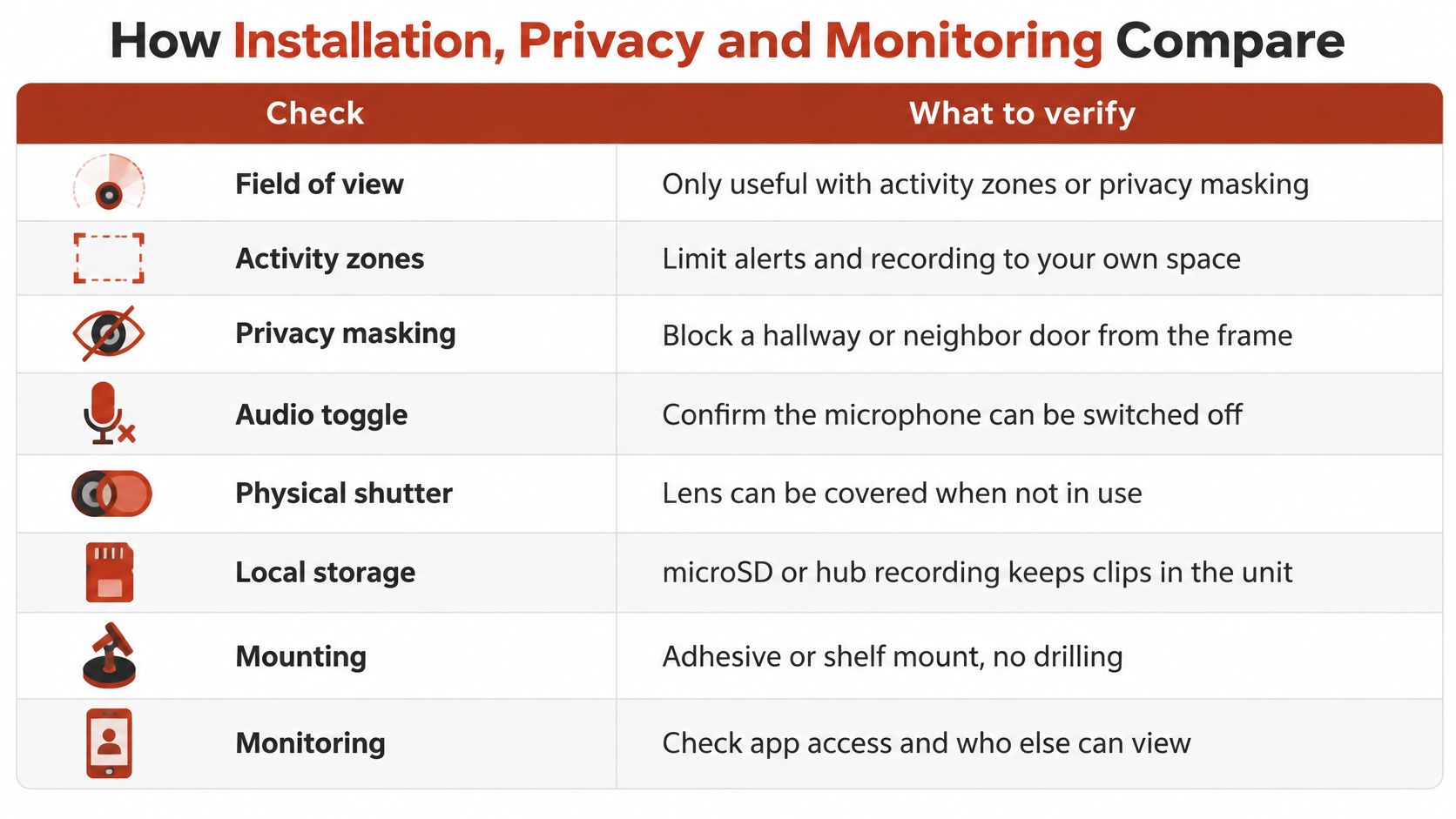
The checks that keep a camera on the right side of that line are the ones worth comparing on a spec sheet.
Crime coverage and continuous observation are separate goals, and the second carries its own costs. A 2024 University of Michigan public-housing policy paper reported that government-controlled cameras were three times more likely to observe the day-to-day lives of public-housing residents than those of residents outside public housing, and that non-White residents in those complexes experienced surveillance at 25 times the rate of White residents (University of Michigan surveillance in public housing paper).
The buying conclusion is narrow. The longest cloud retention and the widest lens aren't automatically better, and a renter's shortlist belongs to cameras with local storage, activity zones, shutters, encryption, limited permissions and deletion controls. Those are the features that decide whether the device protects one household or watches a whole floor.
How Installation Privacy and Monitoring Compare
Resolution is the easiest number to print and the weakest basis for a verdict in a rental. Eight checks separate a camera that suits an apartment from one that turns a corridor into a recording studio, and every one of them is something a maker documents or leaves out.
| Check | Copy from the maker | Rental issue | Pass test |
|---|---|---|---|
| View | Lens degrees, zones, masking | Hallway or neighbor door in frame | View stays in the unit or on own door |
| Image settings | Resolution, codec, bitrate, max frame rate | Unstable Wi-Fi and small faces | Stable stream with the subject large enough |
| Low light | Infrared range and color-night claim | Glare on glass and plates | Usable detail at the real distance |
| Audio | On, off and default state | Shared walls and visitors | Audio can stay disabled |
| Accounts | Unique login, MFA, encryption, updates | Stolen or altered footage | MFA and encrypted transport are documented |
| Monitoring | Alerts, zones, extra users, logs | Everyone in the app sees everything | Access can be limited and reviewed |
| Storage | microSD, hub, cloud days, export, delete | Outage or a subscription gap | Local recording continues offline |
| Install | Drill, adhesive, wire, contractor | Lease, deposit and permission | Removable without damage |
The View Is the First Gate
A field of view is an asset only when it can be fenced. Activity zones and privacy masking decide whether the lens points at the renter's door or at the neighbor's, and without them extra degrees add footage the tenant has to explain. Cropping the frame to the unit's own threshold costs nothing in protection and removes most of the argument.
Image Settings and the Light You Actually Have
Copy the codec, the advertised bitrate or bitrate range, the maximum frame rate at each resolution and whether the camera stores footage locally on microSD or a hub. Those four lines predict more about daily performance than the megapixel count (Fortinet IP surveillance camera white paper).
Uncompressed 1080p video represents roughly 48 Mbit/s of raw data, while real IP-camera bandwidth depends on compression, scene complexity, resolution, frame rate, camera count and viewing clients. A stream set to 15 frames per second eases congestion on apartment Wi-Fi, though fast movement can smear; 30 fps needs a faster, steadier link. 2K earns its price only when a face or a package label fills enough of the frame, and a well-exposed 1080p stream on a stable connection beats a sharper sensor on a link that stalls. Low light is where marketing outruns hardware: consumer infrared can glare, wash out faces and lose detail on reflective surfaces such as license plates, and color night vision doesn't remove those limits.
Accounts, Retention and the Install Test
NIST treats device protection, data protection and privacy protection as three separate objectives. A camera should resist misuse as attack infrastructure, protect video in storage and transit, and limit the privacy harm of collection, and its consumer-IoT criteria flag weak authentication, poor access control and weak protection in storage or transit as the vulnerabilities that expose, delete, modify or open footage to unauthorized viewing (NIST consumer IoT criteria).
So compare unique credentials, multi-factor authentication, encrypted transport, automatic security updates, configurable retention, user access logs, privacy masking and a physical or electronic lens shutter. Local-only recording lowers cloud exposure but secures nothing by itself: it still needs protected accounts, current firmware and an isolated guest or IoT network, and the default privacy settings deserve a look before the first clip is recorded.
Households that want a recorder, a contract or a monitored system should read the best home security systems comparison, which runs the same checks against kits sold with professional setup.
A camera that fails the privacy row or the install row is a rejection, even when its sensor reads better than the one beside it.
Views Audio and Permission by Use
The question isn't whether a renter may install a camera. It's which view, which audio setting and which mount make that installation defensible where the tenant lives, and the answer shifts with the placement.
Private Room, Shelf or Adhesive Mount
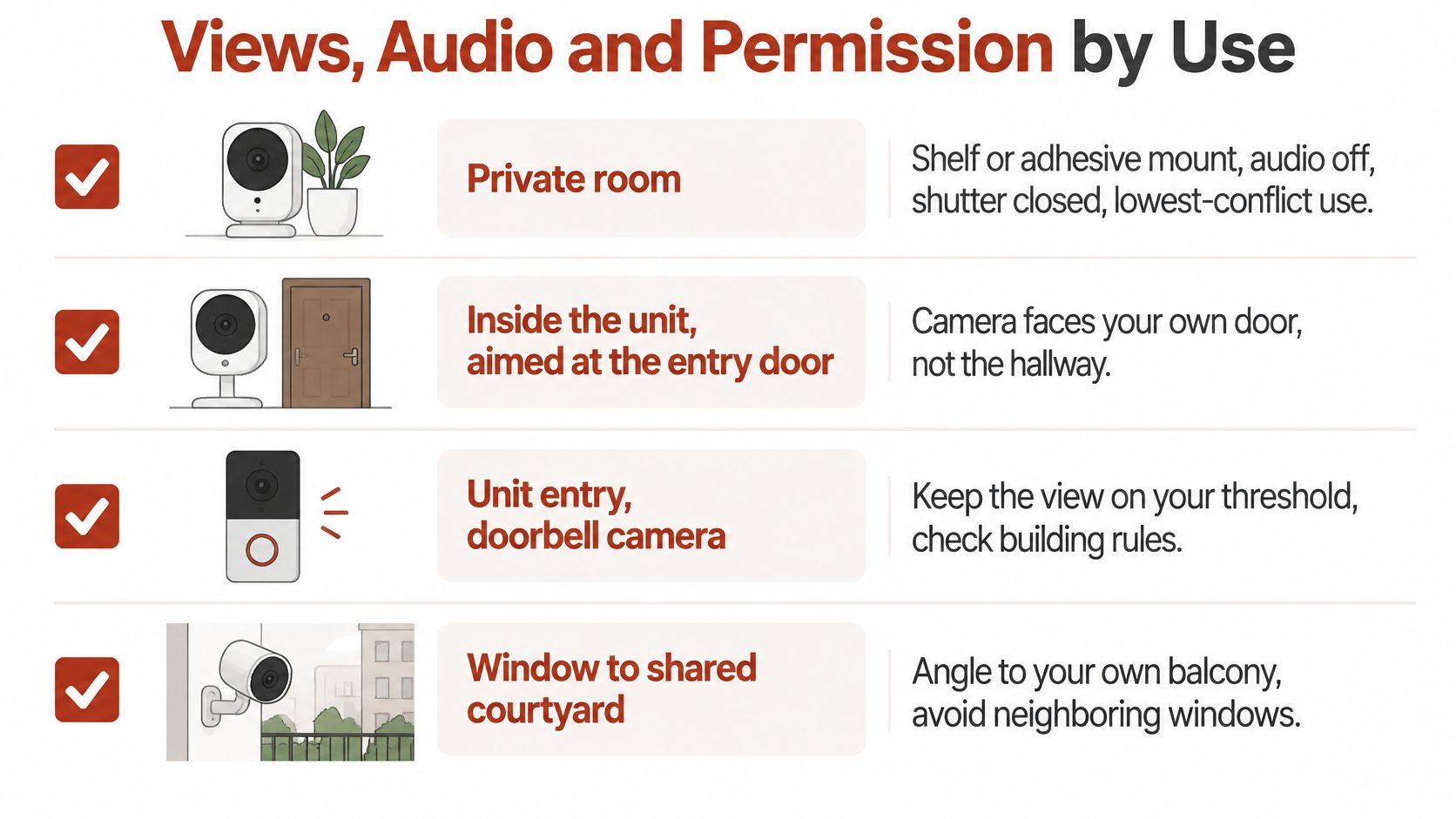
Pointed at a desk, a bike or the inside of the unit's door, with the microphone off and the shutter closed when nobody is home, this is the lowest-conflict installation available. No permission is usually needed, because nothing is drilled and nothing outside the unit is filmed.
Inside the Unit, Aimed at Your Own Door
A camera a couple of meters inside the door covers deliveries and the entry threshold without recording the corridor. Mount it high on a shelf opposite the door and angle down until the frame ends at the door frame, so a visitor on the mat is captured and a neighbor crossing the hall is not.
Shared Hallway, Neighbor Door, Other Balcony
These are the placements to refuse. In New South Wales, tenants generally need written landlord consent for a removable outdoor security camera, and the state housing authority advises disabling audio, limiting the field of view to what is reasonably necessary and avoiding unnecessary monitoring of neighbors or visitors (NSW housing guidance on cameras in rental homes). The same guidance records a Canadian privacy investigation that found hallway cameras in a Toronto building angled so that opening apartment doors exposed parts of tenants' private interiors to recording.
A balcony camera belongs on the tenant's own balcony, aimed along it rather than across it, with written consent secured before the purchase rather than after the complaint.
Signal, mounting and permission fail together often enough that they belong on one diagram.
| Placement | View | Audio | Permission |
|---|---|---|---|
| Private room with shelf or adhesive mount | Inside the renter's own room | Off | Usually none if no drilling |
| Camera inside the unit aimed at own door | Own door and entry threshold only | Off | Check lease; none if no drilling |
| Shared hallway or corridor | Corridor and other residents' doors | Avoid | Landlord controls the space; do not install |
| Neighbor doorway or window | Another household's space | Avoid | Not defensible for the renter |
| Outdoor balcony battery camera | Own balcony only | Off | Written landlord consent before purchase |
Extra coverage can raise legal exposure without protecting the renter's own space, which is why the widest lens is frequently the worst apartment purchase.
Keep the decision file small: private room or own-door view, removable mount, audio off by default, masking on any edge of the frame that reaches shared space, and written approval saved before checkout. A doorbell camera is the natural add-on only where the entrance is private, and the video doorbell ranking covers which models keep the view on the threshold. Tenancy law, strata rules and leases differ by country and state, so a product page can establish what a camera does, never whether a particular view is allowed.
Wi-Fi Walls Outages and Local Recording
Renters inherit the router. It sits where the provider left it, often in a hallway cupboard or another wing, and no new cable can be pulled through a leased wall. Concrete cores, steel reinforcement and distance between rooms weaken 2.4 GHz signals, and one apartment-focused review notes that reinforced newer buildings can do exactly that and that a router in another wing can produce interruptions (apartment wireless camera review).
The failure that matters isn't a worse picture. It's a missing clip.
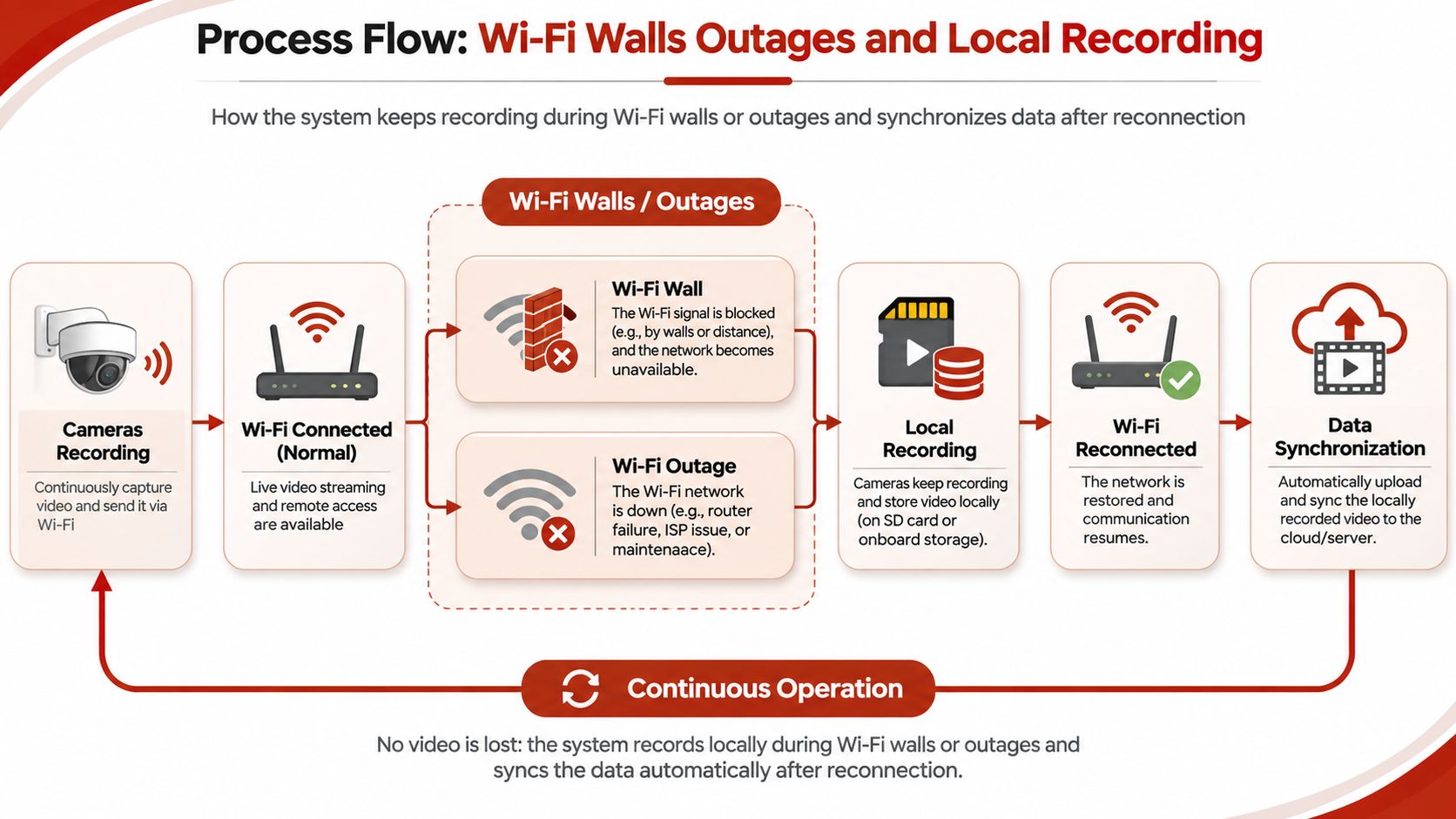
Run this test on the planned position before the return window closes:
- Measure the line of sight. Note the straight-line distance from the router to each camera position.
- Count the walls. Record every partition between router and camera, and mark concrete or steel-framed ones, since each costs signal.
- Pick the near side. Where the lease and layout allow, keep the camera on the same side of the unit as the router.
- Log a 24-hour run. If the stream stalls, set the frame rate to 15 and retest before blaming the hardware.
- Pull the plug on Wi-Fi. Disconnect for ten minutes and confirm the camera keeps writing to microSD or a hub, resumes by itself and sends an offline alert.
- Check the lapse. Find out what the app still shows when a subscription expires, while the trial is still active.
A cloud-only camera can look inexpensive and then lose the evidence that justified it while a bill is unpaid or the broadband is down. Deletion belongs to the same problem: removing a clip in an app may not clear every copy held on company servers at once, and regulators have acted over weak account security and unauthorized employee access. Keep audio off while testing, so the only variable is the link.
Resilience rule: a camera that keeps recording predictably in a rental is worth more than a sharper one that misses the event.
Where the signal itself is the problem, a mesh Wi-Fi system comparison covers the hardware side, though an extra node in a rental still has to sit where the lease allows.
Hardware Plans and Other Ongoing Costs
The sticker price is the smallest number in the decision. Keeping a clip long enough to be useful is a separate purchase, and the total depends on whether history lives on a card, on a hub drive or on somebody else's server. Prices quoted in this article are the US prices shown on each maker's own store at the time HearSmart checked them, and they change.
| Cost line | When it applies | Copy from the seller | What changes it |
|---|---|---|---|
| Hardware | Every purchase | US price and date checked | Bundles or refurbished units |
| Cloud plan | History is not local | Monthly or annual price and camera count | A card or hub can avoid it |
| microSD or hub drive | Local recording | Capacity and sold-separately price | Retention days versus card size |
| Power extras | Battery cameras | Spare battery if a price is published | Recharge time and outages |
| Install or alarm contract | Wired or monitored systems | Service price if published | Landlord permission and term length |
| Extra users or export | Shared households | Included or paid | Access logs and download limits |
Capacity Isn't the Same as Policy
Advertised storage is not a retention rule. The Boston Housing Authority's video-surveillance policy, updated in 2026, keeps recordings on a secure server for a minimum of 30 days under Massachusetts public-records requirements, limits footage and related information to law-enforcement or other approved official purposes, requires internal requests for video evidence to be submitted in writing or electronically, and treats downloaded recordings as evidence subject to chain-of-custody procedures (Boston Housing Authority video surveillance policy).
A renter's camera won't follow that policy unless the building operates it. The example still separates two lines that buyers merge: a tenant who can't export a clip into a dated file owns footage with no usable history, while a building that keeps its own 30-day record may already hold the view a renter was about to duplicate. Buy the card for the days you want, and buy the export control for the case you might have to prove.
Match the Camera to the Lease and the Room
For a studio or one-bedroom, buy the removable indoor Wi-Fi camera from the first table, fit a card sized to the retention the household wants, and aim it inside the unit. That is the whole system for most renters, and the only version that needs no conversation with a landlord.
For a long apartment with the router at the far end, the deciding feature is local recording plus the position that survived the wall test, not the highest resolution on the shelf. Where the lease allows a private entrance, a doorbell becomes the add-on, cropped to that entrance alone. A household that won't pay monthly chooses a hub or a card and skips cloud history rather than accepting a free trial that ends mid-lease.
If the only useful view is a shared hallway or a neighbor's door, the answer isn't a wider camera. Ask the building what it already records, keep any renter camera inside the unit, and spend the difference on a card and a proper mount.
Before checkout, save three things: the seller's price with the date checked, the lease clause that covers mounting, and a photograph of the intended view taken from the intended position. HearSmart publishes independent rankings of gadgets, home gear, money apps, travel services and software, scored the same way every time, and its home security camera buying guides list named models with seller prices dated on the check day.
Confirm in this order: mount, view, audio, local storage, written permission. Then buy the single type that passes all five.
The five checks travel well. Does the mount come off without a mark, does the frame stay inside the unit, does the microphone switch off, does recording continue without the internet, and does the building allow that position in writing. A camera that clears all five is the purchase; anything that clears four is a future argument with a landlord. For readers who want to verify the figures behind these calls, HearSmart's sourced consumer statistics pages carry the publisher, data year and exact source line for each number.
Spotted an error in this guide? Email editorial@hearsmart.org