Guide · General
eSIM vs Physical SIM: Which Fits Your Phone in 2026
eSIM vs physical SIM compared on setup, compatibility, travel, recovery and switching, with sourced 2026 data and a decision guide by situation.
By the HearSmart research desk · Updated November 25, 2026 · 17 min read
Most phone buying advice treats eSIM vs physical SIM as a settled race: drop the plastic chip, switch to an embedded SIM, and get better security and simpler travel. That guidance misses the half of the trade-off that strands people without phone service. Neither format improves signal strength or data speeds, and the better choice hinges on recovery friction, handset and carrier eligibility, and whether a phone needs multiple active lines.
Embedded SIMs are moving rapidly from a niche spec to the global default, though removable cards aren't vanishing overnight. In its 2024 baseline forecast, the GSMA Mobile Economy 2024 report estimated roughly 1 billion eSIM smartphone connections worldwide by the end of 2025 and projected 6.9 billion eSIM connections by 2030, equal to about 76% of all global smartphone connections. That same 2024 forecast maps a wide uncertainty band for 2030, spanning from 5.6 billion connections (61%) in a low-adoption scenario to 8.0 billion (88%) in a high-adoption scenario, while projecting slower adoption in developing regions such as 55% eSIM penetration in Sub-Saharan Africa and 65% in India by 2030.
Because both formats will share networks and handsets for years, buyers benefit from measuring how each option behaves when things go wrong. The HearSmart research desk evaluates eSIM vs physical SIM not only on everyday convenience and theft protection, but on how reliably a subscriber regains cellular service after a lost phone, a failed digital activation, or an accidentally deleted profile.
Table of Contents
- eSIM and Physical SIM at a Glance
- Checking Phone and Carrier Compatibility First
- How to Activate an eSIM or Swap a Physical SIM
- Travel, Dual Lines and Multi-Profile Use
- Recovering Service After a Lost Phone or Failed eSIM
- Choosing the Right SIM Type and Next Steps
eSIM and Physical SIM at a Glance
A physical SIM is a removable card moved by hand between compatible phones, whereas an eSIM is a programmable subscriber profile built directly into the device and activated through a carrier's digital provisioning system. Both store the credentials a wireless network needs to authenticate a phone number and data plan, yet they move control of those credentials from a physical object to handset software.
That shift explains the commercial scale behind embedded chips. According to GSMA Intelligence's eSIM market progress report, global eSIM smartphone connections were projected to climb from roughly 850 million in 2022 to about 6.7 billion by 2030, with a later GSMA forecast pinpointing 2028 as the year eSIM reaches roughly half of global smartphone connections.
The graphic below summarizes how the two formats differ in hardware delivery and daily handling.
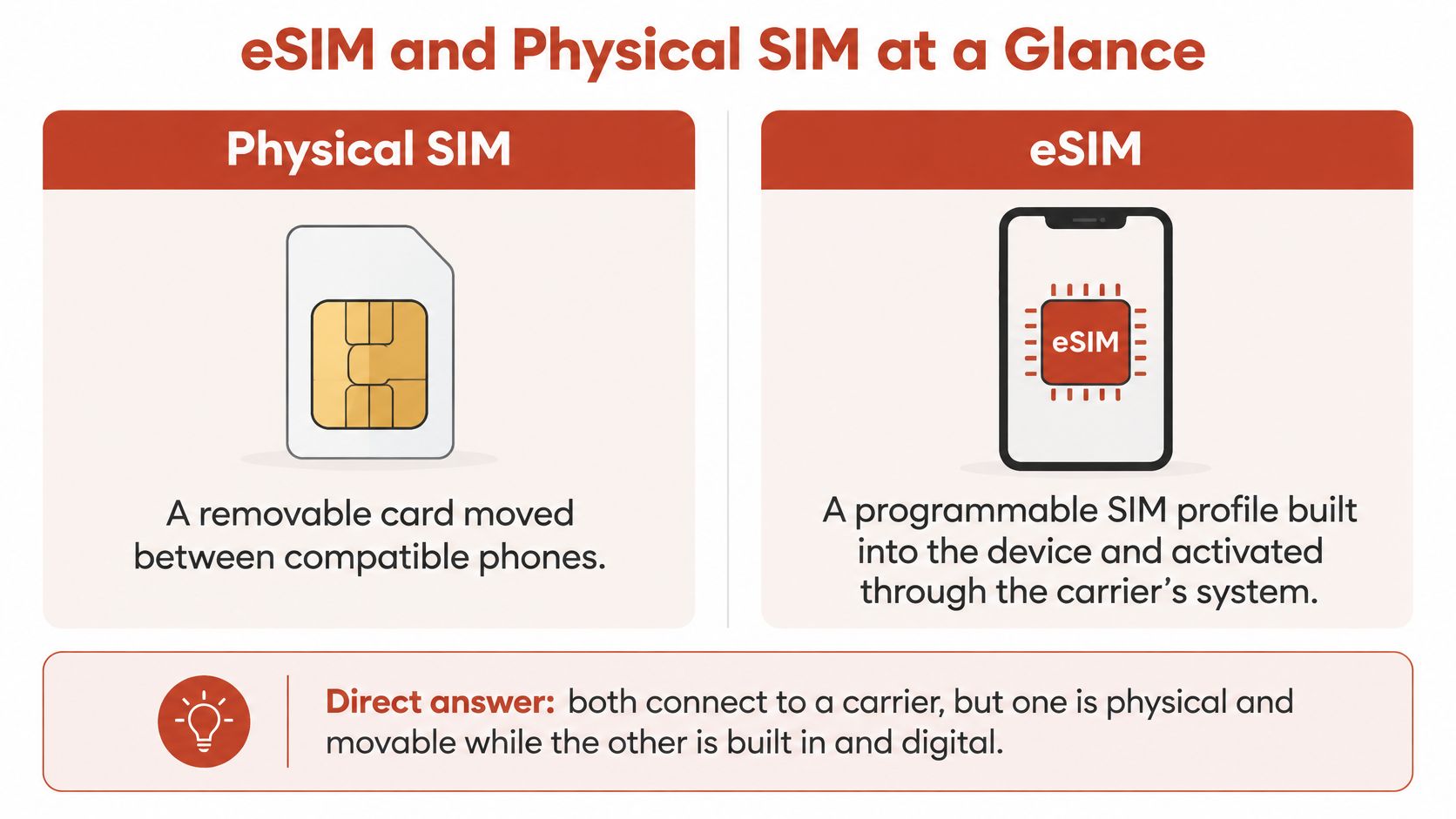
A side-by-side spec breakdown shows where the two SIM formats separate and where marketing claims exaggerate the difference.
| Attribute | Physical SIM | eSIM |
|---|---|---|
| How it is delivered | Removable card supplied by the carrier | Profile downloaded and activated digitally by QR code or carrier app |
| Moving to another phone | Remove and insert into a compatible unlocked handset | Carrier re-download or transfer, which may need a QR code, app or account check |
| Multiple profiles on one device | Not applicable, one card per slot | Several profiles can be stored; usually one or a device-defined subset is active |
| Security | Credentials held in a secure element | Equivalent to a removable UICC under GSMA consumer requirements |
| Support in older or budget devices | Widely supported | Limited to models with built-in eUICC hardware and carrier provisioning |
| Speed and signal | Set by modem, radio bands and network | Set by modem, radio bands and network, not by the SIM format |
Why Speed and Security Rarely Separate the Two
Two rows in the comparison table routinely surprise shoppers: network performance and cryptographic security. Converting a line from a plastic nano-SIM to a digital profile won't deliver faster 5G downloads, lower gaming latency, stronger indoor reception, or noticeably longer battery life. Those metrics come from the phone's cellular modem, supported radio frequency bands, antenna engineering, and carrier tower density rather than how the SIM credentials sit inside the chassis.
Security works on the same technical footing. Both formats protect subscriber identity credentials inside a tamper-resistant secure element and authenticate to cell towers under identical cellular standards. Under the 2018 GSMA eSIM Whitepaper, consumer eSIM architecture must match or exceed the security of a removable UICC (Universal Integrated Circuit Card), protecting cryptographic keys, authentication parameters, subscriber identity data, and profile contents downloaded over an authenticated, encrypted Remote SIM Provisioning channel.
The security divergence is operational, not cryptographic. An embedded profile can't be pried out of a stolen handset, yet its reliance on carrier provisioning complicates emergency transfers. For most buyers, three rows in the table settle the practical trade-off: handset and carrier support, moving service to another phone, and storing multiple profiles on one device.
Checking Phone and Carrier Compatibility First
Owning a smartphone with an embedded SIM chip doesn't guarantee eSIM service. Working eSIM connectivity requires two separate approvals: a handset equipped with an eUICC chip and a wireless carrier that actively provisions digital profiles for that specific device model. A physical SIM tray doesn't guarantee a carrier offers eSIM, and built-in eSIM hardware doesn't bypass a carrier lock.
Apple's published documentation provides a clear worked example of how hardware, software, and carrier rules stack together. According to Apple's Dual SIM with eSIM requirements (accessed in 2026), eSIM activation requires an iPhone XS, iPhone XS Max, iPhone XR, or later running iOS 12.1 or later, paired with a wireless carrier that supports eSIM. Running plans from two different carriers on one iPhone requires an unlocked device; on a locked handset, both lines must come from the same provider.
Model generation also determines how many profiles can run live at the same time. While supported iPhones can store multiple eSIM profiles in internal memory, Apple's 2026 documentation notes that iPhone 13 models and later support two active eSIMs simultaneously alongside the standard physical-SIM-plus-eSIM pairing. Older supported iPhones must pair one physical card with one active eSIM.
Running the Pre-Purchase Compatibility Checks
Buyers should verify eligibility in strict order before paying for a digital plan or requesting a SIM conversion. Skipping step two or three is the most common reason non-refundable eSIM plans fail on arrival.
| Check | Where to confirm | Why it matters |
|---|---|---|
| eSIM support on the phone model | Maker's specification page | Apple requires iPhone XS, iPhone XS Max, iPhone XR or later on iOS 12.1 or later (Apple, 2026) |
| Carrier eSIM support | Carrier activation or device page | A device with eUICC still needs the carrier to provision a profile |
| Carrier lock status | Phone settings or carrier unlock record | Two different carriers on one iPhone need an unlocked device (Apple, 2026) |
| Two active eSIMs | Model specification | iPhone 13 models and later support two active eSIMs (Apple, 2026) |
| Stored profile count | Model specification | Set by handset model; stored profiles are not the same as active lines |
| Android model support | Maker's support page | Set by manufacturer and carrier; verify on the maker's site |
Checking lock status takes less than a minute on modern devices. On an iPhone, open Settings, tap General, select About, and scroll to Carrier Lock; a phone with no carrier restrictions displays No SIM restrictions. On Android phones from Samsung, Google, Motorola, or OnePlus, regional hardware variants and carrier firmware differ substantially, so confirming exact model compatibility on the handset manufacturer's official support page is essential before ordering an eSIM.
Hardware support never overrides a carrier lock. A flagship phone with built-in eUICC still rejects a second carrier's profile until the original provider clears the lock record.
Subscribers comparing low-cost wireless providers that support digital provisioning can inspect published plan terms and carrier capabilities in the guide to the best cheap cell phone plans. Once a handset passes every check in the table above, activation becomes a straightforward setup sequence rather than a troubleshooting session.
How to Activate an eSIM or Swap a Physical SIM
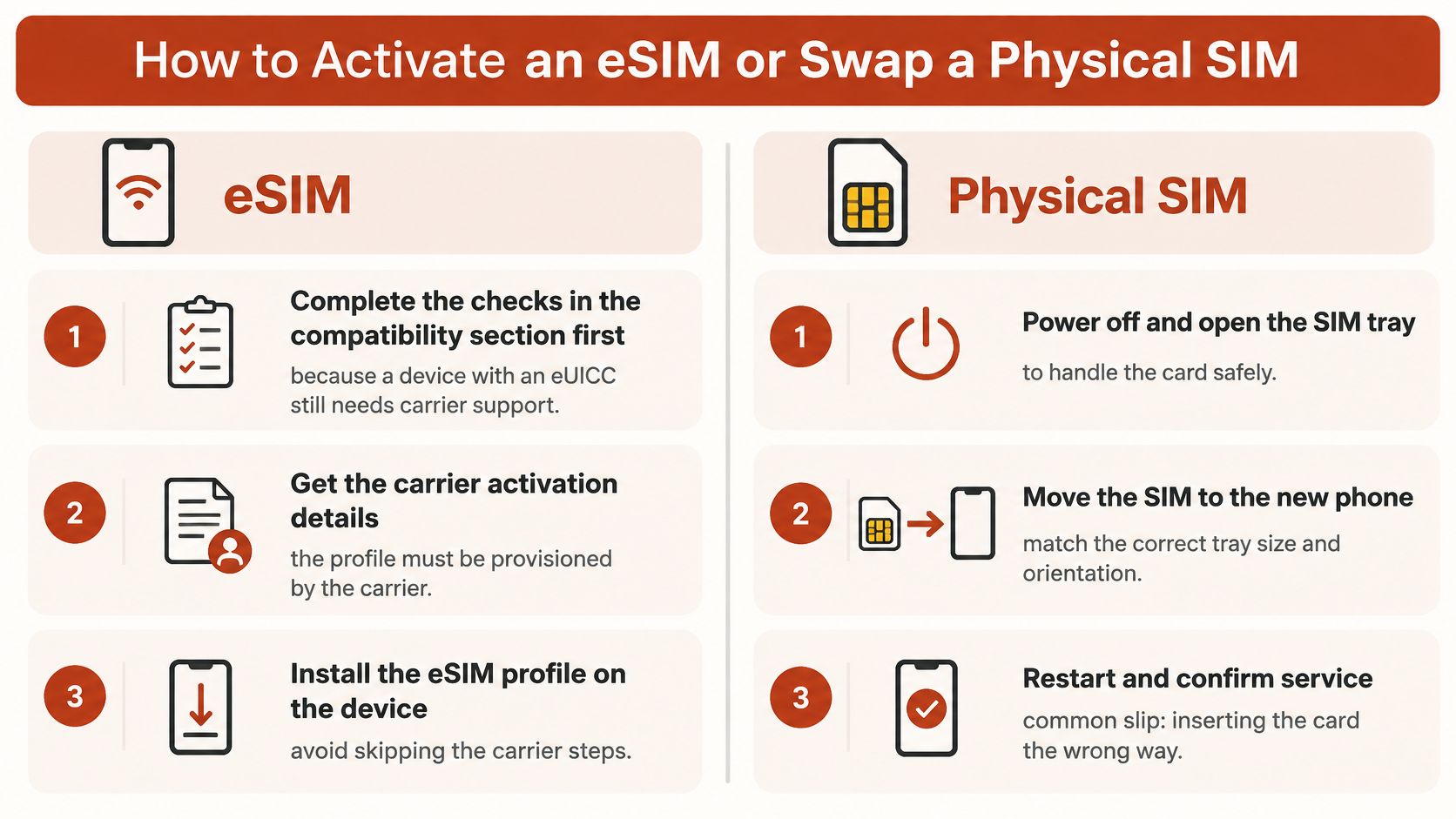
Switching SIM formats or moving a line to a replacement handset requires different workflows depending on whether credentials live on a plastic chip or inside carrier software. The diagram below lays out both routines side by side so buyers can see where carrier provisioning enters the process.
Six Steps to Activate an eSIM
Digital activation avoids waiting for a mailed starter kit, yet each step requires strict sequencing because interrupted downloads can invalidate single-use credentials.
- Verify handset and carrier eligibility first. Confirm model capability, operating system version, and carrier lock status before requesting a profile, since an embedded chip can't install credentials without carrier-side approval. Attempting installation on a locked phone triggers an immediate provisioning rejection.
- Connect to a stable Wi-Fi network. Downloading and decrypting an operator profile requires uninterrupted internet access. Running setup over weak cafe Wi-Fi or fluctuating cellular reception can freeze the profile halfway through registration.
- Pull up the carrier activation details. Log into the carrier's official app or web account to generate an in-app push transfer or a QR code. Display the QR code on a second screen, such as a laptop or tablet, or print it out so the phone's camera can scan it cleanly.
- Install the profile on the target handset only. Open the phone's cellular settings, choose the option to add an eSIM, and follow the on-screen carrier prompts until the new line registers. Avoid scanning a single-use QR code with the wrong device, because once a code is claimed, it normally can't be reused without requesting a fresh issue from support.
- Label the line and set default routing. Assign an unmistakable label such as Home or Travel Data, then choose which line handles voice calls, SMS texts, and mobile data. Default line assignments differ across operating systems, and leaving mobile data pointed at the wrong profile can trigger surprise roaming charges.
- Keep the old line live until the new one passes tests. Don't delete an existing eSIM or cancel an active physical card until calls, texts, and data work on the replacement profile. Keeping the previous line online protects access to bank or account two-factor authentication codes if setup hits a snag.
Five Steps to Swap a Physical SIM
Moving a removable card stays completely offline and requires no carrier login, though physical handling brings its own mechanical slips.
- Power the handset off completely. Shutting down both the old and new phones prevents electrical contact damage and stops the cellular modem from holding stale network sessions.
- Eject the SIM tray with a proper pin. Press a metal SIM ejector tool or straightened paperclip straight into the tray pinhole until it pops free. Twisting or angling the pin risks bending the internal spring mechanism.
- Seat the card into the target phone. Confirm the card size matches the tray (most modern phones take a nano-SIM) and align the angled corner notch so the chip sits flush. Forcing a crooked tray back into the frame can snap delicate reader pins inside the handset.
- Restart the device and watch for network registration. Boot the phone and give the modem up to a minute to locate the carrier signal and display the operator name in the status bar.
- Enter carrier APN settings if mobile data stays offline. Major networks configure Access Point Name (APN) settings automatically over the air, yet smaller prepaid carriers sometimes require manual APN entry inside cellular network settings before web browsing works.
Confirming a Working Connection
Neither routine is finished when the setup screen closes. Turn Wi-Fi off completely and verify three indicators: the carrier's network name appears at the top of the screen, signal bars remain steady, and both a short outbound voice call and a mobile web page load succeed. If calls connect while SMS or data stalls, toggling airplane mode on for fifteen seconds forces a fresh handshake with the local cell tower.
Travel, Dual Lines and Multi-Profile Use
Consider an international traveler landing in Tokyo for ten days who wants affordable local data for transit maps and messaging without missing bank fraud alerts or urgent family calls on a home phone number. With a removable card, buying a prepaid airport SIM requires ejecting the home chip, storing a fingernail-sized piece of plastic safely for the entire trip, and going unreachable on the primary number until landing back home. With an eSIM on a dual-SIM handset, the home card stays seated while a downloaded local data profile comes online the moment the plane reaches the gate.
The photograph below shows a common multi-profile travel routine, managing local data alongside a primary home number directly from handset settings.

Stored Profiles Versus Live Network Connections
Multi-profile storage is the core technical feature that separates embedded SIMs from conventional removable cards, yet buyers often confuse how many profiles a phone stores with how many networks it runs simultaneously. Under the 2025 GSMA SGP.22 technical specification, a compliant eUICC isolates multiple operator profiles inside separate security domains so one carrier profile can't read another profile's applications or subscriber data. Even so, normally only one profile, or a device-defined subset, remains active for live cellular service at any time.
Running two numbers concurrently requires specific dual-SIM radio hardware, such as Dual SIM Dual Standby (DSDS) or Dual SIM Dual Active (DSDA), paired with carrier support. On a DSDS phone, both lines wait for incoming calls and texts, though taking a voice call on one line temporarily pauses mobile data on the other unless the handset and carrier support simultaneous data switching.
In everyday use, multi-profile capability solves three distinct situations:
- Keeping a home number alive abroad: Travelers leave their domestic SIM enabled for incoming SMS verification while routing all cellular browsing through a prepaid regional or local eSIM; shoppers comparing published travel plan terms and coverage lists can review the ranking of the best eSIM apps.
- Separating work and personal numbers: Freelancers, clinicians, and field staff run a business line alongside a personal number on one handset, turning the work profile off after hours without carrying a second phone.
- Switching domestic carriers on demand: Subscribers moving to a lower-priced plan can activate a new carrier profile digitally instead of waiting days for a plastic starter kit in the mail.
Removable cards still hold a practical advantage for travelers who swap hardware mid-trip. Sliding a local prepaid physical SIM out of a smartphone and into a portable Wi-Fi hotspot, cellular tablet, or spare phone takes seconds. Moving an eSIM across devices isn't nearly as fluid, because most carriers require a replacement QR code, an operator app login, identity verification, or account reauthorization to reissue the profile.
Pre-departure check: Verify three specifications separately before buying a travel profile: total stored eSIM capacity on the handset, whether both lines can stay active simultaneously, and whether the destination carrier supports the phone's eSIM provisioning method.
Before leaving home, check individual settings for voice calls, SMS, and data roaming on both lines. Turning off data roaming on the home line while enabling it strictly on the travel profile prevents accidental daily roaming charges while keeping incoming text messages reachable.
Recovering Service After a Lost Phone or Failed eSIM
Most buyers hear that embedded SIMs win on security because a thief can't pop the SIM tray open on a stolen smartphone and slide the card into another handset to hijack text messages. That anti-tamper benefit is genuine. Yet focusing strictly on theft deterrence hides a major operational weakness: the exact carrier-controlled provisioning system that blocks physical tampering can also slow down or block the rightful owner from restoring service during an outage.
When a digital activation stalls, a profile gets deleted by mistake, or a handset breaks unexpectedly, recovery doesn't happen in the user's hands. Rebuilding an eSIM connection can require stable Wi-Fi, an official carrier app, an account password, identity verification, a freshly generated QR code, or a live customer support agent. Independent security research published in 2025 in the ACM Digital Library proceedings identified real-world operational hazards including deletion failures and profile lock-in, while EU cybersecurity guidance cited in that 2025 research warns that swapping profiles can deactivate active profiles and cause sudden loss of connectivity. In edge cases, an orphaned profile can leave neither the wireless carrier nor the provisioning platform able to remove the broken credential from the chip.
A removable card flips that failure mode on its head. If a phone's screen shatters during a business trip or its battery swells and dies, ejecting the physical SIM and dropping it into a spare handset restores voice calls and text messages immediately. No Wi-Fi login, identity check, or carrier support queue stands in the way. (If the entire handset is stolen with the physical card inside, the owner still needs a carrier replacement, which is why enabling a SIM PIN lock on a physical card closes most of the physical-removal gap.)
Scoring Recovery Friction Across Both Formats
To give buyers a realistic picture beyond marketing headlines, the HearSmart research desk scores recovery friction across five failure points that determine how fast a subscriber gets back online after hardware or activation trouble.
| Recovery check | Physical SIM | eSIM |
|---|---|---|
| Recovery route after a lost phone | Move the card into a spare unlocked phone | Carrier re-download, which may need an account login and identity check |
| Activation without SMS access | Card needs no activation | Requires carrier app, email, Wi-Fi, or live support identity check when SMS is unreachable |
| Replacement fees | Set by carrier | Set by carrier; some reissue profiles free while others charge a replacement fee |
| Service while traveling | Home card must be removed | Home line can stay active with a local profile on dual-SIM handsets |
| Deletion failure or profile lock-in | Not applicable | Reported in 2025 security research and EU guidance |
Protecting Two-Factor Authentication Before Converting
Recovery friction hits hardest for subscribers who depend on a single smartphone for two-factor authentication (2FA), including international travelers, parents managing family accounts, and older users without a backup device. A failed eSIM transfer creates a circular lockout: the carrier's self-service portal tries to text a one-time security code to the exact phone number that just lost cellular service.
Move critical banking, email, and work logins off SMS verification and onto an authenticator app with printed recovery codes before converting a primary number to eSIM.
Before switching a primary line off a physical tray, verify three carrier recovery rules in advance. Confirm whether the operator allows instant eSIM re-download without an SMS code, whether a replacement fee applies after a phone reset or hardware swap, and whether customer support can verify identity and reissue a profile while the subscriber is traveling outside the home country.
Choosing the Right SIM Type and Next Steps
Rather than ranking one SIM format as universally superior, the smarter move is matching the format to the exact failure modes and habits of the person holding the phone. The decision matrix below maps six everyday buyer scenarios to the stronger fit and the single factor that settles the choice.
| Situation | Better fit | Deciding reason |
|---|---|---|
| Frequent international travel with a home line | eSIM | Add a local data profile without removing the home card |
| One carrier, no travel, phone supports eSIM | Either | Both work; choose on price and carrier plan |
| Switching carriers and keeping one number | eSIM if the carrier supports instant transfer; physical SIM if the phone is unlocked | Transfer method is set by the carrier process |
| Older or unlocked phone without eSIM | Physical SIM | eSIM is not available on the device |
| Phone holds two-factor apps and there is no spare device | Physical SIM | A card can be moved into a spare unlocked phone |
| Phone lost, eSIM fails to re-download | Physical SIM as recovery route | Carrier account access may be needed for eSIM recovery |
Two rows in the table turn on carrier execution rather than device specs. Subscribers switching domestic carriers while porting an existing number benefit from eSIM only when the incoming carrier offers instant automated transfer; if the provider relies on manual QR reissues or slow support tickets, sliding a physical card into a handset cuts down activation risk. Buyers shopping for lower-cost phones also need to confirm whether eUICC hardware is built into the model at all, a spec tracked across entry-level models in the guide to the best budget smartphones.
Why Setup Certainty Matters More Than Hype
Consumer survey data shows a wide gap between how fast carriers talk about embedded SIMs and how confidently ordinary buyers use them. According to the 2025 BICS eSIM Survey Report, a 2025 YouGov survey of 6,625 adults across the US, UK, and China found that only 33% knew what an eSIM was, while 42% were unsure whether their current smartphone even supported one. In the same 2025 BICS industry survey, 44% of respondents identified lack of consumer awareness or understanding as the largest adoption hurdle, even as 45% rated eSIM demand as moderately or very high.
Travel habits point to a similar priority: continuity and reliability outweigh one-trip bargain hunting. In a 2025 survey of current travel-eSIM users cited in that report, 64% preferred a multi-destination eSIM over single-country profiles, and only 24% deleted the eSIM after returning home. For real-world buyers, the decisive variable in eSIM vs physical SIM isn't novelty, it's setup certainty. That means knowing ahead of time whether the handset is carrier-locked, whether destination networks support the phone's radio bands, whether calls and SMS stay active alongside a second profile, and how a provider handles a QR code opened on the wrong device.
Three Final Checks Before Switching
Before converting an active line or buying a travel profile, run through three quick verification steps:
- Confirm model and software support: Verify the exact phone generation and required OS version on the device maker's official support page before purchasing any digital plan.
- Verify carrier provisioning and lock status: Check that the chosen carrier supports eSIM on that specific handset and confirm the phone carries no carrier lock if combining two networks.
- Set up a non-SMS backup route: Store recovery codes for banking, email, and password managers offline or on a secondary device before turning off or replacing an existing SIM.
HearSmart compares documented features and published prices and does not do hands-on testing of products. Because wireless carriers update activation fees, roaming passes, and supported device lists regularly, readers should verify current pricing and transfer rules directly on their carrier's official website before starting a switch.
That leaves one clear decision to make right now: stay on a physical SIM for low recovery friction and instant handset swaps, move to an eSIM for dual-line travel and quick digital carrier changes, or keep an active physical card in place until the chosen carrier confirms instant eSIM recovery without SMS access.
Verify your current handset's lock status and eSIM compatibility in device settings today, confirm your carrier's profile recovery policy before removing an active card, and compare documented specs and published prices across phone plans, travel eSIM providers, and open handsets on HearSmart to choose the setup that keeps your connection reliable at home and abroad.
Cite this page
HearSmart. eSIM vs Physical SIM: Which Fits Your Phone in 2026. Updated November 25, 2026. https://hearsmart.org/esim-vs-physical-sim
Spotted an error in this guide? Email editorial@hearsmart.org