Review · Tech & gadgets
 ASUS Chromebook Plus CX34 review
A 14-inch Chromebook Plus with Intel Core processors, an anti-glare screen and a camera privacy shutter.
By the HearSmart research desk · Updated November 24, 2026
The short answer
The ASUS Chromebook Plus CX34 (CX3402) is a 14-inch Chromebook Plus with Intel Core processors, a Full HD anti-glare screen and a 50Wh battery, and it is the cheapest Chromebook Plus on our list: Google's Chromebook store listed it from $369 (MSRP, Core i3, 8GB, 128GB) when checked in November 2026. It suits students, families and home users who want a full-size laptop for Google Docs, video calls and web apps without paying for an OLED screen or a premium build.
- Performance (40%)
- 7.2
- Ease of use (25%)
- 8.8
- Value (35%)
- 9.4
What it looks like
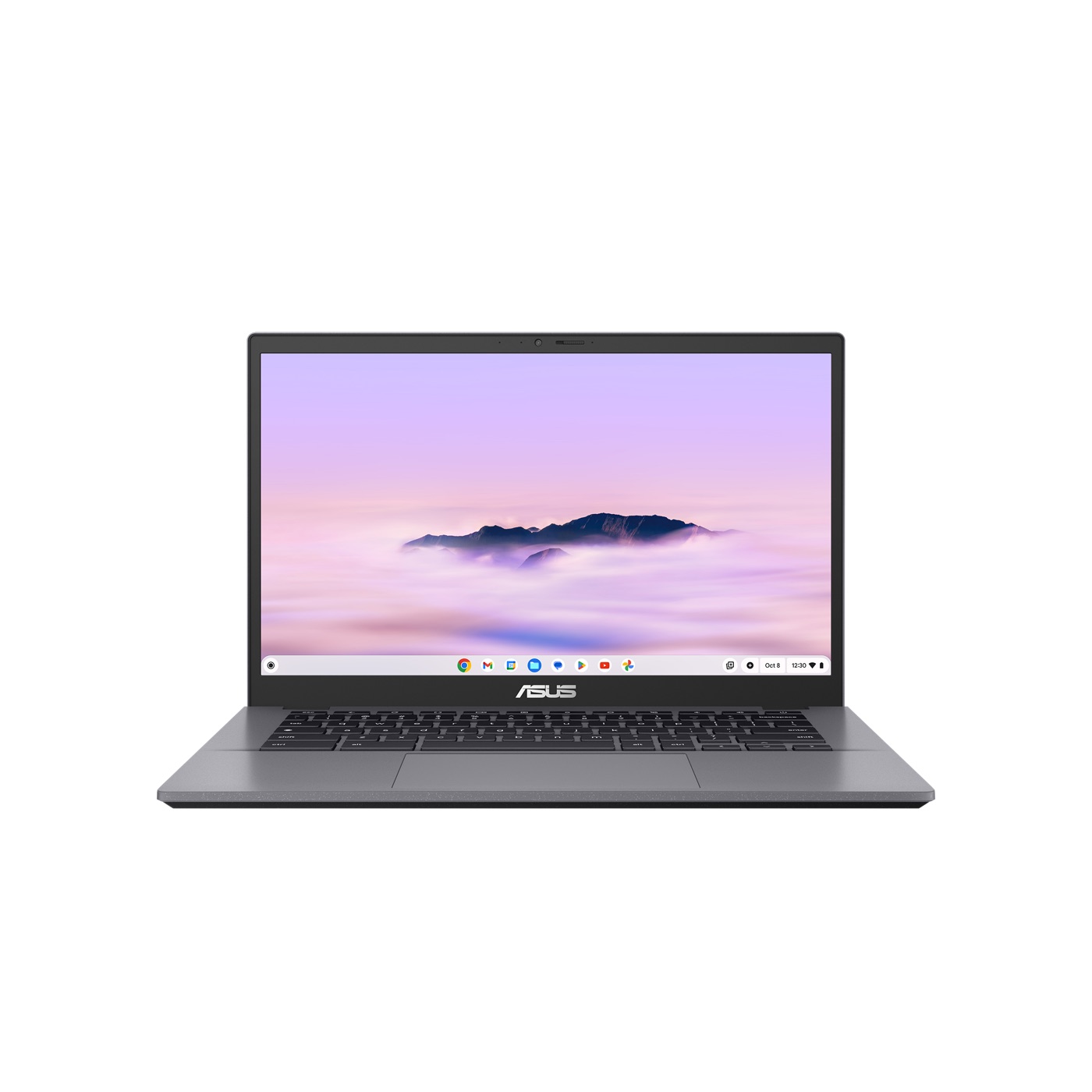
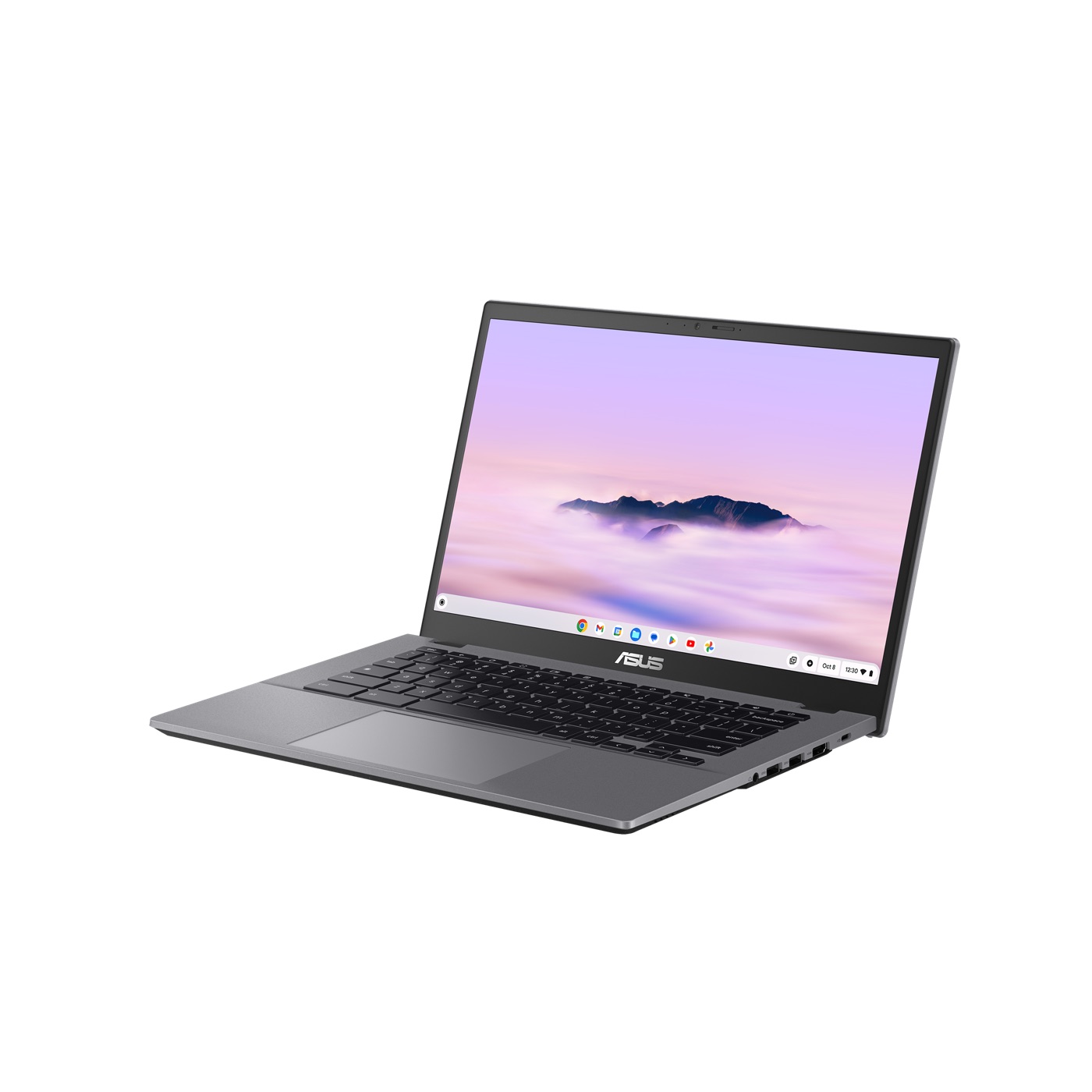
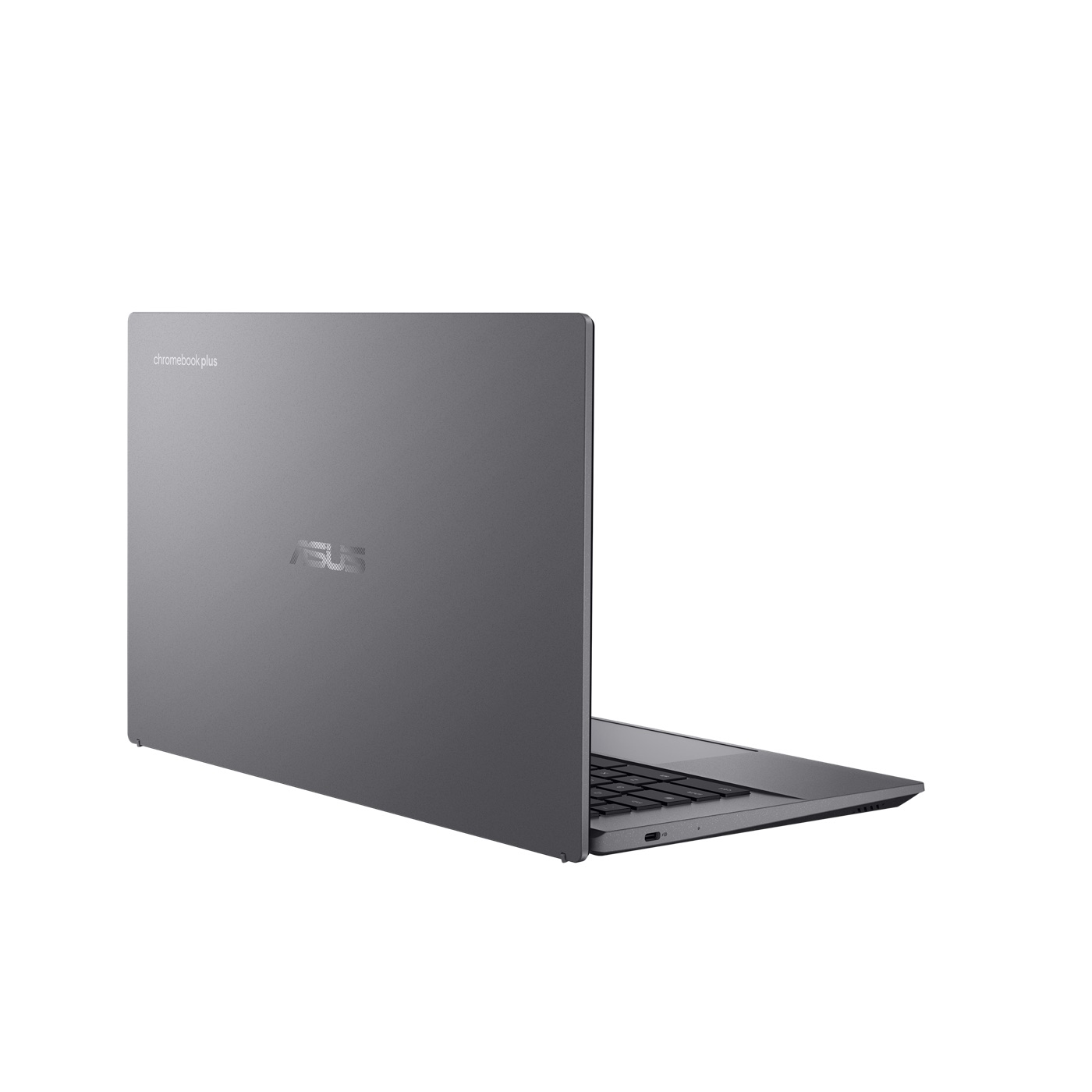
Our verdict
Buy the CX34 if you want the most Chromebook Plus for the money: $369 at MSRP gets a 6-core Intel Core i3-1215U, 8GB of LPDDR5, a 1080p webcam with a privacy shutter, two USB-C and two USB-A ports, HDMI 1.4 and a chassis ASUS says meets US MIL-STD 810H. Skip it if screen quality or carrying weight matters most, because ASUS rates the panel at 250 nits and 45% NTSC and the laptop starts at 3.17 lb (1.44 kg); the Lenovo Chromebook Plus (14" MediaTek) with a 400-nit OLED, or the 2.58 lb Samsung Galaxy Chromebook Plus, fit those buyers better. The deciding fact is the configuration: the CX34 ships in many processor, memory, touch and keyboard combinations, so the $369 model is not the one with a backlit keyboard, a touchscreen or 16GB of memory.
Overview
The ASUS Chromebook Plus CX34, model family CX3402, is a 14-inch clamshell laptop that runs ChromeOS and carries Google's Chromebook Plus badge. ASUS's US tech spec page lists two models, CX3402CBA and CX3402CVA, in Rocky Grey, Pearl White and White, with Intel Core i3-1215U, i3-1315U, i5-1235U, i5-1335U, i5-1334U, Core 3 100U and Core 5 120U processor options. All have a 14.0-inch anti-glare display, 8GB or 16GB of LPDDR5 soldered on the board, and 128GB or 256GB of UFS storage. ASUS's global spec page adds Core i7 and Core 7 150U versions and Education and Enterprise upgrade editions, which are not on the US list.
The current line-up is a mix of processor generations rather than a single new model. The later CX3402CVA versions with Intel Core 3 100U or Core 5 120U chips list an Intel AI Boost NPU, while the 12th and 13th generation Core i3 and i5 versions use Intel UHD Graphics. Google's Chromebook store shows one starting configuration, the Core i3 (Alder Lake U) with 8GB of RAM and 128GB of storage, from $369 based on MSRP. ASUS's own US product page shows no price and states that resellers are free to set their own, so the price for higher configurations depends on the retailer.
Against the other Chromebooks on this site, the CX34 is the value pick. It undercuts the ASUS Chromebook Plus CX14 ($669.99 at the ASUS Store when checked), the Lenovo Chromebook Plus 2-in-1 14-inch Intel ($529.99 sale price at Lenovo) and the Samsung Galaxy Chromebook Plus ($774.99 at Samsung). It also has more ports than most of them: ASUS lists two USB 3.2 Gen 1 Type-C ports with display output and power delivery, two USB 3.2 Gen 1 Type-A ports, HDMI 1.4 and a 3.5mm combo jack. The Lenovo Chromebook i 15-inch costs a little less at $349.99 but uses an Intel N150 with 4GB of memory and is not a Chromebook Plus.
The limits are the screen and the weight. ASUS's global spec sheet rates every CX34 panel at 1920 x 1080, 250 nits and 45% NTSC color, which is dimmer and less colorful than the 400-nit panels on several Lenovo rivals. The laptop starts at 1.44 kg (3.17 lb) and measures 0.74 inch thick. Battery life is listed as up to 10 hours by ASUS and by Google's store page, from a 50Wh, 3-cell battery charged by a 45W USB-C adapter; ASUS notes that actual battery life depends on usage.
Some marketing on the ASUS product page is out of date. The page still promotes a 12-month Google One AI Premium offer whose fine print says it had to be redeemed by December 31, 2024. Google's Chromebook store page, checked in November 2026, lists a different current perk: 12 months of the Google AI Pro plan at no cost and 25% off the LumaFusion video editing app, both under Google's limited-time terms. It also mentions up to 512GB SSD and Core 7 options that the US spec list does not include, so buyers should go by the spec page and the retailer listing.
How it scored
The CX34 is the cheapest way to get a 14-inch Chromebook Plus from a major brand. Google's Chromebook store page listed it from $369 when we checked. ASUS sells it in several configurations: Intel Core i3-1215U, Core i5, Core 3 100U or Core 5 120U processors, 8GB or 16GB of LPDDR5 memory, and 128GB or 256GB of UFS storage. The 14.0-inch screen is anti-glare and comes in touch and non-touch versions. ASUS lists a camera privacy shutter, a Titan C security chip, Wi-Fi 6 or 6E with Bluetooth 5.4, two USB-A ports, a headphone jack and a 45W USB-C charger, and says the chassis meets the US MIL-STD 810H military-grade standard. The tradeoffs are a starting weight of 3.17 pounds and a spec sheet with so many variants that the $369 model will not have every feature, such as the backlit keyboard. For a family that wants a reliable homework laptop at the lowest Chromebook Plus price, it is the default choice.
Who it is for
families on a tight budget who want a full-size 14-inch Chromebook Plus
Good fit if
- Families who want a full-size 14-inch homework laptop at the lowest Chromebook Plus price, $369 at MSRP on Google's store
- Students on video classes who want a 1080p webcam with a physical privacy shutter
- Home users who plug into monitors and accessories, since ASUS lists two USB-C ports with display output, two USB-A ports and HDMI 1.4
- Buyers who knock their laptop around, given ASUS's MIL-STD 810H rating and 180-degree lay-flat hinge
- Anyone who mostly works in Google Docs, Gmail and web apps and wants 8GB of memory and a Core i3 rather than an entry Celeron or N-series chip
Skip it if
- People who work outdoors or by bright windows: the 250-nit panel is dim next to the 400-nit OLED on the Lenovo Chromebook Plus (14" MediaTek)
- Commuters who carry their laptop all day: at 3.17 lb it is heavier than the 2.58 lb Samsung Galaxy Chromebook Plus
- Anyone who wants a tablet or pen: the CX34 is a clamshell only, so the Lenovo Chromebook Plus 2-in-1 or the Lenovo Chromebook Duet Gen 9 fit better
- Buyers who need Windows apps or desktop software that has no web or Android version: a Windows laptop from our best laptops for students list is the safer choice
Specifications
| Price | From $369 (MSRP) for Core i3, 8GB RAM, 128GB storage on Google's Chromebook store; ASUS US page lists no price | source |
|---|---|---|
| US models | CX3402CBA and CX3402CVA | source |
| Processor (US) | Intel Core i3-1215U (6 cores, up to 4.4 GHz), i3-1315U, i5-1235U, i5-1335U, i5-1334U, Core 3 100U or Core 5 120U (10 cores, up to 5.0 GHz) | source |
| Display | 14.0 in FHD 1920 x 1080, 16:9, anti-glare, 250 nits, 45% NTSC, touch or non-touch | source |
| Memory | 8GB or 16GB LPDDR5 on board, not upgradeable beyond the fitted amount | source |
| Storage | 128GB or 256GB UFS | source |
| Ports | 2x USB 3.2 Gen 1 Type-C (display and power delivery), 2x USB 3.2 Gen 1 Type-A, 1x HDMI 1.4, 3.5mm combo jack | source |
| Battery | 50Wh, 3-cell; up to 10 hours according to ASUS and Google | source |
| Charger | 45W USB-C adapter (15V, 3A) | source |
| Camera | 1080p FHD camera with privacy shutter | source |
| Keyboard | Chiclet keyboard with 1.4 mm key travel; backlight on some models | source |
| Wireless | Wi-Fi 6 (dual band) or Wi-Fi 6E (triple band) 2x2, Bluetooth 5.4 | source |
| Weight | From 1.44 kg (3.17 lb) | source |
| Dimensions | 32.64 x 21.43 x 1.87 cm (12.85 x 8.44 x 0.74 in) | source |
| Durability | US MIL-STD 810H military-grade standard | source |
| Security and ecolabels | Titan C security chip; Energy Star 8.0, FSC Mix | source |
Price
From $369 on Google's Chromebook store page when checked.
Chromebook Plus CX34 From $369
Quoted from the vendor pricing page on November 12, 2026.
Plans and pricing
| Plan | Price | What is included | Source |
|---|---|---|---|
| CX34 Core i3, 8GB RAM, 128GB storage (starting configuration) | From $369 (MSRP)one-time purchase | Intel Core i3 (Alder Lake U) processor; 8GB RAM, 128GB storage; 14 inch 1920 x 1080 screen, Intel UHD Graphics; Up to 10 hours of battery per Google's listing; Google perks: 12 months of Google AI Pro at no cost and 25% off LumaFusion, limited time | Checked Nov 24, 2026 |
| CX3402CBA (Intel Core i3 and i5 versions) | Price not listed on ASUS's US page; ASUS says resellers set their own pricesone-time purchase | 12th or 13th generation Intel Core i3 or i5 options, Intel UHD Graphics; 8GB or 16GB LPDDR5, 128GB or 256GB UFS; Touch or non-touch 14.0 inch anti-glare display; Backlit or standard chiclet keyboard depending on configuration; Wi-Fi 6 or Wi-Fi 6E with Bluetooth 5.4 | Checked Nov 24, 2026 |
| CX3402CVA (Intel Core 3 100U and Core 5 120U versions) | Price not listed on ASUS's US page; ASUS says resellers set their own pricesone-time purchase | Intel Core 3 100U (6 cores) or Core 5 120U (10 cores, up to 5.0 GHz); Intel AI Boost NPU listed; 8GB or 16GB LPDDR5, 128GB or 256GB UFS; Same 14.0 inch anti-glare display options, ports and 45W USB-C charger; Titan C security chip and MIL-STD 810H rating | Checked Nov 24, 2026 |
Key features
Chromebook Plus hardware floor
Every US configuration has an Intel Core i3 or better, at least 8GB of LPDDR5 and at least 128GB of UFS storage, with a Full HD screen and a 1080p camera. ASUS's page pairs this with Chromebook Plus software such as Magic Eraser in Google Photos and AI video call controls.
Ports for a desk setup
ASUS lists two USB 3.2 Gen 1 Type-C ports that carry display output and power delivery, two USB 3.2 Gen 1 Type-A ports, HDMI 1.4 and a 3.5mm combo jack.
Camera privacy shutter
The 1080p webcam has a sliding cover. ASUS also points to ChromeOS video call controls that adjust lighting, cancel noise and blur backgrounds in any app.
Durability claims
ASUS says the chassis meets US MIL-STD 810H and goes through in-house panel-pressure, shock and drop tests. Its fine print says the tests run under lab conditions, do not mean fitness for military use, and damage from trying to repeat them is treated as accidental and not covered by the standard warranty.
Antimicrobial keyboard and palm rest
ASUS Antimicrobial Guard covers the keyboard, touchpad and palm rest. ASUS cites an independent lab test to ISO 22196 with an R value above 2, which it describes as a 99% reduction in bacterial activity over 24 hours.
180-degree hinge and 5.7-inch touchpad
The screen folds flat to 180 degrees for sharing across a table, and ASUS lists a 5.7-inch touchpad. The keyboard has 1.4 mm of key travel; the backlight is optional by model.
Battery and charging
A 50Wh, 3-cell battery is rated for up to 10 hours by ASUS and Google, and charges from a 45W USB-C adapter.
Strengths and weaknesses
What we like
- Lowest starting price of any Chromebook Plus on our list: $369 at MSRP on Google's Chromebook store, against $529.99 to $799.99 for the Lenovo, Samsung and ASUS CX14 rivals when checked
- Core i3-1215U with 6 cores and 8GB of LPDDR5 in the base model, a clear step up from the Intel N150 with 4GB in the $349.99 Lenovo Chromebook i
- Wide port selection: two USB-C with display and power delivery, two USB-A, HDMI 1.4 and a headphone jack
- 1080p webcam with a physical privacy shutter on every model
- 50Wh battery with up to 10 hours of rated battery life and a 45W USB-C charger
- US MIL-STD 810H rating, a Titan C security chip and an antimicrobial treated keyboard and palm rest, according to ASUS
- Wi-Fi 6E with Bluetooth 5.4 on some models, Wi-Fi 6 on the rest
What could be better
- Screen rated at only 250 nits and 45% NTSC color on every configuration, dimmer than the 400-nit panels on several Lenovo Chromebooks
- Starts at 3.17 lb (1.44 kg), heavier than the 2.58 lb Samsung Galaxy Chromebook Plus and Lenovo Chromebook Plus 14-inch MediaTek
- Memory is soldered, so an 8GB model stays at 8GB
- Backlit keyboard and touchscreen are optional, and the $369 starting configuration lists neither on Google's page
- Many US model variants (seven processor options across two model numbers) make it hard to compare retailer listings
- ASUS's product page still advertises a Google One offer that expired for redemption on December 31, 2024, and mentions 512GB SSD and Core 7 options not on the US spec list
Key facts
- Price: From $369
- Display: 14.0 in anti-glare, touch or non-touch
- Memory and storage: 8GB or 16GB, 128GB or 256GB UFS
- Wireless: Wi-Fi 6 or 6E, Bluetooth 5.4
- Durability: US MIL-STD 810H
- Weight: From 3.17 lb (1.44 kg)
Where it ranks
ASUS Chromebook Plus CX34 is No. 2 in our Best Chromebooks verdict and No. 5 in Best Laptops for Students.
Alternatives to consider
- ASUS Chromebook Plus CX14: The newer ASUS 14-inch Chromebook Plus with an Intel Core 3 N355 and a lighter 3.06 lb body, but it cost $669.99 at the ASUS Store when checked
- Lenovo Chromebook Plus (14" MediaTek): Pick it for the screen: a 14-inch WUXGA OLED at 400 nits and a 2.58 lb weight, from $799.99 on sale at Lenovo
- Samsung Galaxy Chromebook Plus: A thinner 15.6-inch AMOLED Chromebook Plus at 2.58 lb with up to 13 hours of rated battery, for $774.99 at Samsung
- Lenovo Chromebook Plus 2-in-1 (14" Intel): Choose it if you want a touchscreen that folds into a tablet: 14-inch WUXGA IPS touch at 300 nits for $529.99 on sale at Lenovo
- ASUS Chromebook CX15: A cheaper 15.6-inch non-Plus ASUS Chromebook with a Celeron N4500 or Intel N50, for simple browsing and schoolwork only
Questions readers ask
How much does the ASUS Chromebook Plus CX34 cost?
Google's Chromebook store listed the CX34 from $369 at MSRP when checked in November 2026, for a Core i3 model with 8GB of RAM and 128GB of storage. ASUS's US page lists no price and says resellers set their own, so Core i5 and 16GB versions cost more depending on the store.
Is the ASUS Chromebook Plus CX34 worth it?
Yes for buyers who want the cheapest Chromebook Plus with a full set of ports: at $369 it has a 6-core Core i3, 8GB of RAM, a 1080p webcam and two USB-C plus two USB-A ports. It is a weaker choice if you need a bright screen, since ASUS rates the panel at 250 nits.
How long does the CX34 battery last?
ASUS and Google both list up to 10 hours of battery life from its 50Wh, 3-cell battery. ASUS notes that real battery life depends on usage, settings and configuration.
Does the ASUS Chromebook Plus CX34 have a touchscreen?
Some models do: ASUS lists touch and non-touch versions of the same 14.0-inch, 1920 x 1080 anti-glare display. Check the exact model number at the retailer, because Google's listing for the $369 configuration does not mention touch.
Does the CX34 have a backlit keyboard?
Only some configurations have one. ASUS's spec page lists both a backlit chiclet keyboard and a standard chiclet keyboard with 1.4 mm key travel, and calls the backlight an optional feature.
ASUS Chromebook Plus CX34 vs CX14: which should I buy?
The CX34 is the better value at $369 versus $669.99 for the CX14 at the ASUS Store when checked, and it has HDMI and a larger 50Wh battery. The CX14 is lighter at 3.06 lb versus 3.17 lb and uses a newer Intel Core 3 N355.
Can I upgrade the RAM in the CX34?
No. ASUS lists the 8GB or 16GB of LPDDR5 as on board, with the 8GB models capped at 8GB, so buy the 16GB version if you keep many tabs and Android apps open.
Can the ASUS Chromebook Plus CX34 connect to an external monitor?
Yes. ASUS lists an HDMI 1.4 port and two USB 3.2 Gen 1 Type-C ports that support display output and power delivery, so a monitor can connect by HDMI or USB-C.
Sources we checked
- ASUS Chromebook Plus CX34 (CX3402) product page, ASUS USA, checked November 24, 2026
- ASUS Chromebook Plus CX34 (CX3402) tech specs, ASUS USA, checked November 24, 2026
- ASUS Chromebook Plus CX34 (CX3402) tech specs, ASUS global, checked November 24, 2026
- Discover Chromebooks, Google Chromebook store, checked November 24, 2026
- Best Chromebooks list on HearSmart (rival prices and specs), checked November 24, 2026
Deep review last updated November 24, 2026. We recheck prices and specs against these pages; send corrections to the address below.
Alternatives we scored
Cite this page
HearSmart. ASUS Chromebook Plus CX34 review. Updated November 24, 2026. https://hearsmart.org/review/asus-chromebook-plus-cx34
Visit asus.com · Questions or corrections: editorial@hearsmart.org