Review · Software & apps
 Bear review
A Markdown notes app for Mac, iPhone and iPad with flexible tags, sketches and an Apple Design Award.
By the HearSmart research desk · Updated November 24, 2026
The short answer
Bear is a Markdown notes app for Mac, iPhone and iPad, with a new browser version for Pro subscribers. Checked in November 2026, the app is free on a single device and Bear Pro costs $3.99 a month or $39.99 a year for subscriptions started from 24 November 2026. It suits Apple users who want a private, tag-based writing app, and it is a poor fit for Android users or shared team notes.
- Performance (40%)
- 7.4
- Ease of use (25%)
- 9.0
- Value (35%)
- 9.0
What it looks like

Our verdict
Choose Bear Pro if you write on more than one Apple device and want Markdown, nested tags and iCloud sync for $39.99 a year. Choose Apple Notes if you want free notes and shared notes, or Obsidian if you need Windows, Linux and Android apps. The deciding fact is sync: the free version of Bear keeps notes on one device, and the price for new subscribers rose by a third on 24 November 2026, from $2.99 to $3.99 a month, with Bear Web added.
Overview
Bear is made by Shiny Frog and has been on the App Store since November 2016. It stores notes as Markdown text with photos, tables, to-do lists, sketches and attachments in the same note. Bear received an Apple Design Award in 2017, according to its maker. On 24 November 2026 the US App Store showed 4.7 stars from 6.9K ratings and version 3.0.5 for iPhone and iPad.
Two things changed in November 2026. Bear Web arrived, so notes can be read and edited in a browser on Windows or Linux, and Bear Pro moved to $3.99 a month or $39.99 a year for new subscribers from 24 November. Subscriptions started earlier keep their previous price while they stay active, but do not include Bear Web. Subscribers who upgrade to get it cannot return to the old price.
Other 2026 additions include Mermaid diagrams, workspaces that filter the whole app to one tag, and a Mac command-line tool with a Claude Connector and an MCP server for AI assistants. These are separate from the writing app: an AI assistant gets access to notes only after the user connects one.
The free version is complete for writing on one device, but narrower for everything around it. It exports to TXT, Markdown, TextBundle, Bear note and RTF. PDF, HTML, DOCX, JPG and ePub export, iCloud sync, note encryption, app locking and text search inside PDFs and images all need Pro.
Against the rivals on this site, Bear's yearly price sits below the $48 that 12 months of Obsidian Sync costs at $4 a month billed annually, although Obsidian itself is free and runs on more systems. Apple Notes comes with Apple devices and records and transcribes audio. Evernote has Windows and Android apps, but its free plan stops at 50 notes and 1 device.
Privacy has a trade-off. Bear says notes live in the user's private iCloud storage and that it cannot read them. Bear Web, however, does not work with Apple's Advanced Data Protection, according to two of its help pages. Another Bear page, on syncing, says it can work with two-factor authentication and a password sign-in, so the help center is inconsistent. Titles and tag names also stay unencrypted under Bear Sync, that page says.
How it scored
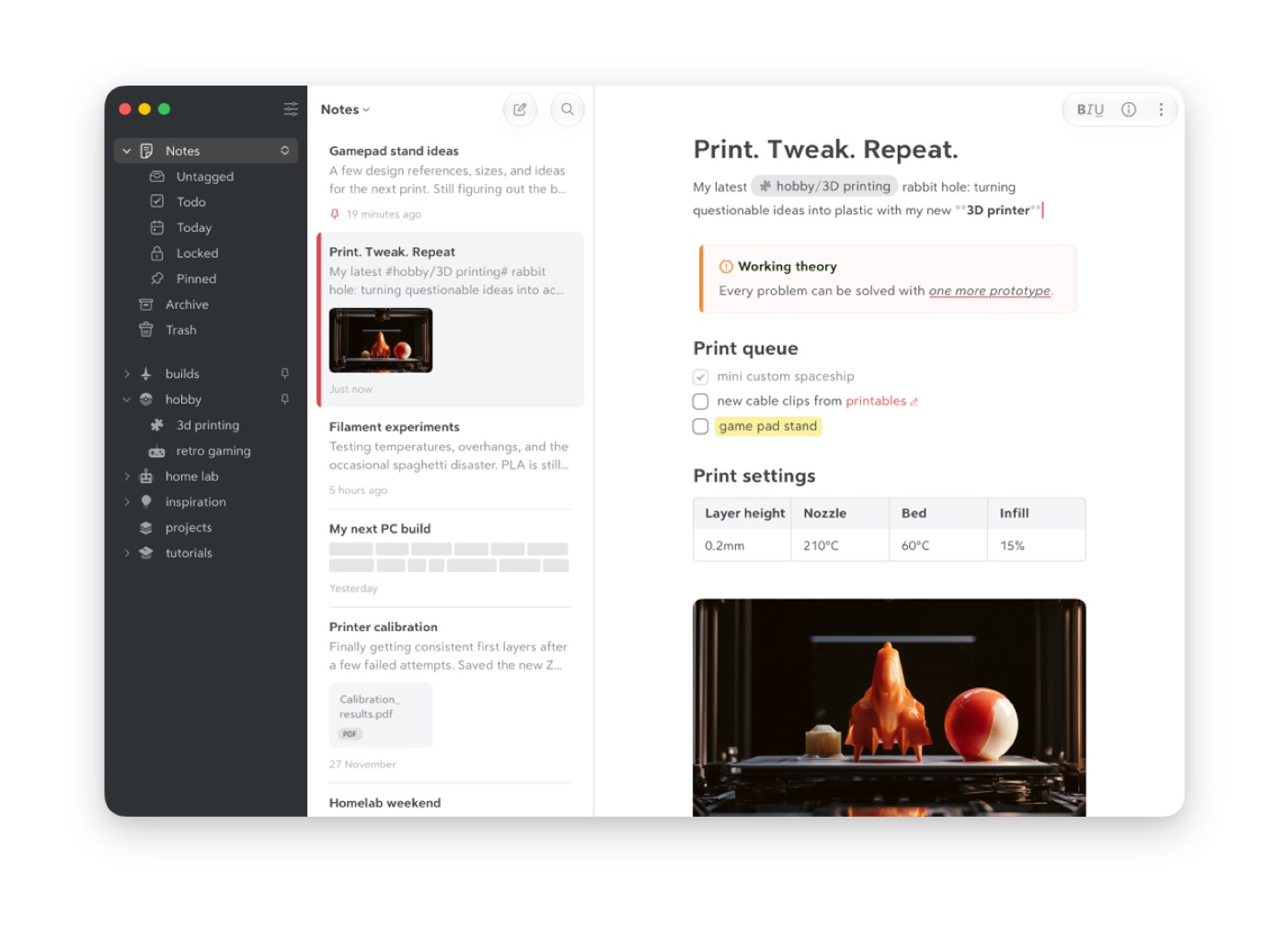
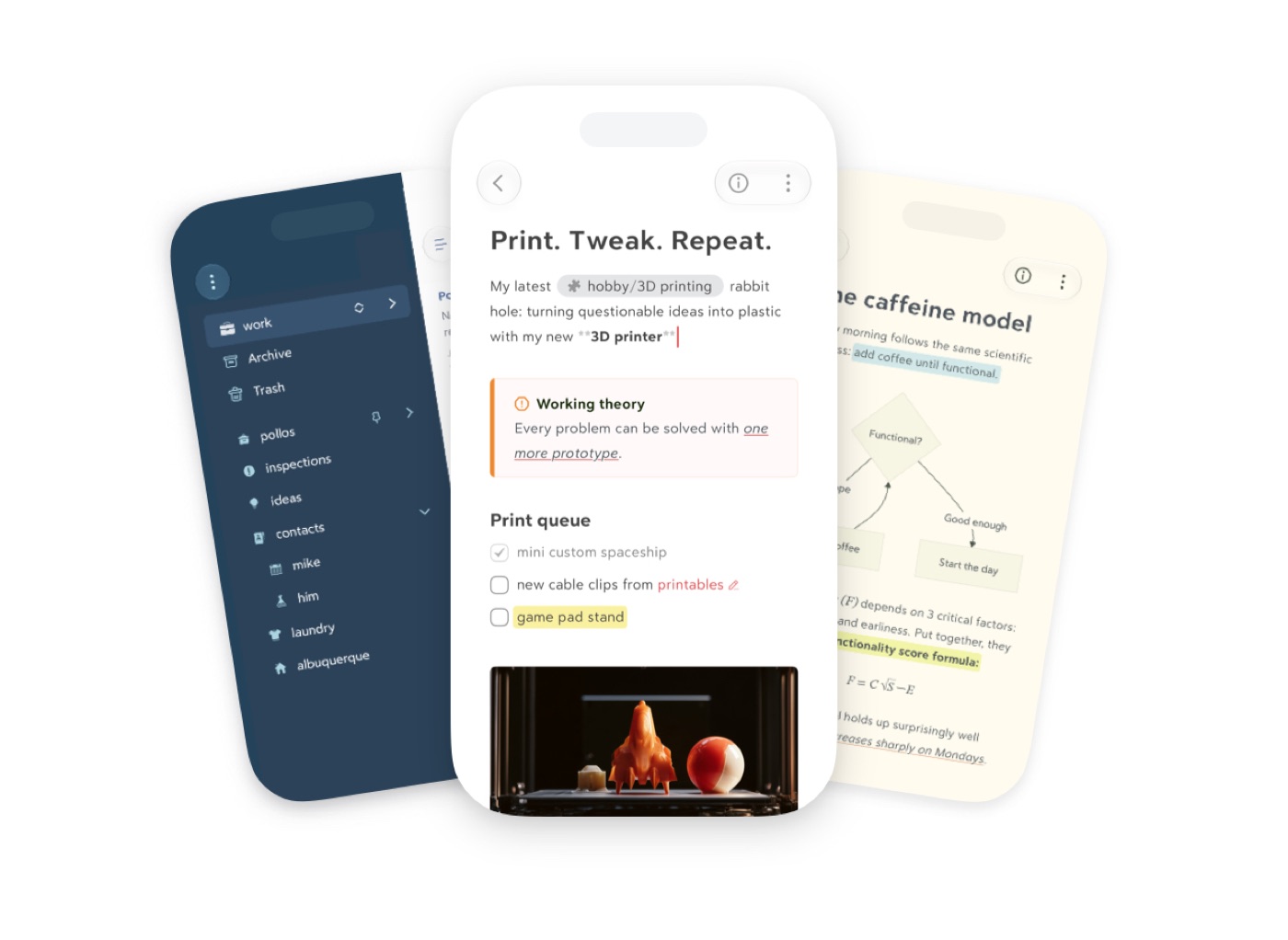
Bear is the calm, writer-friendly option for Apple users. Notes are written in simple Markdown, with text, photos, tables and to-do lists in the same note, and organized with tags you can pin and mark with over 250 icons. Headings fold so you can focus on one section of a long draft, and you can drop a sketch inline with an Apple Pencil or a finger. Privacy is a strength: Bear says your notes are between you and iCloud, notes can be encrypted, and Apple's Advanced Data Protection is supported. The free version includes document scanning, search inside PDFs and images and many export formats. The catch for anyone using several devices is that iCloud sync is a Pro feature, at $2.99 a month or $29.99 a year after a 7-day trial. Bear also runs only on Mac, iPhone and iPad, so it is not an option for Windows or Android users.
Who it is for
Apple users who want a fast, tidy Markdown notebook
Good fit if
- Writers who draft in Markdown on a Mac and continue on an iPhone or iPad
- People who would rather file one note under several nested tags than in one folder
- Privacy-minded Apple users who want password-encrypted notes without creating another account
- Apple users with a Windows or Linux work computer, through Bear Web on the new Pro plan
- Mac users who want to script notes or connect them to an AI assistant through the command line or MCP
Skip it if
- Android users: Obsidian has an Android app, while Bear lists native apps for Apple platforms only
- Teams that edit notes together: Notion is built for shared workspaces, while the Bear help pages checked describe no shared editing
- People who want free sync between an iPhone and a Mac: Apple Notes is the cheaper choice
- Anyone who wants a library of plain files on disk: Obsidian stores notes locally as plain text Markdown files, while Bear uses a SQLite database
Specifications
| Native platforms | Mac, iPhone, iPad and Apple Watch; the US listing also shows Apple Vision compatibility | source |
|---|---|---|
| iPhone and iPad requirement | iOS 16 or iPadOS 16 or later | source |
| Mac requirement | macOS 12.4 or later (version 3.0.6) | source |
| Browser access | Bear Web, with Pro subscriptions started on or after 24 November 2026 | source |
| Free plan | Local notes only, 3 themes, 1 app icon | source |
| Pro price | $3.99 a month or $39.99 a year | source |
| Free trial | 7 days | source |
| Sync | iCloud through Apple's CloudKit, Pro only | source |
| Synced attachment limit | Files over 250 MB are not synced | source |
| Free export formats | TXT, Markdown, TextBundle, Bear note, RTF | source |
| Pro export formats | HTML, DOCX, PDF, JPG, ePub | source |
| Import formats | TXT, Markdown, RTF, TextBundle, TextPack, ENEX, Bear note, HTML, Drafts entries | source |
| Note encryption | Password per note, Pro only; lost passwords cannot be reset | source |
| Storage format | SQLite database, readable on Mac | source |
| Apple Watch | Syncs the 15 most recent notes, excluding encrypted ones | source |
| Languages | 11, including English, French, German, Japanese and Simplified Chinese | source |
Price
Free version; Bear Pro $2.99 a month or $29.99 a year after a 7-day free trial.
A 7 day free trial, then $2.99 /month
Quoted from the vendor pricing page on November 16, 2026.
Plans and pricing
| Plan | Price | What is included | Source |
|---|---|---|---|
| Bear (free) | $0Free | Local access to notes; Document scanning; TXT, Markdown, TextBundle, Bear note and RTF export; 3 themes and 1 app icon | Checked Nov 24, 2026 |
| Bear Pro monthly | $3.99 a monthMonthly through the App Store, 7-day trial | iCloud sync; Bear Web; PDF, HTML, DOCX, JPG and ePub export; Note encryption and app lock; Search inside PDFs and images; 35+ themes and 25+ app icons | Checked Nov 24, 2026 |
| Bear Pro yearly | $39.99 a yearYearly through the App Store, 7-day trial | Everything in Bear Pro monthly; About $3.33 a month | Checked Nov 24, 2026 |
| Bear Pro, started before 24 November 2026 | $2.99 a month or $29.99 a year ($1.49 or $14.99 for pre-Bear 2 subscribers)Kept while the subscription stays active; closed to new subscribers | Previous Pro features; No Bear Web unless upgraded to the new price | Checked Nov 24, 2026 |
| Educational discount | 30% off the first Bear Pro yearYearly, by application; renews at the regular price | For students and scholars; Single-use code with no trial period; Not available during an active subscription or trial | Checked Nov 24, 2026 |
Key features
Markdown editor
Notes hold text, photos, tables, to-dos, sketches and files together. Bear can hide the Markdown symbols for reading, and supports Mermaid diagrams, MathJax formulas, footnotes and folding headings.
Nested tags and workspaces
Tags can be typed anywhere in a note and nested to any depth with a slash, such as #recipes/italian. Setting a tag as a workspace limits the note list, sidebar and search to that tag.
Bear Web
Pro subscribers on the new plan can edit notes at web.bear.app. It cannot open encrypted notes, export notes, rename attachments or show PDF and link previews. A trusted browser keeps an encrypted local copy for dropped connections.
iCloud sync
One Pro subscription covers the devices on the same Apple ID, and Bear itself runs no note server. If a note is edited offline on one device and online on another, Bear keeps both versions for the user to merge.
Note encryption and lock
Pro can encrypt individual notes with a password. App lock is separate: it asks for Face ID or Touch ID but does not encrypt the notes.
AI and command-line access
On Mac, Bear includes bearcli, a one-click Claude Connector and an MCP server. Include and exclude tags control which notes the MCP server can see.
Import and backup
Bear imports Markdown folders and has migration guides for Obsidian, Evernote, Apple Notes, Day One, Drafts and UpNote. Backups are one .bear2bk file that can be renamed to .zip to reach each note.
Strengths and weaknesses
What we like
- One $39.99 yearly subscription covers the Mac, iPhone and iPad on the same Apple ID
- Free writing on one device with no sign-up and no Bear account
- Nested tags to any depth, and as many tags per note as needed
- 10 export formats on Pro, and Markdown and TextBundle export stay free
- Existing subscribers keep their old price, including $14.99 a year for pre-Bear 2 customers
- Bear Web opens notes on Windows and Linux computers
- App Store privacy label lists only crash data, not linked to identity
What could be better
- No sync at all in the free version
- New subscribers pay $10 a year more than before 24 November 2026
- No native Android, Windows or Linux app
- Bear Web cannot open encrypted notes or export, and help pages say it fails with Advanced Data Protection turned on
- Attachments over 250 MB do not sync
- A forgotten note password cannot be reset, and the locked notes cannot be recovered
Key facts
- Platforms: Mac, iPhone, iPad
- Bear Pro: $2.99 a month or $29.99 a year
- Free trial: 7 days
- Sync: iCloud, with Bear Pro
- Themes: 3 free, 28+ with Pro
Where it ranks
Bear is No. 6 in our Best Note Taking Apps verdict and No. 3 in Best Online Mattress Companies.
Alternatives to consider
- Apple Notes: Comes with Apple devices and adds note sharing, audio recording with transcripts and locked notes.
- Obsidian: Free app on Mac, Windows, Linux, iOS and Android; optional end-to-end encrypted Sync costs $4 a month billed annually.
- Joplin: Notes app with Joplin Cloud sync from €2.99 a month on the page checked, and a self-hosted option for businesses.
- Notion: Better for databases and shared team pages, with a free plan for individuals.
Questions readers ask
Is Bear worth it in 2026?
Yes for Apple users who write on several devices, because $39.99 a year adds sync, Bear Web, encryption and 5 more export formats. On one device the free version may be enough, and Apple Notes is a cheaper way to sync.
Does Bear have a free plan?
Yes, Bear is free for local notes on a device, with document scanning, 3 themes and Markdown export. Sync, Bear Web, encryption and PDF or DOCX export need Bear Pro.
How much does Bear Pro cost?
Bear Pro costs $3.99 a month or $39.99 a year in US dollars, with a 7-day free trial, for subscriptions started from 24 November 2026. The App Store description checked that day still mentioned $2.99, $29.99 and a 14-day trial, which conflicts with Bear's own pricing page.
Does Bear work on Windows or Android?
Bear works on Windows only through Bear Web in a browser, and has no native Android app listed. Bear Web needs the new Pro plan, an Apple ID and notes already syncing from an Apple device.
Bear vs Obsidian: which is better?
Bear is simpler for people who use only Apple devices, and Obsidian is better across platforms. Obsidian's app is free on Mac, Windows, Linux, iOS and Android, with Sync at $4 a month billed annually, against $39.99 a year for Bear Pro.
Bear vs Apple Notes: which should I use?
Apple Notes is better for free syncing and sharing, while Bear is better for Markdown, nested tags and export. Bear Pro exports to HTML, DOCX and ePub and can encrypt single notes.
Is Bear private and encrypted?
Bear says notes stay in the user's private iCloud storage and that its team cannot read them. Pro users can also encrypt single notes with a password, but Bear cannot reset that password if it is lost.
Do existing Bear Pro subscribers have to pay more?
No, subscribers from before 24 November 2026 keep their price for as long as they stay subscribed. They do not get Bear Web, and upgrading to add it moves them permanently to the new price.
Sources we checked
- Bear home page and pricing table, checked November 24, 2026
- Bear: features and price of Bear Pro, checked November 24, 2026
- Bear blog: Bear Web and new Pro price, checked November 24, 2026
- Bear blog: Bear turns 10, checked November 24, 2026
- Bear blog: Bear 2 price for new customers (2023), checked November 24, 2026
- Bear blog: workspaces and MCP scoping, checked November 24, 2026
- Bear, US App Store, checked November 24, 2026
- Bear for Mac, Apple store search data (US), checked November 24, 2026
- Bear Web overview, checked November 24, 2026
- Bear Web requirements and limitations, checked November 24, 2026
- Bear Web privacy and security, checked November 24, 2026
- Bear Web sync and trusted devices, checked November 24, 2026
- Bear syncing and privacy, checked November 24, 2026
- Bear note encryption, checked November 24, 2026
- Bear app lock, checked November 24, 2026
- Bear export formats, checked November 24, 2026
- Bear import formats, checked November 24, 2026
- Bear: migrate from Obsidian, checked November 24, 2026
- Bear help center index, checked November 24, 2026
- Bear attachments, checked November 24, 2026
- Bear tags, checked November 24, 2026
- Bear workspaces, checked November 24, 2026
- Bear conflicted notes, checked November 24, 2026
- Bear backup and restore, checked November 24, 2026
- Bear database location, checked November 24, 2026
- Bear CLI, Claude Connector and MCP server, checked November 24, 2026
- Bear for Apple Watch, checked November 24, 2026
- Bear educational discount, checked November 24, 2026
- Obsidian pricing, checked November 24, 2026
- Obsidian Sync, checked November 24, 2026
- Joplin Cloud plans (euro prices shown), checked November 24, 2026
- Apple Notes User Guide for Mac, checked November 24, 2026
- Apple Notes, US App Store, checked November 24, 2026
- Obsidian home page, checked November 24, 2026
- Evernote plan comparison, checked November 24, 2026
- Notion pricing (euro prices shown), checked November 24, 2026
Deep review last updated November 24, 2026. We recheck prices and specs against these pages; send corrections to the address below.
Alternatives we scored
- Microsoft OneNote8.8
- Notion8.8
- Apple Notes8.7
- Obsidian8.7
Cite this page
HearSmart. Bear review. Updated November 24, 2026. https://hearsmart.org/review/bear
Visit bear.app · Questions or corrections: editorial@hearsmart.org