Review · Learning
 Keybr review
A free web trainer that uses your typing statistics to generate lessons focused on your slowest keys.
By the HearSmart research desk · Updated November 29, 2026
The short answer
Keybr (keybr.com) is a free, open source touch typing trainer that measures the time you take on every key and generates the next lesson around your slowest letter. It is the most efficient free option on this site for adults and teens learning or relearning touch typing, and the only paid item is a one-time $10 premium account that removes ads and trackers. Checked in November 2026.
- Performance (40%)
- 8.4
- Ease of use (25%)
- 8.6
- Value (35%)
- 9.4
What it looks like
Our verdict
Pick Keybr if you are a teen or adult who wants to learn touch typing for free and you are happy to drill generated, pronounceable practice words that always include your weakest key. Skip it if you are teaching young children, who will do better with TypingClub's structured lessons or Nitro Type's races, or if you already type fast and only want quick tests, where Monkeytype fits better. The deciding fact is the method: Keybr starts with six letters (E, N, I, T, R, L) and unlocks the next letter only when every current key reaches your target speed, which is 35 words per minute by default.
Overview
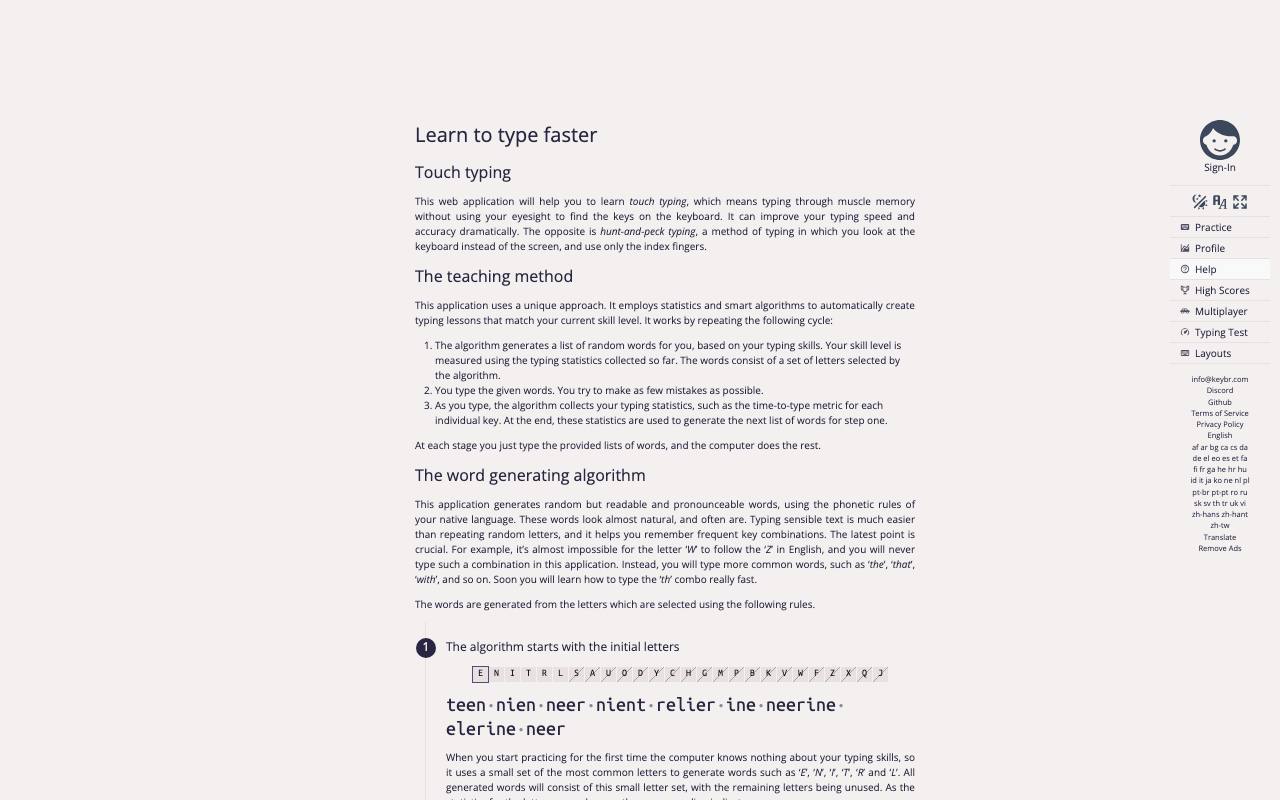
Keybr is a browser-based typing trainer at keybr.com. Its code is published on GitHub under the GNU Affero General Public License v3.0, so anyone can read how the lessons are built or run a copy. The site describes its goal as teaching touch typing, typing by muscle memory without looking at the keys, and it says it works by repeating one cycle: generate a list of words from your typing statistics, let you type them, record the time to type each key, then build the next list from that data.
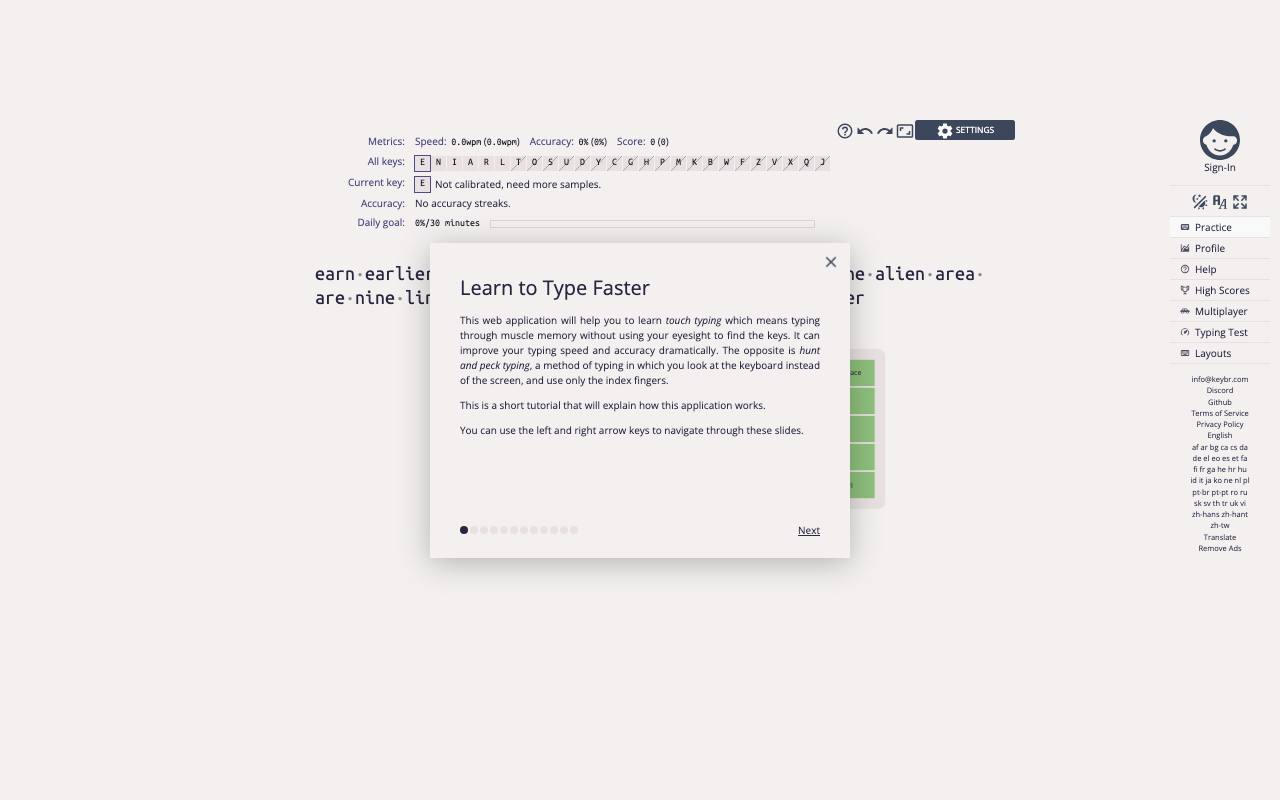
The default Guided lesson starts with a small set of the most common letters, such as E, N, I, T, R and L, and adds a new letter once all current keys turn green, meaning they meet your target speed. The slowest key becomes the target letter and appears in every generated word. The words are produced by a phonetic model of the language, so they are readable and pronounceable even when they are not real words, and impossible combinations such as Z followed by W in English never appear.
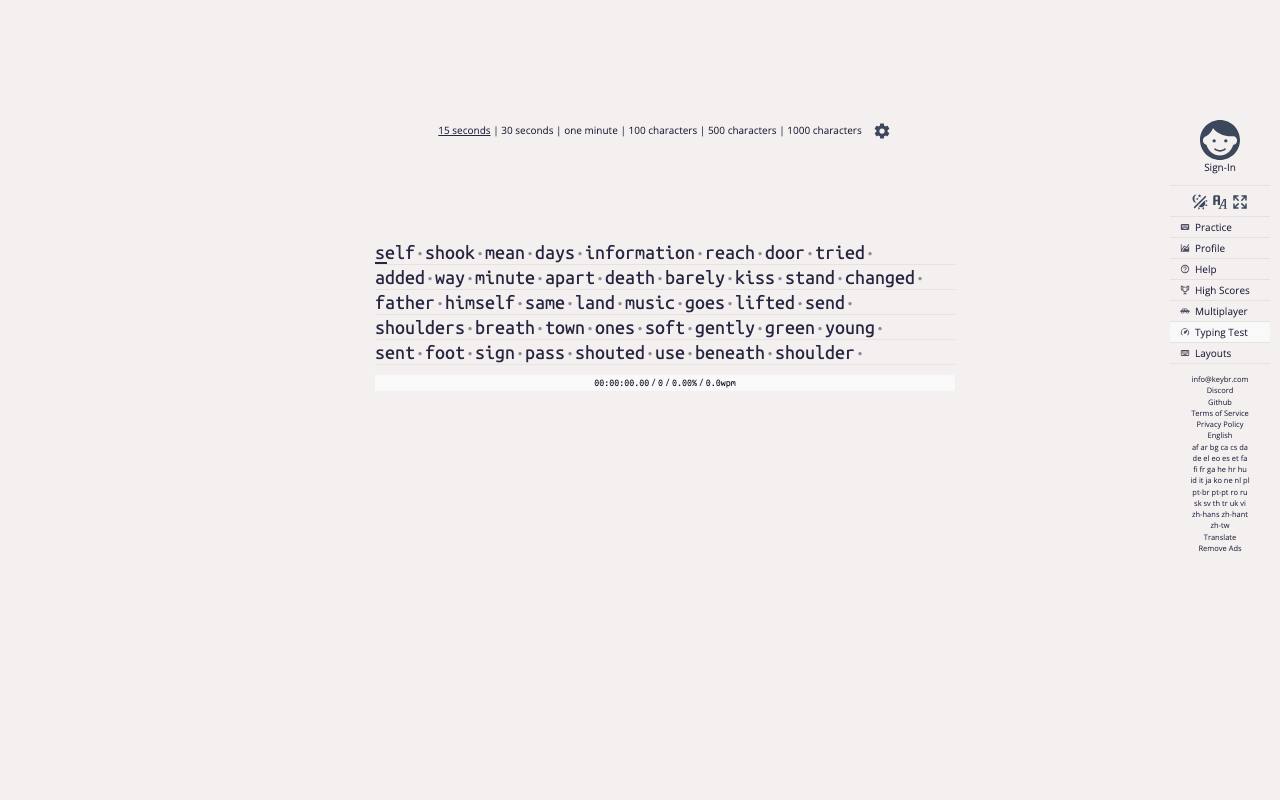
Beyond Guided lessons, the current version offers five more lesson types: common word lists, passages from classic books, custom text you paste in, programming code and numbers. The code mode covers 16 syntax options, including Python, JavaScript expressions, TypeScript, Rust, Go, Java, C#, C/C++, PHP, HTML, CSS, shell and regular expressions. There is also a separate typing test, a multiplayer race page, a high scores table and a profile page with progress charts. The source defines 34 languages and 100 keyboard layouts.
Compared with the other typing tools on this site, Keybr sits between a course and a test. TypingClub and Typing.com use fixed lesson plans with games and teacher dashboards. Monkeytype is a minimal speed test for people who can already touch type. Typesy and Ratatype Plus charge yearly or monthly fees for video lessons and certificates, and TypingMaster and Mavis Beacon are one-time desktop purchases. Keybr is free, runs in any browser and adapts every lesson to your own key timings.
The limits are real. There are no video lessons, stories, characters or classroom management tools, so it suits self-motivated learners more than young children or teachers running a class. Practice in Guided mode uses generated words, which can feel artificial until you switch to word lists or books. The free version shows ads and trackers, and the help pages warn that speed on earlier letters often drops as new ones are added, so progress is not linear. Refunds for the premium account are limited to technical faults, unauthorized purchases and accidental or duplicate payments.
How it scored
Keybr takes a different approach from course-style tools. Instead of fixed lessons, it measures how fast you hit each key and uses that data to generate the next set of practice words. You begin with a small group of common letters, such as E, N, I, T, R and L, and the app adds letters as your speed on each one improves. Every generated word contains your current target letter, so you are always drilling the key that gives you the most trouble. The words follow the phonetic rules of your language, which makes them readable and helps you learn common letter pairs. There is also a typing test, multiplayer races and support for other keyboard layouts. Keybr is free to use without an account; a premium account is a single lifetime payment that removes ads and trackers. The tradeoff is that there are no games or stories, so it suits motivated teens and adults more than young kids.
Who it is for
Adults and teens who want to learn touch typing efficiently with adaptive, data-driven practice.
Good fit if
- Adults switching from hunt-and-peck to touch typing who want free lessons that target their slowest keys
- Teens who already know the keyboard but have a few slow letters to fix
- Programmers who want to practice code symbols in Python, TypeScript, Rust, Go or other languages
- People learning an alternative layout such as Dvorak or Colemak, using one of the 100 layouts in the source
- Typists practicing in a language other than English, with 34 languages defined
Skip it if
- Young children who need games, characters and story lessons: TypingClub offers a structured free course for kids and adult beginners
- Teachers who need class rosters and assignments: Typing.com has a free curriculum built for schools and educators
- Fast typists who only want quick, distraction-free speed tests: Monkeytype is built for that
- Learners who want a printable certificate of their speed: Ratatype offers a shareable typing certificate
Specifications
| Price | Free; optional premium account at $10 one-time for a US address | source |
|---|---|---|
| Billing | Single payment for lifetime access, not a subscription | source |
| Platform | Web browser, no install | source |
| Source code license | GNU Affero General Public License v3.0 | source |
| Starting letters | E, N, I, T, R and L | source |
| Default target speed | 175 characters per minute (35 words per minute), adjustable from 75 to 750 characters per minute | source |
| Default daily goal | 30 minutes, adjustable from 0 to 120 minutes | source |
| Lesson types | Guided, word list, books, custom text, code, numbers | source |
| Code syntaxes | 16, including Python, TypeScript, Rust, Go, Java, C#, C/C++, PHP, HTML, CSS, shell and regex | source |
| Languages | 34 | source |
| Keyboard layouts | 100 | source |
| Typing test lengths | 15, 30 or 60 seconds, or 100, 500 or 1,000 characters | source |
| Account | Optional; signed-in users store typing data in the cloud and can open their profile from any browser | source |
| Payment processor | Paddle | source |
Price
Free to use; optional one-time premium account removes ads (shown in local currency here, USD check pending).
US price check pending. See the vendor pricing page.
Plans and pricing
| Plan | Price | What is included | Source |
|---|---|---|---|
| Free | $0free | All lesson types: guided, word lists, books, custom text, code and numbers; Typing test, multiplayer races and high scores; Progress profile with charts; Optional account to sync typing data across browsers; Shows ads and third-party trackers | Checked Nov 23, 2026 |
| Premium account | $10one-time payment, lifetime access | No ads; No trackers; Faster page loads without ad scripts; Everything in Free | Checked Nov 23, 2026 |
Key features
Per-key statistics
Keybr records the time to type each individual key and colors each letter from red (slow) to green (at target speed). The next lesson is generated from those numbers rather than from a fixed syllabus.
Target letter in every word
The key with the worst speed becomes the target letter and is included in every generated word, so practice time goes to the key that slows you down most.
Phonetic word generator
Guided lessons use pronounceable words built from the phonetic rules of the chosen language, which helps you learn common pairs such as 'th' in English and never asks for combinations that do not occur.
Six lesson types
Besides Guided, you can practice common words (1,000-word list by default), passages from six classic books such as Alice's Adventures in Wonderland, your own pasted text, code in 16 syntaxes, or numbers.
Adjustable goals
Target speed defaults to 175 characters per minute and can be set from 75 to 750. A daily practice goal defaults to 30 minutes. Sliders add capital letters and punctuation, and words can be repeated up to 10 times.
Typing test and multiplayer
A separate typing test runs for 15, 30 or 60 seconds or 100, 500 or 1,000 characters using common words, pseudo-words or book text. A multiplayer page lets you race other typists, and a high scores table ranks results.
Layouts and languages
The source code defines 100 keyboard layouts and 34 languages, and the project accepts contributions for new layouts and languages through GitHub.
Strengths and weaknesses
What we like
- Free for every lesson type, with only ads removed by the $10 premium account
- Premium is a single $10 payment, not a subscription like Ratatype Plus at $49.99 a year or Typesy VIP at $84 a year
- Adaptive lessons put your slowest key into every generated word
- Starts with only 6 letters, so beginners are not hit with the whole keyboard at once
- Code practice in 16 syntaxes, which most beginner typing courses do not offer
- 100 keyboard layouts and 34 languages defined in the source
- Open source under the AGPL v3.0, so the lesson logic can be inspected
What could be better
- Generated practice words can feel artificial, and the help page says earlier letters often slow down again as new ones are added
- No videos, games, characters or certificates, which makes it a weaker fit for young children
- No classroom tools such as rosters, assignments or teacher reports
- The free version shows ads and third-party trackers
- Premium refunds are refused for dissatisfaction after use; only technical faults, unauthorized purchases and accidental or duplicate payments qualify
- The premium price is shown in local currency at checkout, so non-US buyers see a different amount, for example £7.63 including tax for a UK address
Key facts
- Price: Free; optional one-time premium account
- Method: Adaptive lessons from per-key statistics
- Account: Optional, sign in with Google, Microsoft, Facebook or email
- Default daily goal: 30 minutes
- Platform: Web browser
Where it ranks
Keybr is No. 3 in our Best Typing Courses verdict.
Alternatives to consider
- TypingClub: Free structured course with lesson plans that suits children and adult beginners better than generated drills.
- Typing.com: Free curriculum with tools for teachers, schools and homeschool families.
- Monkeytype: Free, minimal speed and accuracy tests for people who can already touch type.
- Typesy: Paid course with video teaching and cross-device sync, from $7 a month billed yearly.
- TypingMaster: Offline Windows course sold once, with a lifetime Standard license at $19.90.
Questions readers ask
Is Keybr free?
Yes, every lesson type, the typing test and multiplayer are free to use. The only paid option is a premium account, which costs $10 once for a US address and removes ads and trackers.
Is Keybr worth it for learning touch typing?
For self-motivated teens and adults, yes: it times every key and builds each lesson around your slowest letter, starting from six letters and adding more as you reach your target speed. Young children usually need the games and structure of TypingClub or Typing.com.
Is the Keybr premium account a subscription?
No. Keybr's account page states that premium is a single payment that provides lifetime access and is not a recurring subscription.
What does the Keybr target speed mean?
It is the speed each key must reach before the next letter is unlocked. The default is 175 characters per minute, about 35 words per minute, and you can set it anywhere from 75 to 750 characters per minute.
Keybr vs Monkeytype: which is better?
Keybr is better for learning, because it adapts lessons to your slowest keys and introduces letters gradually. Monkeytype is better for testing and polishing speed once you can already touch type.
Does Keybr support Dvorak, Colemak and other languages?
Yes. Keybr's source code defines 100 keyboard layouts and 34 languages, and you choose them in the settings.
Can I practice coding on Keybr?
Yes. The code lesson type offers 16 syntax options, including Python, TypeScript, Rust, Go, Java, C#, C/C++, PHP, HTML, CSS, shell and regular expressions.
Do I need an account to use Keybr?
No, you can practice without signing in. An account stores your typing data on Keybr's servers so you can open your profile from any computer or browser.
Sources we checked
- keybr.com: Typing lessons (practice page), checked November 23, 2026
- keybr.com: Help (teaching method and word generator), checked November 23, 2026
- keybr.com: Account and premium account price (price preview for US and UK addresses via the page's Paddle checkout), checked November 23, 2026
- keybr.com source code repository on GitHub (README and license), checked November 23, 2026
- keybr.com help page source text, checked November 23, 2026
- keybr.com premium account benefits text, checked November 23, 2026
- keybr.com lesson settings (target speed, daily goal), checked November 23, 2026
- keybr.com lesson types, checked November 23, 2026
- keybr.com code lesson syntaxes, checked November 23, 2026
- keybr.com languages, checked November 23, 2026
- keybr.com keyboard layouts, checked November 23, 2026
- keybr.com typing test settings and durations, checked November 23, 2026
- keybr.com books available for practice, checked November 23, 2026
- keybr.com Terms of Service and Refund Policy, checked November 23, 2026
- Ratatype Plus pricing, checked November 9, 2026
- Typesy for individuals pricing, checked November 9, 2026
- TypingMaster Typing Tutor order page, checked November 9, 2026
Deep review last updated November 23, 2026. We recheck prices and specs against these pages; send corrections to the address below.
Alternatives we scored
- TypingClub9.2
- Typing.com9.1
- Monkeytype8.8
- Ratatype8.3
Cite this page
HearSmart. Keybr review. Updated November 29, 2026. https://hearsmart.org/review/keybr
Visit keybr.com · Questions or corrections: editorial@hearsmart.org