Review · Tech & gadgets
 Logitech MX Brio review
Logitech's flagship 4K webcam with its most advanced webcam sensor yet, AI face-based image enhancement, Show Mode and a built-in privacy shutter.
By the HearSmart research desk · Updated November 23, 2026
The short answer
The Logitech MX Brio is a 4K USB-C webcam with an 8.5MP Sony STARVIS sensor, 4K at 30 fps or 1080p at 60 fps, dual beamforming mics and a built-in privacy shutter. When checked in November 2026, Logitech's US store listed it at $169.99, down from a $199.99 list price. It suits remote workers and hybrid teams who want a sharper, better exposed picture in dim or backlit rooms, not streamers who need 4K at 60 fps or a camera that follows them.
- Performance (40%)
- 8.9
- Ease of use (25%)
- 9.0
- Value (35%)
- 8.6
What it looks like
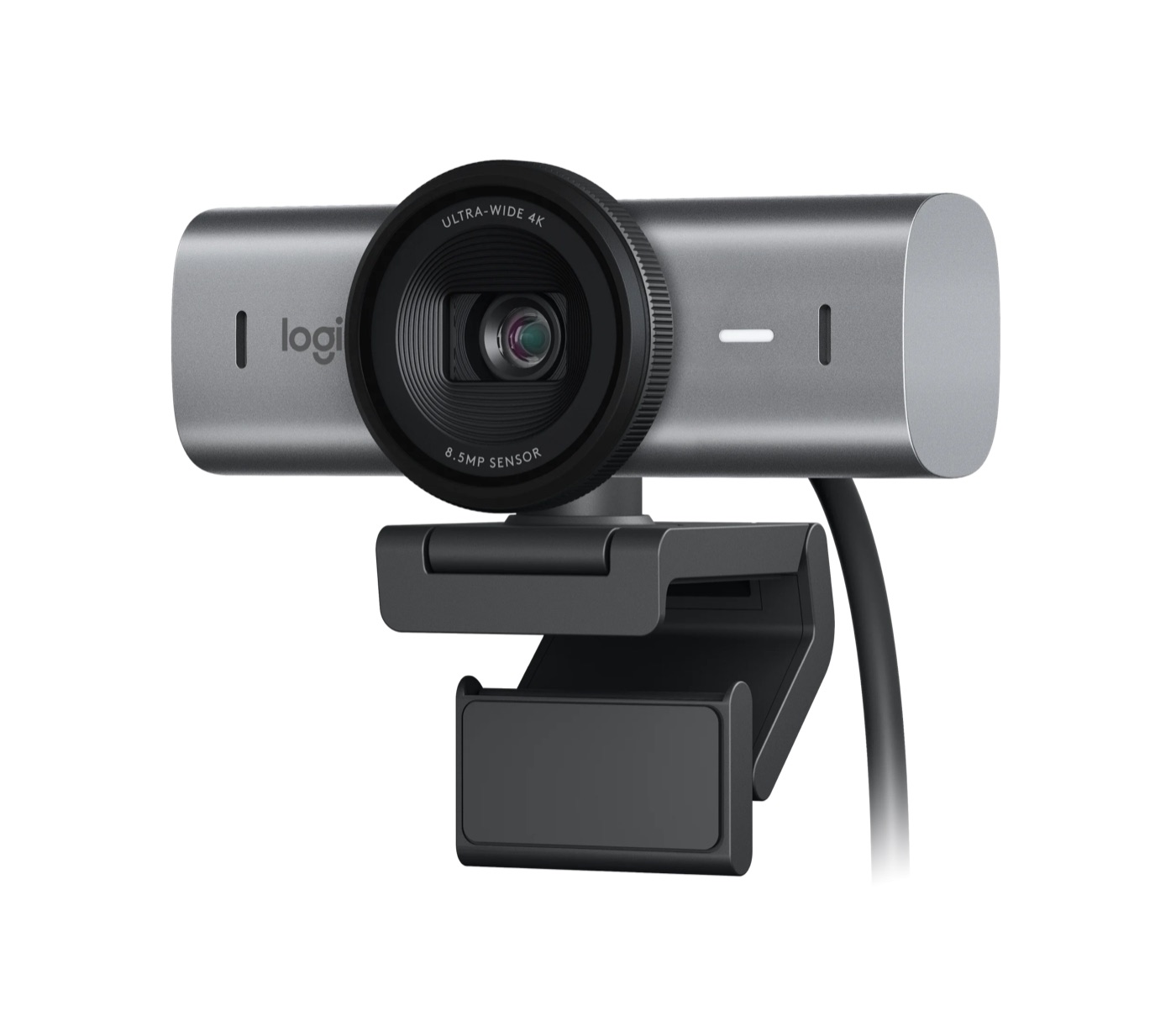
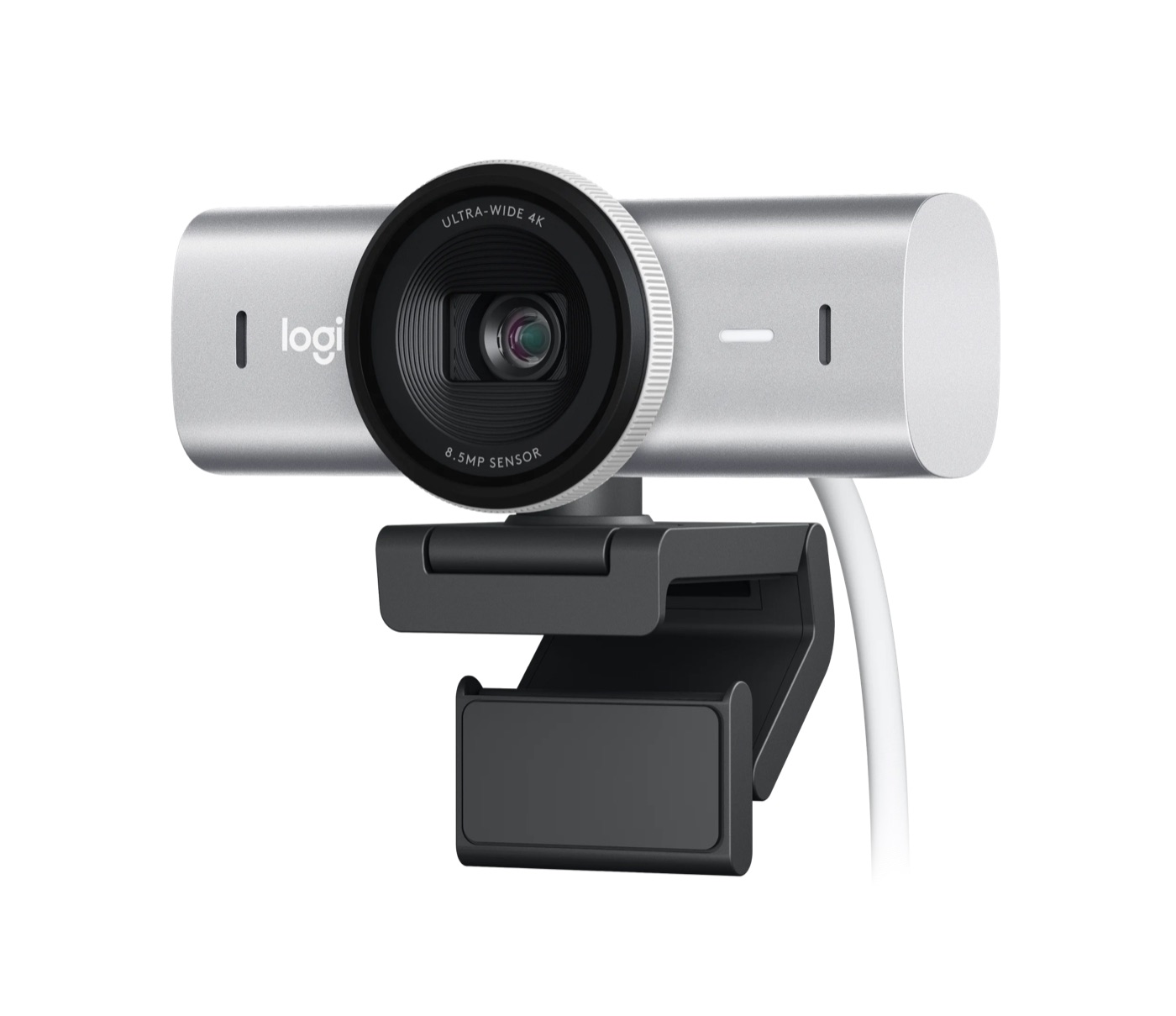
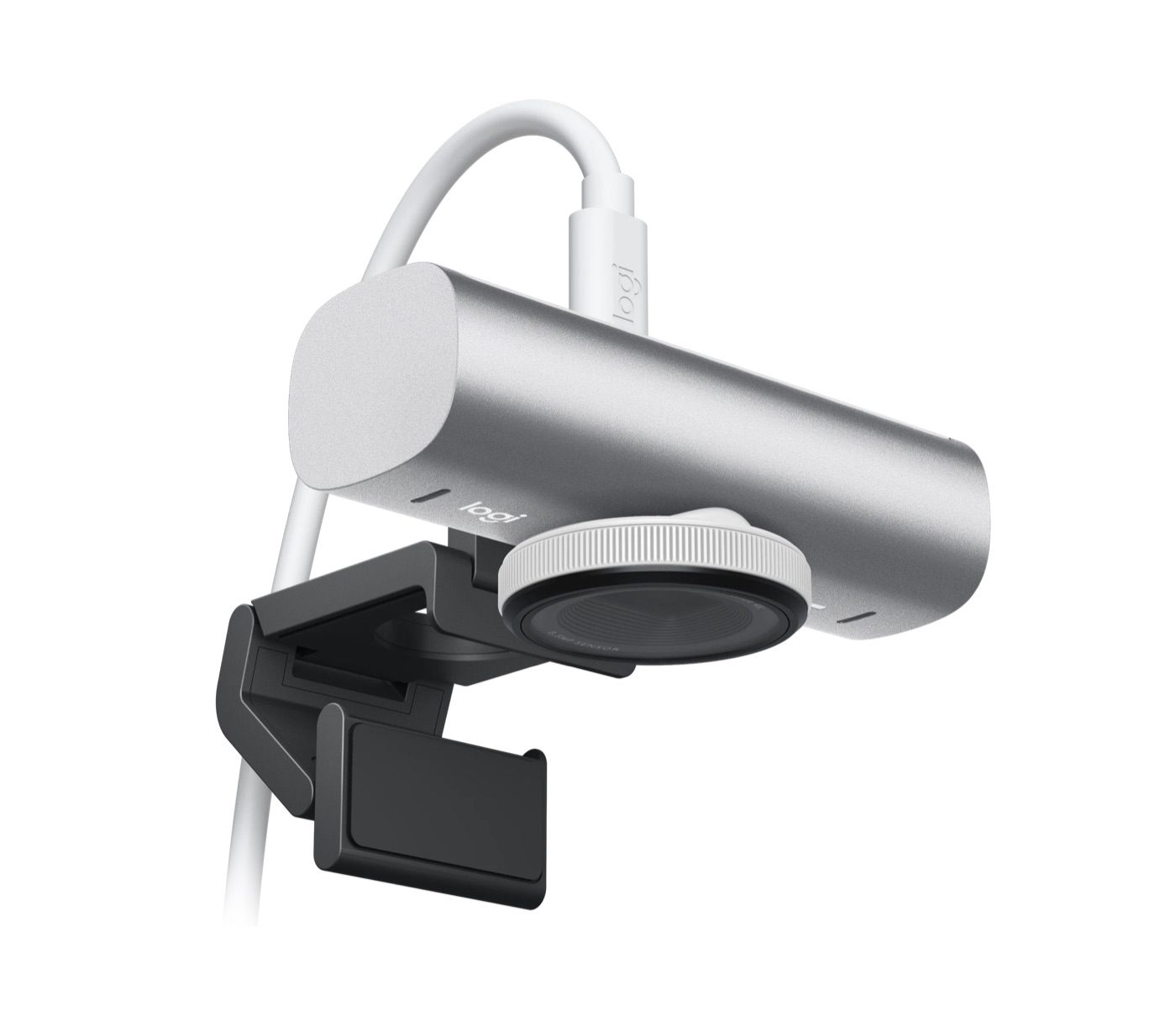
Our verdict
Buy the MX Brio if video calls are a daily part of the job, the desk faces a window or sits in a dim room, and the goal is a clean, well exposed image with no extra setup: Logitech rates it for 2x finer image detail and face visibility than the Brio 4K, and Windows Central, Trusted Reviews and Tom's Hardware all praised its auto-exposure and low-light handling. Skip it if Windows Hello face login matters, since the older Brio 4K supports it and the MX Brio does not, or if the plan is 4K60 streaming or auto-framing, which point to the Elgato Facecam 4K, Razer Kiyo V2 Pro or OBSBOT Tiny 3. The deciding fact is the current $169.99 price, which puts the newer sensor at the same price the Brio 4K lists for.
Overview
The MX Brio is the top webcam in Logitech's Master Series. Logitech's product page lists an 8.5MP Sony STARVIS image sensor with 70% larger pixels than the Brio 4K, a glass lens with autofocus, 4K at 30 fps (3840 x 2160) or 1080p at 60 fps (1920 x 1080), three diagonal fields of view (90, 78 and 65 degrees) and 4x digital zoom. It connects through a detachable USB-C to USB-C cable that supports the USB 3.0 standard, and it comes in Pale Gray, Graphite and Black.
Image processing runs through what Logitech calls RightLight 5 with face-based image enhancement, which combines autofocus, HDR, white balance and exposure for scenes from low light to direct sunlight. In Logi Options+ or G HUB, the Fine Controls panel exposes ISO, shutter speed, white balance, tint and vibrance, or the camera can be left on Auto. Show Mode flips the image when the camera is tilted down so others can see notes or sketches on the desk.
The MX Brio replaced the Brio 4K at the top of Logitech's range when it launched in 2024 at $199.99, the same launch price the older model carried. The one feature it dropped is Windows Hello: Windows Central and Tom's Hardware both list the missing face login as a reason to avoid it, and Tom's Hardware notes the MX Brio 705 for Business lacks it too. That business version adds RightSight auto-framing and Logitech Sync management through Logi Tune, features the consumer MX Brio does not offer.
Against the other webcams on this site, the MX Brio sits in the middle on price and leads on ease of use. The Brio 4K lists at $169.99 with HDR and the same three field of view presets but a smaller sensor and Windows Hello. The Elgato Facecam 4K costs $199.99 and records 4K at 60 fps, but has no microphone and uses fixed focus from 30 to 120 cm. The Razer Kiyo V2 Pro starts at $299.99 with 4K at 60 fps and AI auto-framing, and the OBSBOT Tiny 3 and Insta360 Link 2 add motorized gimbal tracking.
The limits are clear from the spec sheet and the published reviews. 4K tops out at 30 fps, there is no auto-framing on the consumer model, Logitech software runs only on Windows and macOS (ChromeOS and Linux get basic UVC webcam support), and the warranty is one year. Tom's Hardware found the image flatter and less detailed than pricier 4K webcams such as the Razer Kiyo Pro Ultra and Insta360 Link, and Trusted Reviews called its low-light compensation over-eager, fixable by lowering exposure in Options+.
How it scored
The MX Brio is the webcam we would hand to most people who work from home. Logitech describes it as its most advanced webcam, with a sensor that has 70% larger pixels, and says it shows 2x finer image detail and face visibility than the Brio 4K, especially in low light or with a window behind you. It records 4K at 30 fps or 1080p at 60 fps, and AI face-based enhancement works with auto-exposure, white balance and noise reduction to keep skin tones accurate. Show Mode lets you tilt the camera down to show notes on your desk during a call. For more control, Logi Options+ and G Hub expose ISO, shutter speed, tint and vibrance. Dual beamforming mics with AI noise reduction mean you can take calls without a headset, and the rotating shutter closes the lens between meetings. The limits: no 4K at 60 fps and no gimbal tracking.
Who it is for
Remote workers who want the sharpest picture in low light or backlit rooms, plus good mics, with no setup fuss.
Good fit if
- Remote and hybrid workers on several video calls a day who want a better image than a laptop camera without tuning settings
- People whose desk faces a window or sits in a dim room, where HDR and the larger-pixel sensor matter most
- Teachers, designers and planners who show paper notes or sketches on calls and can use Show Mode
- Mac and Windows users who want manual ISO, shutter and white balance controls in Logi Options+ or G HUB
- Anyone who wants a physical shutter built into the camera rather than a clip-on cover
Skip it if
- Windows users who sign in with their face: the MX Brio does not support Windows Hello, while the Logitech Brio 4K does
- Streamers who want 4K at 60 fps: the Elgato Facecam 4K ($199.99) or Razer Kiyo V2 Pro (from $299.99) record 4K60
- Presenters who walk around while talking: the OBSBOT Tiny 3 or Insta360 Link 2 track people with a motorized gimbal
- Budget buyers who only need clear 1080p calls: the Logitech C920s costs $69.99 and the Brio 500 adds auto-framing for $129.99
Specifications
| Image sensor | 8.5MP Sony STARVIS, 70% larger pixels than Brio 4K per Logitech | source |
|---|---|---|
| Resolution and frame rate | 4K at 30 fps (3840 x 2160), 1080p at 60 fps (1920 x 1080) | source |
| Lens and focus | Glass lens, advanced autofocus | source |
| Diagonal field of view | 90, 78 or 65 degrees | source |
| Zoom | 4x digital | source |
| Light correction | RightLight 5 with face-based image enhancement: autofocus, HDR, white balance, exposure | source |
| Microphones | Dual beamforming with AI noise reduction, range up to 4 ft (1.2 m) | source |
| Connection | Detachable USB-C to USB-C cable, USB 3.0 standard, 5 ft (1.5 m) | source |
| Privacy | Built-in rotating privacy shutter | source |
| Mounting | Detachable universal clip for laptops and monitors, standard 1/4 inch tripod thread | source |
| Size and weight | 44 x 98 x 36 mm, 137 g (176 g with mount) | source |
| Compatibility | Windows 10 or later, macOS 10.15 or later; ChromeOS and Linux get basic UVC support without Logitech software | source |
| Certified for | Microsoft Teams, Zoom, Google Meet, Works With Chromebook, Streamlabs | source |
| Windows Hello | Not supported | source |
| Warranty | 1-year limited hardware warranty | source |
Price
$199.99 at Logitech's US store when checked.
$199.99 Color Pale Gray In stock
Quoted from the vendor pricing page on November 9, 2026.
Plans and pricing
| Plan | Price | What is included | Source |
|---|---|---|---|
| MX Brio (Pale Gray 960-001550, Graphite 960-001545, Black 960-001558) | $169.99 sale price, $199.99 list priceone-time purchase | MX Brio webcam; Mount clip with removable adapter; USB-C to C 3.0 cable; User documentation; Logitech's US store showed $30.00 off all three colors when checked, with free 3 to 5 business day shipping and free returns within 30 days | Checked Nov 23, 2026 |
| MX Brio 705 for Business | price not listed (sold through Logitech sales and resellers)one-time purchase | Same 4K webcam hardware class with RightSight auto-framing through Logi Tune; Remote management with Logitech Sync; Auto-framing not available on computers with ARM processors | Checked Nov 23, 2026 |
Key features
Larger-pixel 8.5MP sensor
Logitech lists an 8.5MP Sony STARVIS sensor with 70% larger pixels than the Brio 4K and claims 2x finer image detail and face visibility, especially in low light or with a window behind the user.
RightLight 5 and HDR
Face-based image enhancement combines autofocus, HDR, auto white balance and exposure. Windows Central listed impressive low-light performance as a reason to buy, while Trusted Reviews found the low-light compensation over-eager.
Fine Controls in Logi Options+ and G HUB
Manual ISO, shutter speed, white balance, tint and vibrance, plus field of view presets of 65, 78 and 90 degrees and custom presets. Tom's Hardware notes both apps toggle HDR, low-light exposure and Show Mode.
Show Mode
Tilting the camera down flips the image so a desk, notebook or sketch reads correctly for others on the call. Tom's Hardware measured the mount tilting about 5 degrees back and more than 90 degrees forward.
Dual beamforming mics
Two beamforming microphones with AI noise reduction and a rated pickup range of up to 4 ft (1.2 m). Trusted Reviews described them as decent and not thin or tinny.
Built-in privacy shutter and USB-C
A rotating shutter fully blocks the lens between meetings, and the detachable 1.5 m USB-C cable uses the USB 3.0 standard, so a USB-C port is required.
Strengths and weaknesses
What we like
- Logitech rates the sensor's pixels 70% larger than the Brio 4K, for up to 2x finer detail and face visibility in dim or backlit rooms
- Current US store price of $169.99 matches the Brio 4K's list price and undercuts the $199.99 Elgato Facecam 4K and the $299.99 Razer Kiyo V2 Pro
- Three field of view presets (65, 78 and 90 degrees) plus 4x digital zoom cover tight head shots and wider room views
- Full manual control of ISO, shutter speed, white balance, tint and vibrance in two free Logitech apps
- Dual beamforming mics with a 1.2 m pickup range mean no separate mic is needed for routine calls, unlike the mic-less Elgato Facecam 4K
- Built-in rotating privacy shutter, 1/4 inch tripod thread and certification for Teams, Zoom and Google Meet
- Works as a basic UVC webcam on ChromeOS and Linux, and Logitech software covers Windows 10 or later and macOS 10.15 or later
What could be better
- No Windows Hello face login, which the older Brio 4K supports
- 4K is limited to 30 fps; 60 fps only at 1080p
- No auto-framing on the consumer model; RightSight is reserved for the MX Brio 705 for Business
- Tom's Hardware found its image flatter and less detailed than $300 plus 4K webcams
- Requires a USB-C port, and Logitech software is not available for ChromeOS or Linux
- 1-year limited hardware warranty
Key facts
- Max resolution: 4K at 30 fps, 1080p at 60 fps
- Sensor: 70% larger pixels, per Logitech
- Microphones: Dual beamforming, AI noise reduction
- Privacy: Built-in rotating shutter
- Software: Logi Options+ and G Hub
Where it ranks
Logitech MX Brio is No. 1 in our Best Webcams verdict.
Alternatives to consider
- Logitech Brio 4K: Lists at $169.99 with HDR, the same 65, 78 and 90 degree presets and Windows Hello support, but Logitech says the MX Brio has 2x finer detail.
- Elgato Facecam 4K: Same $199.99 list price but records 4K at 60 fps and accepts 49 mm lens filters; it has no microphone and fixed focus from 30 to 120 cm.
- Razer Kiyo V2 Pro: From $299.99 with 4K at 60 fps, a Sony STARVIS 2 sensor and AI auto-framing, for streamers who need more than 30 fps at 4K.
- OBSBOT Tiny 3: A gimbal webcam with a 1/1.28 inch 50MP sensor, AI Tracking 2.0 and 1080p at 120 fps, for presenters who move around.
- Logitech Brio 500: At $129.99 it drops to 1080p but adds RightSight auto-framing and keeps Show Mode.
Questions readers ask
Is the Logitech MX Brio worth it?
Yes for daily video calls in tricky light, especially at the $169.99 sale price Logitech's US store showed in November 2026. Its 8.5MP sensor has 70% larger pixels than the Brio 4K, but streamers who need 4K at 60 fps or auto-framing should look at other models.
Does the Logitech MX Brio support Windows Hello?
No. Windows Central and Tom's Hardware both confirm the MX Brio lacks Windows Hello face login, and Tom's Hardware notes the MX Brio 705 for Business lacks it too. The older Brio 4K does support it.
Can the MX Brio record 4K at 60 fps?
No. Logitech lists 4K at 30 fps and 1080p at 60 fps as the supported modes. The Elgato Facecam 4K and Razer Kiyo V2 Pro both record 4K at 60 fps.
Logitech MX Brio vs Brio 4K: what is the difference?
The MX Brio has a larger 8.5MP Sony STARVIS sensor that Logitech says gives 2x finer image detail, plus RightLight 5, Show Mode, beamforming mics and a USB-C cable. The Brio 4K keeps Windows Hello support and lists at $169.99, the price the MX Brio was selling for in November 2026.
Does the MX Brio have auto-framing?
No, the consumer MX Brio has no auto-framing. Logitech offers RightSight auto-framing only on the MX Brio 705 for Business, through the Logi Tune app, and not on computers with ARM processors.
Does the MX Brio work with a Mac or Chromebook?
Yes. Logitech lists macOS 10.15 or later with full Logi Options+ and G HUB support, and ChromeOS and Linux with basic UVC webcam support but no Logitech software. It is certified Works With Chromebook.
Does the MX Brio have a built-in microphone and privacy cover?
Yes to both. It has dual beamforming microphones with AI noise reduction and a 1.2 m range, and a built-in shutter that rotates to fully block the lens.
What warranty does the MX Brio have?
Logitech lists a 1-year limited hardware warranty for the MX Brio in the US, and its US store offers free returns within 30 days of purchase.
Sources we checked
- Logitech: MX Brio 4K Ultra HD webcam (US store, specs, price and box contents), checked November 23, 2026
- Logitech: MX Brio 705 for Business, checked November 23, 2026
- Windows Central: Logitech MX Brio review, checked November 23, 2026
- Tom's Hardware: Logitech MX Brio Review, checked November 23, 2026
- Trusted Reviews: Logitech MX Brio Review, checked November 23, 2026
- Logitech: Brio 4K (US store), checked November 9, 2026
- Elgato: Facecam 4K, checked November 9, 2026
- Razer: Kiyo V2 Pro, checked November 9, 2026
- OBSBOT: Tiny 3 series, checked November 9, 2026
Deep review last updated November 23, 2026. We recheck prices and specs against these pages; send corrections to the address below.
Alternatives we scored
Cite this page
HearSmart. Logitech MX Brio review. Updated November 23, 2026. https://hearsmart.org/review/logitech-mx-brio
Visit logitech.com · Questions or corrections: editorial@hearsmart.org