Review · Kids & family
 Qustodio review
A parental control service with web filtering, screen time limits and a family locator with saved places alerts.
By the HearSmart research desk · Updated November 28, 2026
The short answer
Qustodio is a paid parental control service that filters websites, blocks apps, sets screen time limits and locates children across Windows, Mac, Android, iPhone, iPad, Chromebook and Kindle devices from one parent dashboard. Its Basic plan costs $59.95 a year for up to 5 devices and Complete costs $104.95 a year for unlimited family devices, according to Qustodio's pricing page checked in November 2026. It suits households with a mix of platforms; families on one platform can get the core controls free from Apple or Google.
- Performance (40%)
- 7.4
- Ease of use (25%)
- 7.8
- Value (35%)
- 7.8
What it looks like
Our verdict
Buy Qustodio if your children use a mix of devices, for example an iPhone, an Android tablet and a Windows laptop, and you want one set of rules and one activity report across all of them: Basic at $59.95 a year covers web filtering, app blocking, daily limits, routines and location on up to 5 devices. Choose Complete at $104.95 a year only if you need per-app time limits, calls and messages monitoring, social chat alerts or more than 5 devices. Skip it if every child device is an iPhone or every one is an Android or Chromebook, because Apple Screen Time and Google Family Link cover app limits and content filters for free, and skip it if your main worry is risky messages on social apps, where Bark's scanning is the focus. The deciding fact is platform mix: Qustodio's value is one dashboard across operating systems that the free tools do not share.
Overview
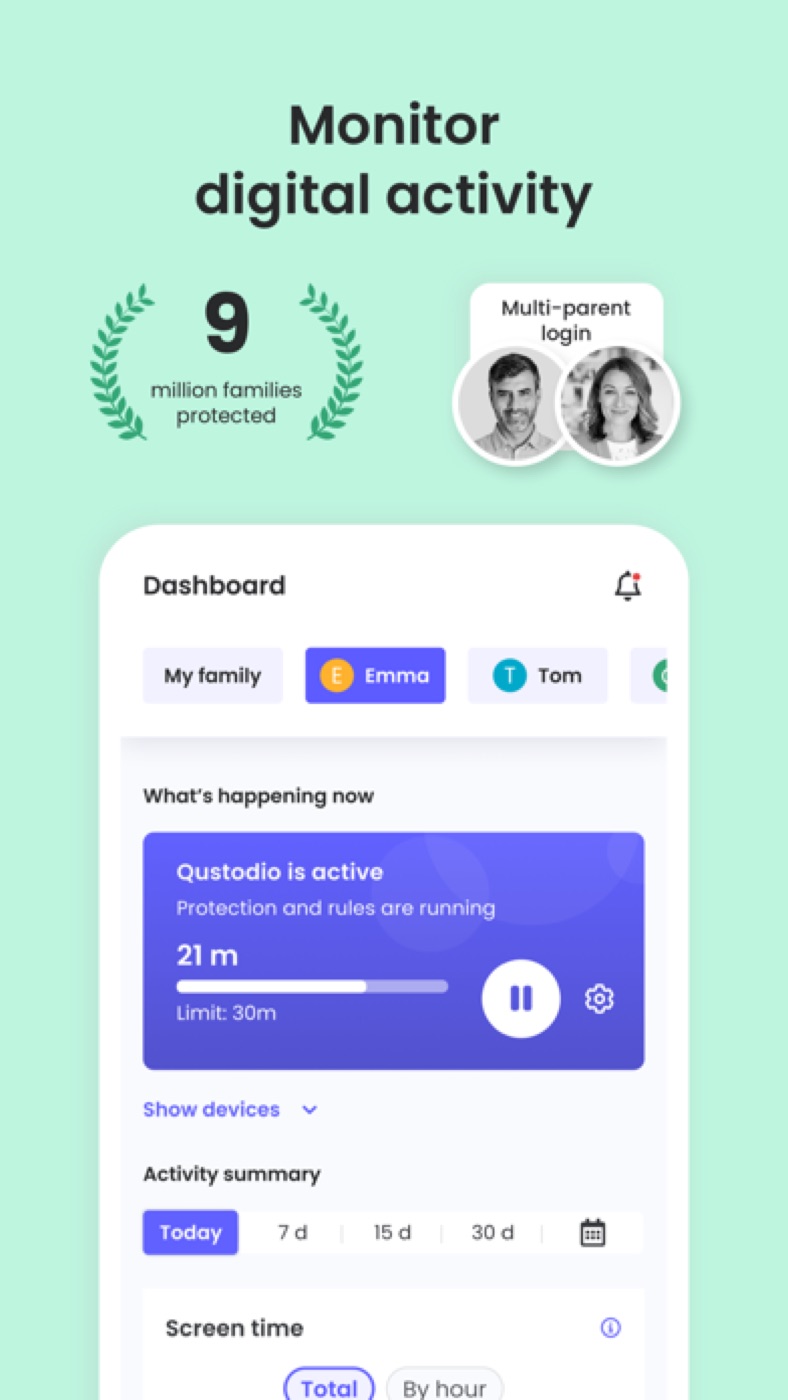
Qustodio is a parental control service made by Qustodio Technologies SL, a company with offices in Barcelona, Spain and Charlotte, North Carolina, according to its website footer. A parent installs the Qustodio Parental Control App on their own phone, or uses the Qustodio Web dashboard in any browser, and installs the separate Kids App Qustodio on each child device. Rules for web filtering, app blocking, time limits and location are then set once and applied per child. Qustodio states that more than 9 million parents use it.
The current line-up has three tiers. Qustodio Free protects 1 device with Safe search, web filtering, restricted times, an internet pause button and 7-day activity reports. Basic, at $59.95 a year (Qustodio shows it as the same as $5.00 a month), raises coverage to 5 devices and adds games and apps blocking, daily time limits, device blocking routines, location monitoring, the Android panic button, 30-day reports and premium email support. Complete, at $104.95 a year (shown as $8.75 a month), adds blocking by app category, per-app time limits, custom app and website rule routines, app download and web activity alerts, YouTube monitoring, calls and messages monitoring, AI-powered search and message alerts, social chat alerts, gaming alerts, saved places alerts, the Care Plus support service and unlimited family devices. Both paid plans are priced yearly on the plan page, and Qustodio offers a 30-day money-back guarantee.
Recent changes show in the plan table. Several features that older Qustodio material placed in every paid plan, including YouTube monitoring, AI-powered search alerts and saved places alerts, are now marked as Complete only on the November 2026 pricing page. Qustodio also lists gaming voice alerts, which flag risky conversations in a child's in-game voice chat, and social monitoring that now names WhatsApp, Instagram, TikTok, Snapchat and X chat alerts. Both App Store apps were updated on November 16, 2026 to version 182.
Against the main rivals on this site, Qustodio sits between the free platform tools and the message scanners. Apple Screen Time and Google Family Link cost nothing but each works best inside its own ecosystem. Bark costs $14 a month or $99 a year for unlimited children and devices and centers on scanning texts and social apps for risks. Mobicip starts at $2.99 a month billed annually for 5 devices, and Aura Parental Controls costs $10 a month billed annually for unlimited kids and devices. Qustodio's Basic plan is priced close to Bark's yearly plan but focuses on filtering, limits and location rather than message analysis, which needs the Complete plan.
The limits come from Qustodio's own pages and the app stores. The panic button and Instagram, TikTok, Snapchat and X message alerts work only on Android, and calls and messages monitoring for an iPhone requires a Windows or Mac computer. Chromebook support needs a Chromebook with Google Play. Basic stops at 5 devices, and the unlimited device count on Complete covers family devices only, not schools or businesses. The child-side apps are rated lower than the parent app: Kids App Qustodio shows 1.4 stars from 56.9K reviews on Google Play and 2.2 stars from 7,879 ratings on the US App Store, against 4.2 stars from 9,688 ratings for the parent app on the App Store.
How it scored
Qustodio is a parental control service first, and its family locator is one of several tools. Parents can spot a child on the map to see where they are and have been, save frequently visited places such as school and home, and get notifications when a child arrives or leaves. Location monitoring is checked in the Basic plan, which costs $59.95 a year, the same as $5.00 a month, and covers up to 5 devices. Complete costs $104.95 a year and adds AI-powered alerts, social monitoring, gaming alerts and custom routines across unlimited devices. Around the locator, Qustodio offers web filtering by category, daily time limits, a button to pause the internet, YouTube monitoring and calls and messages monitoring, with a panic button available on Android. It has no driving features, and it is sold on yearly plans. Families who mostly want to share locations will find dedicated apps simpler, but parents who want filtering and screen time rules get location at no extra cost.
Who it is for
Parents who mainly want screen time and content controls and want location included in the same plan.
Good fit if
- Families whose children use devices from different makers, such as an iPhone plus a Windows laptop, who want one dashboard and one set of rules
- Parents of younger children who mainly need web filtering, app blocking and daily time limits on up to 5 devices for $59.95 a year
- Households with Windows or Mac computers that Apple Screen Time or Google Family Link do not fully cover
- Families with Android phones who want calls and messages monitoring, contact blocking and a panic button in the same service as screen time rules
- Larger families with more than 5 phones, tablets and computers, on the Complete plan's unlimited family devices
Skip it if
- All-iPhone and iPad families who only need app limits and content filters: Apple Screen Time does this for free
- Families on Android phones and Chromebooks only who want basic limits and approvals: Google Family Link is free
- Parents whose main concern is bullying or predators in texts and social apps on an iPhone: Bark scans messages across unlimited devices for $99 a year
- Budget buyers who want paid features on several devices at the lowest price: Mobicip Lite costs $2.99 a month billed annually for 5 devices
Specifications
| Free plan | Yes, 1 device, with Safe search, web filtering, restricted times, pause the internet and 7-day reports | source |
|---|---|---|
| Basic price | $59.95 a year (same as $5.00 a month) | source |
| Complete price | $104.95 a year (same as $8.75 a month) | source |
| Devices covered | 1 on Free, 5 on Basic, unlimited family devices on Complete | source |
| Money-back guarantee | 30 days | source |
| Child devices supported | Windows, Mac, Chromebook with Google Play, Android, iPhone and iPad, Kindle | source |
| Windows | Windows 10 and above | source |
| Mac | macOS Catalina 10.15 to macOS Tahoe 26 | source |
| Android | Android 9 and above | source |
| iPhone and iPad | iOS 16 and above | source |
| Kindle | Android 8 or FireOS 6 and above | source |
| Parent access | iOS app, Android app or Qustodio Web in any browser | source |
| Activity reports | 7 days on Free, 30 days on Basic and Complete | source |
| Android-only features | Panic button; Instagram, TikTok, Snapchat and X message alerts | source |
| Payment methods | Visa, Mastercard, American Express, PayPal, Google Pay, Apple Pay (varies by location) | source |
| Parent app rating, US App Store | 4.2 stars from 9,688 ratings, version 182.42.0 | source |
Price
Basic $59.95 a year (same as $5.00 a month); Complete $104.95 a year.
Basic $59.95/year Same as $5.00/month
Quoted from the vendor pricing page on November 28, 2026.
Plans and pricing
| Plan | Price | What is included | Source |
|---|---|---|---|
| Qustodio Free | $0free | 1 device; Safe search; Web filtering; Restricted times; Pause the internet; 7-day activity reports | Checked Nov 18, 2026 |
| Basic | $59.95 a year (same as $5.00 a month)yearly | Up to 5 devices; Safe Search and web filtering; Games and apps blocking; Daily time limits; Pause internet access; Device blocking routines; 30-day activity reports; Panic button (Android); Location monitoring; Premium email support | Checked Nov 18, 2026 |
| Complete | $104.95 a year (same as $8.75 a month)yearly | Unlimited family devices; Everything in Basic; Blocking by app category; Games and apps time limits; Custom app and website rules routines; Web activity, blocked website and app download alerts; App insights; YouTube monitoring; Calls and messages monitoring; AI-powered search and message alerts; Social monitoring (WhatsApp, Instagram, TikTok, Snapchat and X chat alerts); Gaming alerts; Saved places alerts; Care Plus | Checked Nov 18, 2026 |
Key features
Web filtering and Safe Search
Every plan, including Free, filters websites by category and forces Safe Search. Complete adds alerts for web activity and blocked websites, so a parent hears about attempts to reach blocked pages rather than finding them later in a report.
App blocking and time limits
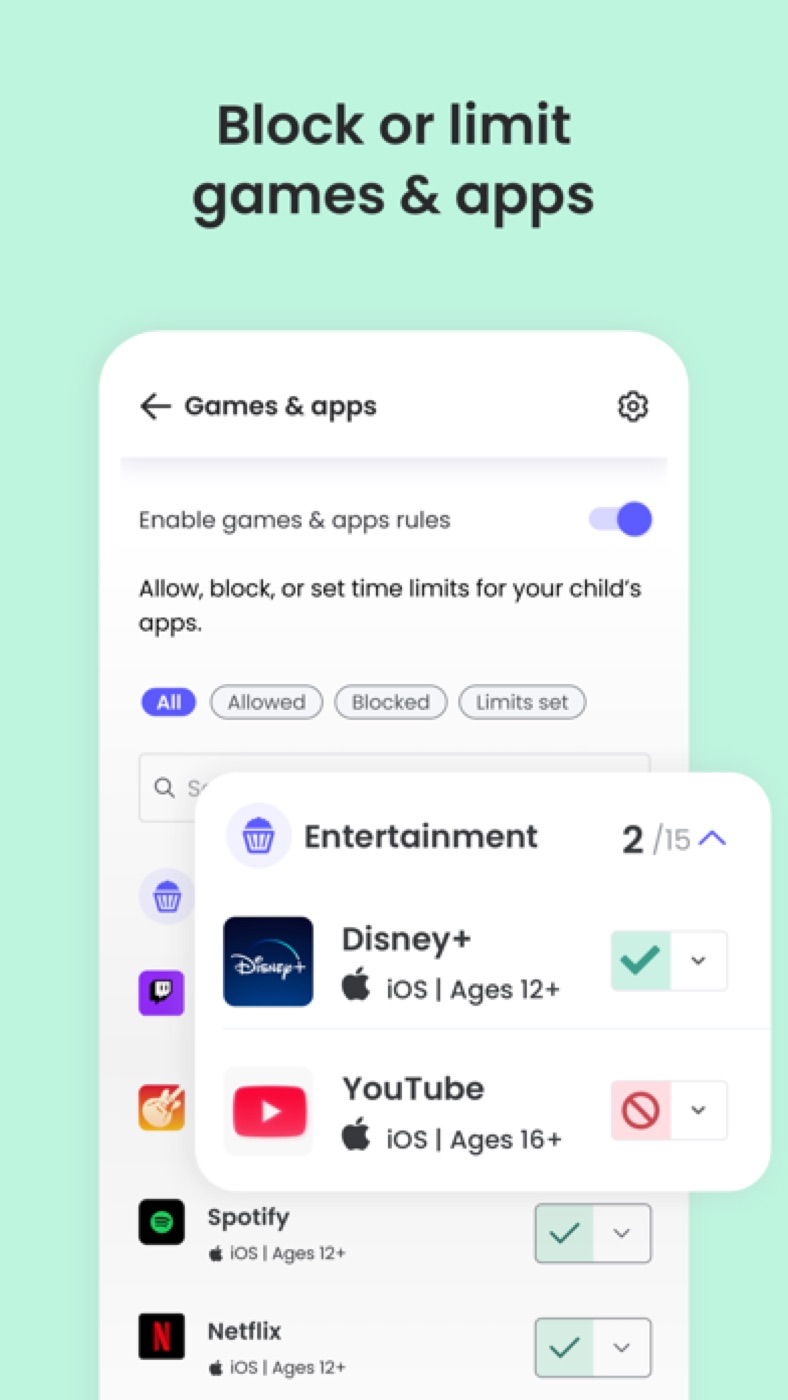
Basic blocks individual games and apps and sets a daily device time limit. Per-app time limits, blocking by app category and app download alerts are Complete only, per the plan comparison table.
Routines and internet pause
Parents can pause internet access with one button and schedule device blocking routines for study or bedtime on Basic. Complete adds routines with custom app and website rules, for example allowing only school apps during homework time.
Location and saved places
Location monitoring shows where a child is and has been on a map, and is included from Basic. Alerts when a child arrives at or leaves saved places such as school or home require Complete.
Calls, messages and social alerts
Complete shows who a child calls and texts, lets parents read messages and block contacts, and sends AI-powered alerts on concerning messages and searches. Instagram, TikTok, Snapchat and X message alerts work only on Android, and iPhone calls and messages monitoring needs a Windows or Mac computer.
Reports and dashboard
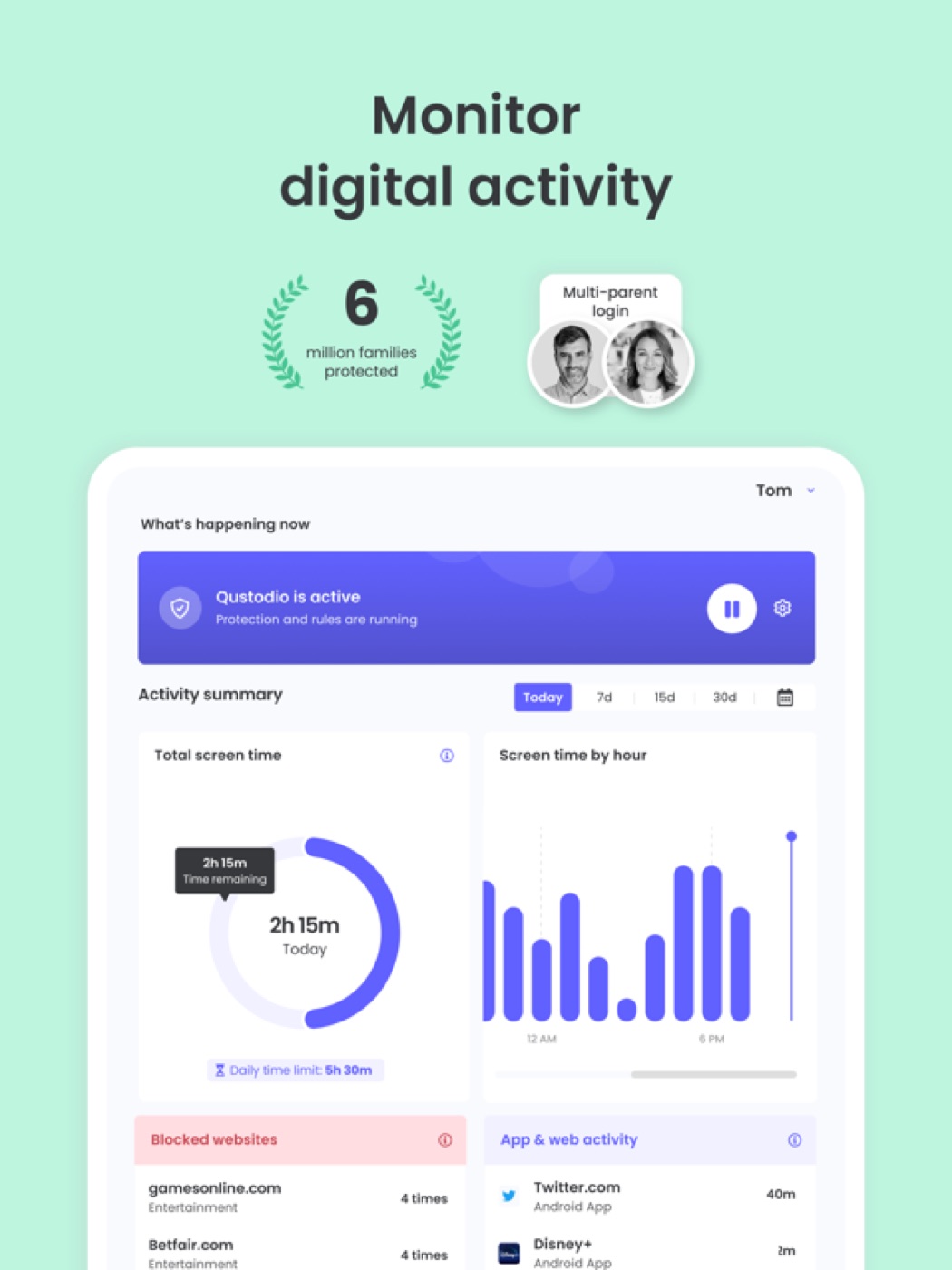
Activity timelines, browsing history, YouTube views and screen time appear in the parent app and on Qustodio Web. Paid plans keep 30 days of history against 7 days on Free, and Qustodio emails daily and weekly summaries.
Panic button
Qustodio lists a panic button for children in both paid plans and marks it as unavailable on Free. Its pricing page states that the panic button is only available for Android, so it does not work on an iPhone or iPad.
Strengths and weaknesses
What we like
- Covers seven child platforms (Windows, Mac, Chromebook, Android, iPhone, iPad and Kindle) from one parent dashboard, which Apple Screen Time and Google Family Link do not match
- Basic costs $59.95 a year for up to 5 devices, about $1.00 per device per month spread over 5 devices
- Complete at $104.95 a year has no device cap for family devices, useful for households with many phones, tablets and computers
- A permanent free tier filters the web on 1 device with Safe search, restricted times and 7-day reports
- Paid plans keep 30 days of activity history and email daily and weekly summaries
- 30-day money-back guarantee on paid plans
- Location monitoring is included from the $59.95 Basic plan, with no separate locator subscription
- The parent app holds 4.2 stars from 9,688 ratings on the US App Store as of November 2026
What could be better
- Per-app time limits, YouTube monitoring, saved places alerts and AI alerts all moved to Complete, so Basic is thinner than its $59.95 price might suggest
- No monthly billing is shown on the plan page: both paid plans are priced as yearly charges of $59.95 or $104.95
- Panic button and Instagram, TikTok, Snapchat and X message alerts are Android only
- Calls and messages monitoring for iPhone requires a Windows or Mac computer
- The child-side app is rated 1.4 stars from 56.9K reviews on Google Play and 2.2 stars from 7,879 ratings on the US App Store
- Basic stops at 5 devices, and unlimited devices on Complete does not apply to schools or businesses
Key facts
- Basic: $59.95 a year, up to 5 devices
- Complete: $104.95 a year, unlimited devices
- Location: Location monitoring and saved places alerts
- Refund: 30-day money-back guarantee
- Driving alerts: Not offered
Where it ranks
Qustodio is No. 8 in our Best Family Locator Apps verdict and No. 1 in Best Parental Control Apps.
Alternatives to consider
- Apple Screen Time: Free and built into iPhone, iPad and Mac, with app limits, downtime and content restrictions; the better choice when every child device is from Apple.
- Google Family Link: Free for Android phones and Chromebooks, with daily limits, app approvals, Chrome filters and location; the better choice for an all-Android household.
- Bark: Costs $14 a month or $99 a year for unlimited children and devices and focuses on scanning texts and social apps for risks, which Qustodio reserves for Complete.
- Mobicip: Lite costs $2.99 a month billed annually for 5 devices, with a free Basic plan for 2 devices, so it undercuts Qustodio Basic on price.
- Aura Parental Controls: Costs $10 a month billed annually or $13 monthly for unlimited kids and devices, for parents who want monthly billing.
Questions readers ask
How much does Qustodio cost?
Qustodio Basic costs $59.95 a year and Complete costs $104.95 a year, according to Qustodio's pricing page checked in November 2026. Qustodio presents these as $5.00 and $8.75 a month, but both are billed yearly.
Does Qustodio have a free plan?
Yes, Qustodio Free protects 1 device with Safe search, web filtering, restricted times, an internet pause button and 7-day activity reports. App blocking, daily time limits and location monitoring need a paid plan.
Is Qustodio worth it?
Qustodio is worth it mainly for families with devices on more than one platform, since $59.95 a year puts filtering, app blocking, limits and location for 5 devices in one dashboard. Families using only Apple devices or only Android and Chromebooks get similar core controls free from Apple Screen Time or Google Family Link.
What is the difference between Qustodio Basic and Complete?
Complete adds per-app time limits, YouTube monitoring, calls and messages monitoring, AI-powered search and message alerts, social and gaming alerts, saved places alerts and unlimited family devices. Basic covers up to 5 devices with web filtering, app blocking, daily limits, routines and location.
Does Qustodio work on iPhone?
Yes, Qustodio works on iPhones and iPads running iOS 16 and above. The panic button and Instagram, TikTok, Snapchat and X message alerts are Android only, and iPhone calls and messages monitoring requires a Windows or Mac computer.
Qustodio vs Bark: which is better?
Qustodio is stronger on web filtering, time limits and routines across computers and phones, while Bark focuses on scanning messages and social apps for risks. Bark costs $99 a year for unlimited devices; Qustodio Basic costs $59.95 a year for 5 devices and its message alerts need the $104.95 Complete plan.
Can my child uninstall Qustodio?
On Android, Kids App Qustodio is password protected and cannot be uninstalled from a child's device without parental permission, according to its Google Play listing. It uses the Device Administrator permission to prevent removal.
Can I get a refund on Qustodio?
Yes, Qustodio offers a 30-day money-back guarantee on its paid plans, according to the FAQ on its pricing page.
Sources we checked
- Qustodio Premium plans and pricing, checked November 18, 2026
- Qustodio Free vs. Qustodio Premium, checked November 18, 2026
- Qustodio Downloads, checked November 18, 2026
- Qustodio Features, checked November 18, 2026
- Qustodio Parental Control App, Apple App Store (US), checked November 18, 2026
- Kids App Qustodio, Apple App Store (US), checked November 18, 2026
- Kids App Qustodio, Google Play, checked November 18, 2026
- Qustodio Parental Control App, Google Play, checked November 18, 2026
- Bark pricing, checked November 16, 2026
- Mobicip pricing, checked November 16, 2026
- Aura Parental Controls, checked November 16, 2026
- Apple Support: Use Screen Time on your child's device, checked November 16, 2026
- Google Family Link, checked November 16, 2026
Deep review last updated November 18, 2026. We recheck prices and specs against these pages; send corrections to the address below.
Alternatives we scored
Cite this page
HearSmart. Qustodio review. Updated November 28, 2026. https://hearsmart.org/review/qustodio
Visit qustodio.com · Questions or corrections: editorial@hearsmart.org