Review · Music & creators
 AIVA review
AI composition assistant with 250+ styles, MIDI and audio influences, a track editor and full copyright on the Pro plan.
By the HearSmart research desk · Updated November 18, 2026
The short answer
AIVA is an AI music generation assistant from Aiva Technologies in Luxembourg that composes instrumental tracks in more than 250 styles and exports MIDI, MP3 and, on Pro, WAV and stems. It suits composers, game developers and video makers who want editable MIDI and, on the Pro plan, full copyright of their tracks; it is not for people who want sung vocals. When checked in November 2026 the pricing page showed only euro prices: Free at €0, Standard at €15 a month or €11 a month billed yearly, and Pro at €49 a month or €33 a month billed yearly, all plus VAT.
- Performance (40%)
- 8.3
- Ease of use (25%)
- 7.6
- Value (35%)
- 7.8
What it looks like
Our verdict
Buy AIVA Pro if you write instrumental music for games, films or videos and want MIDI you can rework plus a written assignment of copyright: the EULA states that on Pro AIVA "assigns, grants and conveys all copyrights" of each composition to you, and the plan allows 300 downloads a month. Stay on Free if you only need music for non-commercial projects and can credit AIVA. Skip it if you want finished songs with vocals from a text prompt, where Suno is the better fit, or if you need a license that covers unrestricted commercial use for under €15 a month. The deciding fact is the license ladder: Free and Standard tracks stay owned by AIVA, and only Pro hands the copyright to you.
Overview
AIVA, short for Artificial Intelligence Virtual Artist, is built by Aiva Technologies SARL, a company based in Luxembourg and founded by Pierre Barreau, Denis Shtefan and Vincent Barreau. It started in 2016 as a composer of classical and symphonic music and is described as the first virtual composer recognized by a music society, the French rights body SACEM. Today it is sold as a composition assistant that runs in the browser, with desktop apps listed for Windows, macOS and Linux.
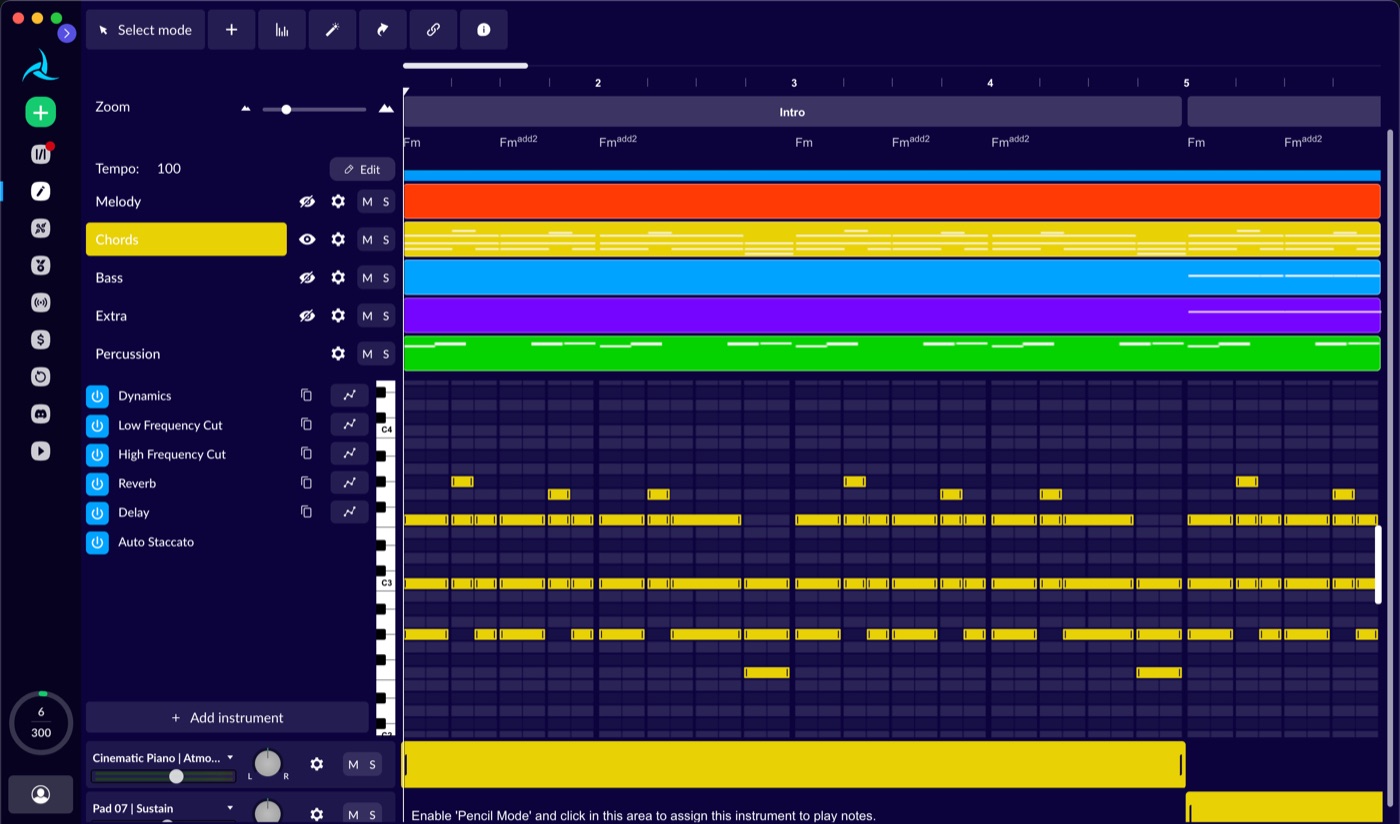
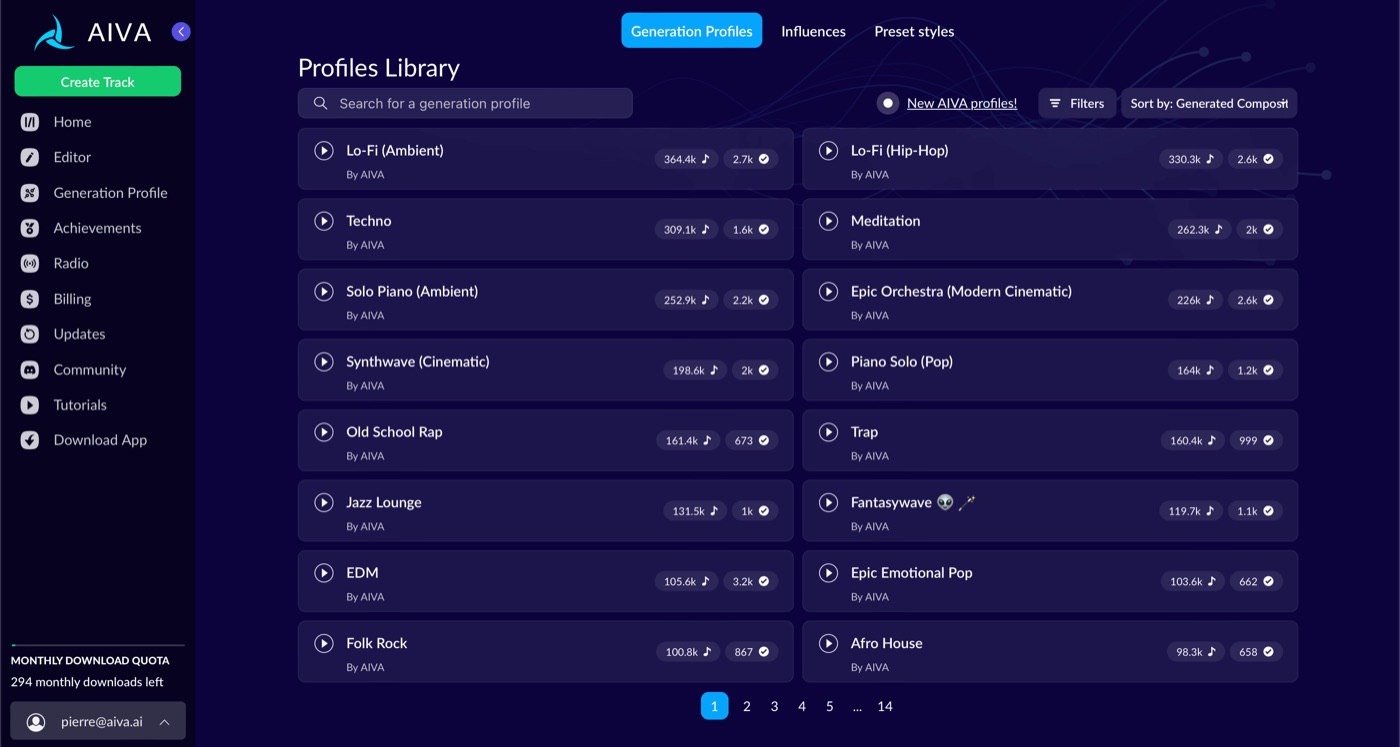
The product centers on four ways to start a track: from one of more than 250 preset styles, from a chord progression you enter or generate, from an uploaded influence, or from your own imported MIDI. AIVA's user manual describes a Style Designer for building custom styles, a piano roll editor with built-in virtual instruments, layer in-painting to regenerate parts of a piece, and per-layer editing of instruments, tempo and effects. Downloads include MP3, orchestrated and reduced MIDI, 16-bit 48 kHz WAV, stems and a text file of the chords.
Pricing comes in three tiers for individuals, shown in euros from the location used for this check. Free costs €0 with 3 downloads a month and tracks up to 3 minutes. Standard costs €15 a month or €11 a month billed yearly, with 15 downloads and tracks up to 5 minutes. Pro costs €49 a month or €33 a month billed yearly, with 300 downloads, tracks up to 5 minutes 30 seconds, all file formats and WAV export. Students and schools get discounts on request, and businesses with 3 or more employees and more than $300k in yearly revenue must ask for a custom enterprise plan.
Compared with the other AI music generators on this site, AIVA is the one most aimed at composers. Suno and ElevenLabs Music write full songs with vocals from a text prompt; AIVA writes instrumentals and does not sing. Soundraw and Mubert generate background music for video and streams; AIVA adds MIDI export on every plan, a chord editor and a piano roll, so a piece can move into a DAW or notation software. Stable Audio's free plan includes a commercial license, while AIVA's free plan is non-commercial and requires a credit line.
The limits are real. Standard plan tracks can only be monetized on YouTube, Twitch, TikTok and Instagram, and the copyright stays with AIVA. Pro ownership applies to individuals and small businesses only. Uploaded influences grant AIVA a perpetual license to train its systems on that material. The EULA caps use at 100 compositions an hour, 400 every 24 hours and 4,000 stored in an account, and refunds are not given once premium features have been used. In the United States, the Copyright Office said in January 2025 that AI outputs are protected only where a human has determined enough expressive elements, so a contract assignment from AIVA may not on its own make a purely generated track registrable.
Software upkeep is uneven. The web app and help center are current, but the Linux snap package was last updated on 10 June 2024 at version 2.4.21, and several help center articles were last updated in 2021. Prices are only shown in euros plus VAT, so US buyers should check the converted amount at checkout.
How it scored
AIVA is the most composer-friendly tool here, built around editing rather than one-click songs. It generates music in more than 250 styles, lets you create your own style models, accepts an audio or MIDI influence and exports MIDI on every plan, so you can take a piece into notation software or a DAW and rework it. The license tiers are the deciding factor. On the free plan AIVA owns the copyright, you must credit AIVA, and you cannot monetize. Standard allows monetization only on YouTube, Twitch, TikTok and Instagram, with 15 downloads a month. Pro assigns you the full copyright of your compositions, forever, with 300 downloads a month and high quality WAV export. Tracks top out around five and a half minutes, it does not sing, and the interface asks more of you than Suno or Soundraw. Prices showed in EUR from our location, so check the USD rate before you buy.
Who it is for
Composers who want MIDI files and full copyright
Good fit if
- Indie game developers who need looping orchestral or ambient scores and want MIDI plus the copyright on Pro
- Composers who want to sketch ideas from a chord progression and then edit notes in a piano roll or export MIDI to a DAW
- YouTubers and streamers who monetize only on YouTube, Twitch, TikTok or Instagram, which the Standard plan covers
- Teachers and students who want a free tool that shows chord progressions and exports MIDI for non-commercial projects
- Film and podcast makers who want stems and 48 kHz WAV files to mix the music under dialogue
Skip it if
- People who want a finished song with vocals from a text prompt: Suno writes full songs with vocals and its Pro plan costs $8 a month billed yearly
- Anyone who needs free music for commercial use: Stable Audio's free plan includes a commercial license
- Streamers and podcasters who need hour-long background beds: Mubert is built for long background music
- Businesses with 3 or more employees and over $300k in yearly revenue, which fall outside AIVA's individual plans and need a custom quote
Specifications
| Maker | Aiva Technologies SARL, Luxembourg | source |
|---|---|---|
| Styles | More than 250 preset styles, plus custom styles from the Style Designer | source |
| Ways to start a track | From a style, a chord progression, an uploaded influence, or imported MIDI | source |
| Vocals | No vocal layer; tracks are built from melody, bass, chords, percussion and extra layers | source |
| Download formats | MP3, orchestrated MIDI, reduced MIDI, 16-bit 48 kHz WAV, stems, chords as text | source |
| Maximum track length | 3 minutes on Free, 5 minutes on Standard, 5 minutes 30 seconds on Pro | source |
| Monthly downloads | 3 on Free, 15 on Standard, 300 on Pro | source |
| Audio influence upload | MP3 or WAV, 1 to 20 minutes long | source |
| MIDI influence upload | At least 8 bars; trimmed beyond 100 bars | source |
| Generation limits | 5 at a time, 100 per hour, 400 per 24 hours, 4,000 stored | source |
| Platforms | Web app; desktop downloads for Windows, macOS and Linux | source |
| Linux package | Snap version 2.4.21, last updated 10 June 2024 | source |
| License term and territory | Perpetual, worldwide | source |
| Governing law | Luxembourg | source |
Price
See vendor pricing (USD check pending).
US price check pending. See the vendor pricing page.
Plans and pricing
| Plan | Price | What is included | Source |
|---|---|---|---|
| Free | €0Free forever, no credit card required | Copyright owned by AIVA, no monetization; Credit to AIVA required; 3 downloads per month; Tracks up to 3 minutes; MP3 and MIDI downloads | Checked Nov 18, 2026 |
| Standard Monthly | €15 per month plus VAT (price shown in EUR, USD not listed)Monthly | Copyright owned by AIVA; Monetization only on YouTube, Twitch, TikTok and Instagram; No credit to AIVA needed; 15 downloads per month; Tracks up to 5 minutes; MP3 and MIDI downloads | Checked Nov 18, 2026 |
| Standard Annually | €11 per month plus VAT (price shown in EUR, USD not listed)Billed yearly, 26% off the monthly price | Same license and limits as Standard Monthly; 15 downloads per month; Tracks up to 5 minutes | Checked Nov 18, 2026 |
| Pro Monthly | €49 per month plus VAT (price shown in EUR, USD not listed)Monthly | Copyright owned by you; Full monetization; No credit to AIVA needed; 300 downloads per month; Tracks up to 5 minutes 30 seconds; All file formats, including high quality WAV | Checked Nov 18, 2026 |
| Pro Annually | €33 per month plus VAT (price shown in EUR, USD not listed)Billed yearly, 33% off the monthly price | Same license and limits as Pro Monthly; 300 downloads per month; All file formats, including high quality WAV | Checked Nov 18, 2026 |
| Students and schools | Price not listedDiscount on request through the contact form or live chat | Student and school discounts on the individual plans | Checked Nov 18, 2026 |
| Enterprise | Price not listedCustom plan by contact | Required for businesses with 3 or more employees and more than $300k in yearly revenue; High-volume and API use cases negotiated separately | Checked Nov 18, 2026 |
Key features
Chord progression workflow
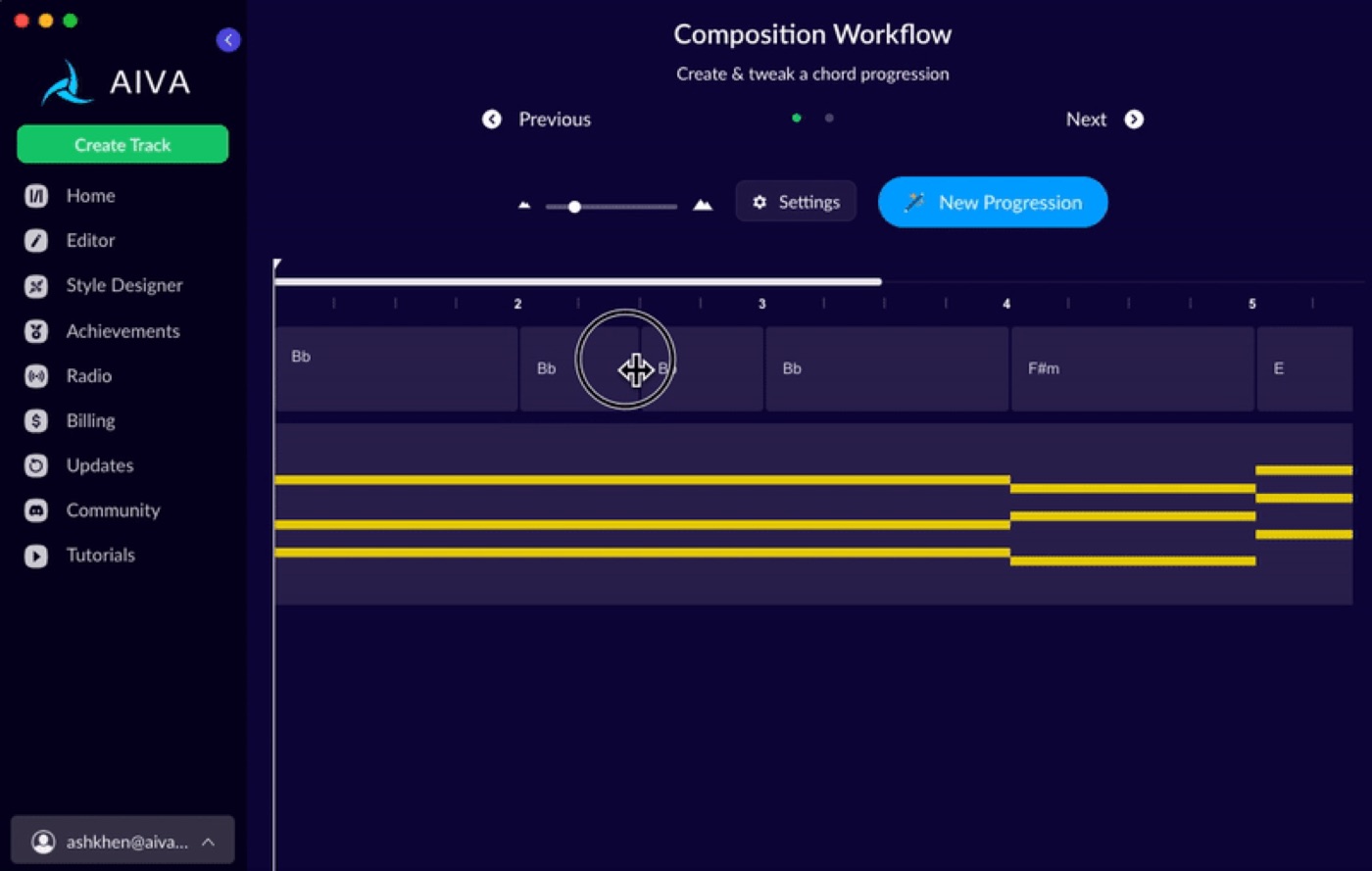
A track can start from a chord progression that you type in or generate. The editor sets key, time signature and tempo, can show Roman numerals, and lets you split, stretch or delete chords before AIVA writes a full composition. Workflows can be saved and reused.
Style Designer
Beyond the 250 or more preset styles, you can build your own style: set layer priorities, harmony, melody and percussion layers, add swing and doubling instruments. Dropping an audio file onto a style component fills it with parameters drawn from that file.
Upload influence
Upload an MP3 or WAV of 1 to 20 minutes, or a MIDI file of at least 8 bars, and AIVA generates a new piece that shares some of its emotional qualities. Uploads grant AIVA a perpetual license to train on that material, and you must hold the rights to what you upload.
Piano roll editor and MIDI import
Generated or imported MIDI opens in a piano roll with built-in virtual instruments. You can edit notes, change BPM, add layers and effects, and use layer in-painting to regenerate one part of a piece while keeping the rest.
Stems, WAV and MIDI exports
Every plan downloads MP3 and MIDI. Pro adds all formats, listed by AIVA as orchestrated and reduced MIDI, 16-bit 48 kHz WAV, stems and chords in text format, which makes it easier to mix or rearrange the music elsewhere.
Copyright assignment on Pro
On Pro the EULA assigns all copyrights of each composition to you, in perpetuity and worldwide. Upgrading to Pro also covers tracks made before the subscription, and cancelling keeps the copyright of tracks you already owned.
Strengths and weaknesses
What we like
- MIDI downloads on every plan, including the €0 Free plan, so any piece can be reworked in a DAW or notation app
- Pro assigns full copyright to you, and upgrading to Pro also covers compositions made before the subscription started
- More than 250 preset styles plus a Style Designer for custom styles
- Pro allows 300 downloads a month, against 15 on Standard and 3 on Free
- Exports stems and 16-bit 48 kHz WAV for mixing under dialogue or video
- Chord progression, influence upload and MIDI import give more control over structure than prompt-only generators
- Yearly billing cuts the price by 26% on Standard and 33% on Pro
What could be better
- No vocals: AIVA writes instrumental music only
- Free and Standard tracks stay owned by AIVA, and Standard monetization is limited to YouTube, Twitch, TikTok and Instagram
- Prices were shown only in euros plus VAT when checked from Europe, and no USD price is listed
- Tracks top out at 5 minutes 30 seconds, even on Pro
- No refund once any premium feature has been used, per the EULA
- The Linux snap has not been updated since 10 June 2024, and several help articles date from 2021
Key facts
- Free plan: 3 downloads a month, tracks up to 3 minutes, credit to AIVA required
- Standard: 15 downloads a month, tracks up to 5 minutes
- Pro: 300 downloads a month, durations up to 5 minutes 30 seconds
- Copyright on Pro: Owned by you
- Styles: More than 250
Where it ranks
AIVA is No. 6 in our Best AI Music Generators verdict.
Alternatives to consider
- Suno: Writes complete songs with vocals from a text prompt; Pro is $8 a month billed yearly with commercial rights and 20 downloads a month.
- Stable Audio: The free plan includes a commercial license, unlike AIVA's non-commercial Free plan; paid plans start at $12 a month.
- Soundraw: Aimed at video makers who need many instrumental background tracks a month rather than composers editing MIDI.
- Mubert: Generates long background music for streams and podcasts; Pro at $32.49 a month billed yearly covers monetized content and ads.
- ElevenLabs Music: Cheapest paid entry on this site's list at $6 a month for Starter with music commercial use, and it can produce songs with vocals.
Questions readers ask
Is AIVA free?
Yes, AIVA has a Free plan at €0 with no credit card required. It allows 3 downloads a month, tracks up to 3 minutes and MP3 and MIDI exports, but AIVA owns the copyright, you must credit AIVA, and you cannot monetize the music.
How much does AIVA cost?
In November 2026 the pricing page showed Standard at €15 a month or €11 a month billed yearly, and Pro at €49 a month or €33 a month billed yearly, all plus VAT. No USD prices were listed from the location used for this check.
Can I use AIVA music commercially?
Only on paid plans. Standard lets you monetize on YouTube, Twitch, TikTok and Instagram while AIVA keeps the copyright; Pro assigns the full copyright to you for any use, as long as you are an individual or a small business with fewer than 3 employees or under $300k in yearly revenue.
Who owns the copyright of music made with AIVA?
AIVA owns it on the Free and Standard plans, and you own it on Pro. In the United States, the Copyright Office said in January 2025 that AI outputs are protected only where a human has determined enough expressive elements, so editing and arranging the music yourself strengthens any claim.
Can AIVA make songs with vocals?
No, AIVA composes instrumental music only. For full songs with sung vocals from a text prompt, Suno or ElevenLabs Music are the alternatives on this site.
What file formats does AIVA export?
AIVA exports MP3, orchestrated MIDI, reduced MIDI, 16-bit 48 kHz WAV, stems and chords in text format. Free and Standard download MP3 and MIDI, while Pro unlocks all formats including WAV.
AIVA vs Suno: which should I pick?
Pick AIVA if you want editable MIDI, a chord editor and instrumental scores for games or video; pick Suno if you want a finished song with vocals from one prompt. Suno Pro costs $8 a month billed yearly, while AIVA Standard costs €11 a month billed yearly.
What happens to my tracks if I cancel AIVA Pro?
You keep the copyright of compositions you already owned before cancelling, according to AIVA's help center. Paid time is not refunded, and the account returns to the Free plan when the paid period runs out.
Sources we checked
- AIVA pricing for individuals, checked November 18, 2026
- AIVA, the AI Music Generation Assistant (home page), checked November 18, 2026
- AIVA End User License Agreement, checked November 18, 2026
- About AIVA, checked November 18, 2026
- AIVA Helpdesk: General User Manual, checked November 18, 2026
- AIVA Helpdesk: I don't understand the terms of License, checked November 18, 2026
- AIVA Helpdesk: What formats can I download the music in?, checked November 18, 2026
- AIVA Helpdesk: Upload Influence Guidelines, checked November 18, 2026
- AIVA Helpdesk: What happens to the copyright of my compositions if I upgrade / downgrade / cancel my subscription?, checked November 18, 2026
- AIVA Helpdesk: Frequently Asked Questions, checked November 18, 2026
- Install aiva on Linux, Snap Store, checked November 18, 2026
- AIVA, Wikipedia, checked November 18, 2026
- U.S. Copyright Office: Copyright Office Releases Part 2 of Artificial Intelligence Report, checked November 18, 2026
- HearSmart: Best AI Music Generators, checked November 18, 2026
Deep review last updated November 18, 2026. We recheck prices and specs against these pages; send corrections to the address below.
Alternatives we scored
- Suno9.2
- ElevenLabs Music8.8
- Stable Audio8.6
- Loudly8.5
Cite this page
HearSmart. AIVA review. Updated November 18, 2026. https://hearsmart.org/review/aiva
Visit aiva.ai · Questions or corrections: editorial@hearsmart.org