Review · Software & apps
 Descript review
Audio and video editor that repairs recordings by generating speech from an edited transcript.
By the HearSmart research desk · Updated November 24, 2026
The short answer
Descript is a desktop and web video and podcast editor where you cut audio and video by editing an automatic transcript, with AI tools such as Studio Sound, filler word removal and voice clones built in. It suits podcasters, course makers and talking-head creators who would rather edit words than a timeline; the paid line starts at $16 per person a month billed yearly ($24 monthly) for Hobbyist, with a Free plan capped at 1 media hour a month and 720p watermarked exports, as checked in November 2026.
- Performance (40%)
- 8.4
- Ease of use (25%)
- 8.4
- Value (35%)
- 7.2
What it looks like
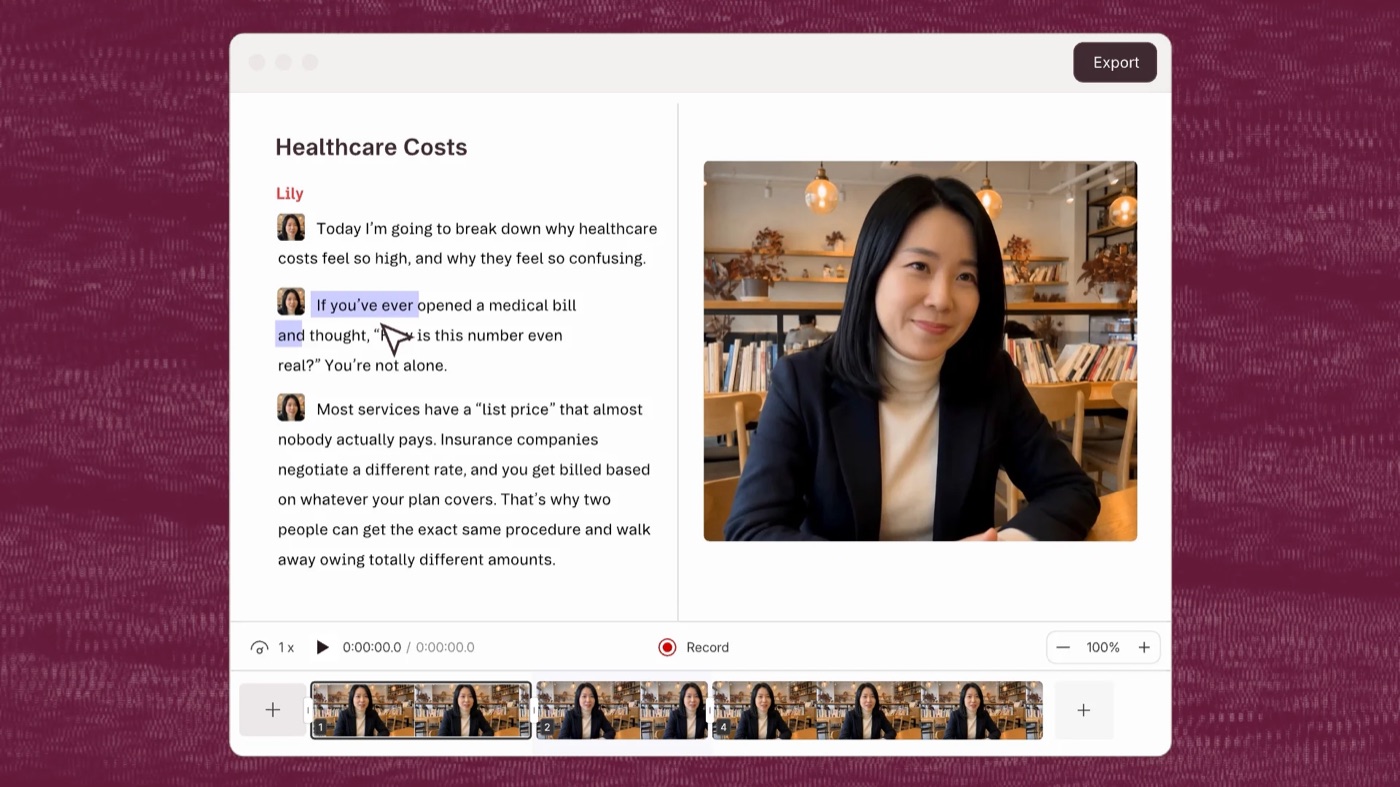
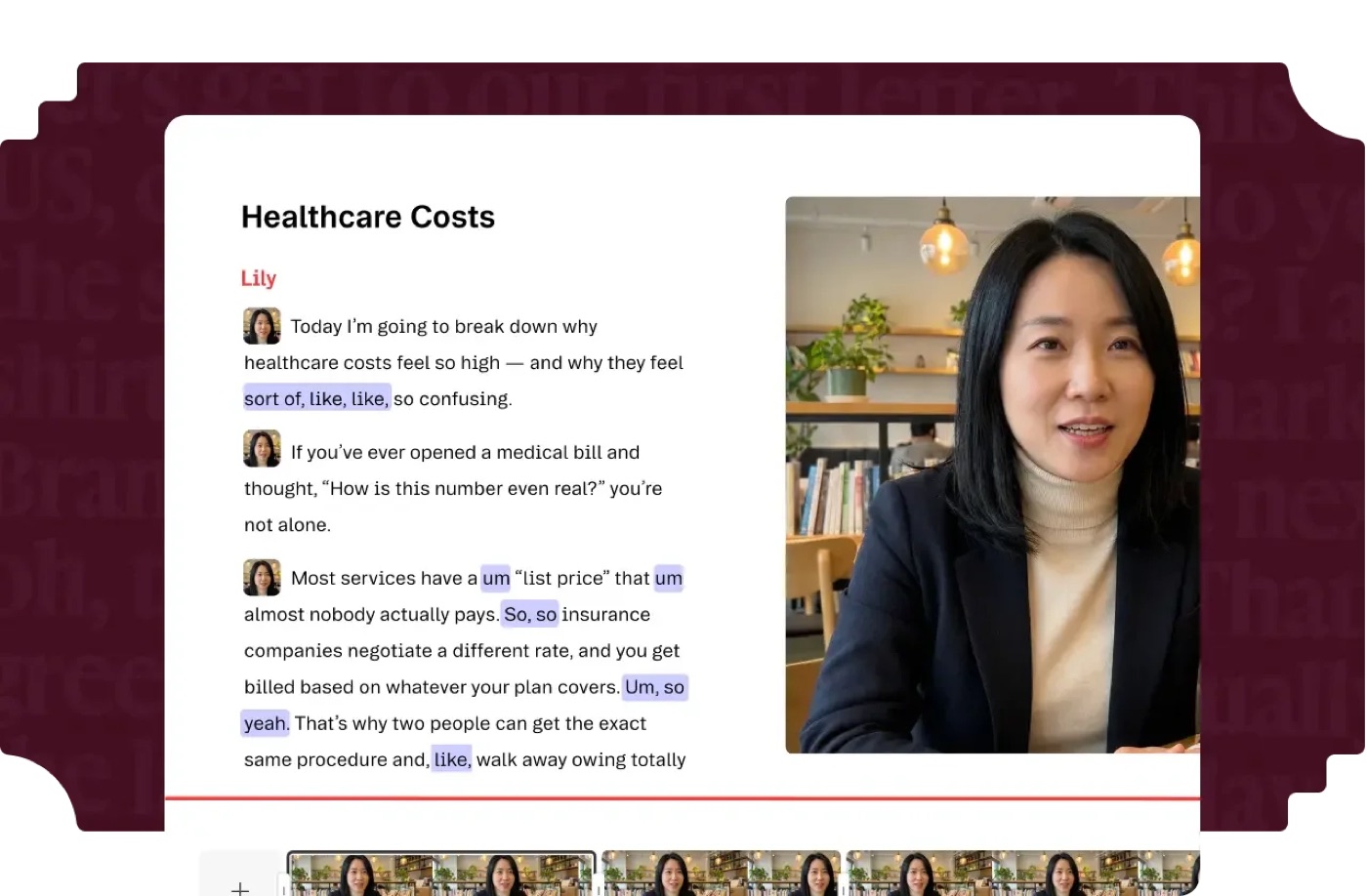
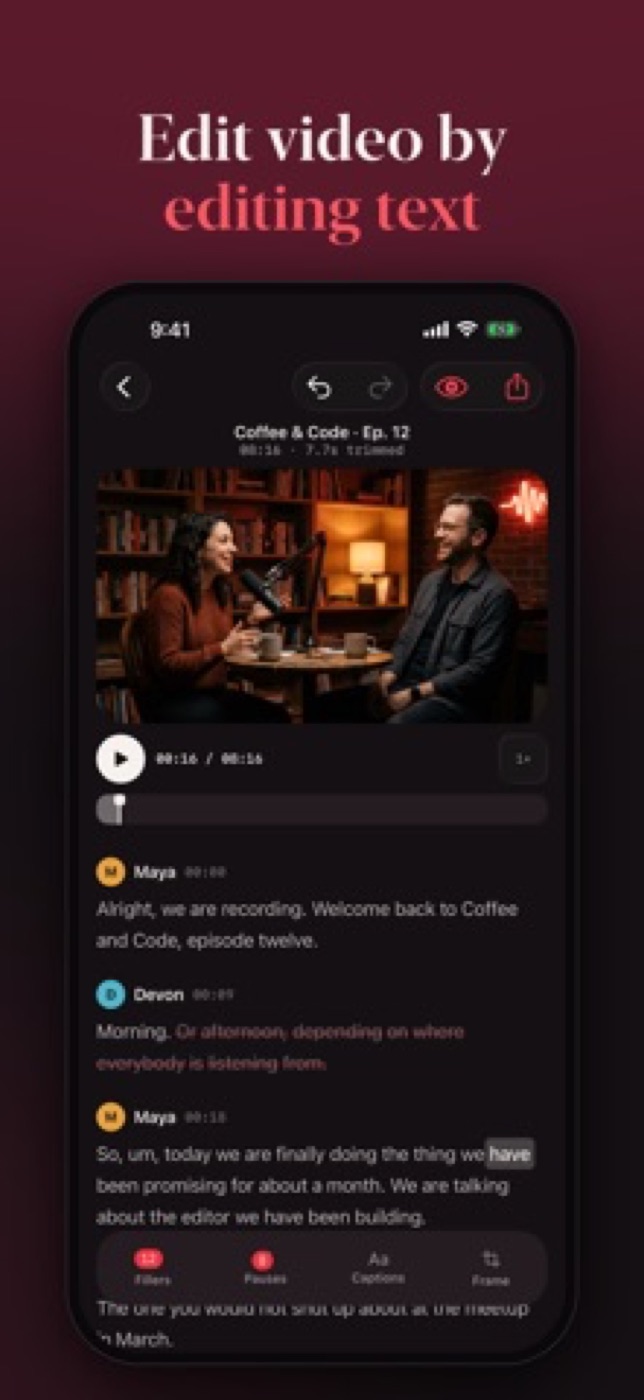
Our verdict
Buy Descript if most of what you publish is people talking, such as podcasts, interviews, tutorials and webinars, and you want transcription, cleanup, captions and remote recording in one subscription: Hobbyist at $16 a month billed yearly gives 10 media hours, 400 AI credits and watermark-free 1080p exports. Skip it if you mostly cut music videos, b-roll heavy edits or footage without speech, where a timeline editor such as DaVinci Resolve or CapCut costs less and does more, and skip it if you only need transcripts, where Otter.ai Pro is $8.33 a user a month billed yearly. The deciding fact is the metering: every plan runs on monthly media hours and AI credits that do not roll over, so a weekly one-hour show fits Hobbyist but a daily one needs Creator at $24 a month billed yearly.
Overview
Descript is made by Descript, Inc., a company whose about page says it has raised a total of $100 million, mainly from the OpenAI Startup Fund, Andreessen Horowitz, Redpoint Ventures and Spark Capital. The app runs as a desktop program for macOS and Windows and in the browser. It transcribes every file you import or record, and deleting, copying or moving words in that transcript makes the same cut in the audio and video. On top of that editor sit recording tools: a screen recorder, a local recorder and Rooms, a browser studio for remote interviews with up to 10 recorded participants.
The current plan line-up has four self-serve tiers plus Enterprise. Free is $0 with 60 media minutes a month, 100 one-time AI credits and 720p exports with a watermark. Hobbyist is $16 per person a month billed yearly or $24 monthly, Creator is $24 or $35, and Business is $50 or $65, with Enterprise priced by sales. Usage is metered in two currencies: media minutes for anything uploaded or recorded, and AI credits for features such as Underlord, Studio Sound, Remove Filler Words, Green Screen, Eye Contact, AI speech and avatars. Descript's help center says unused minutes and credits do not roll over, and top-up bundles are sold only on Creator and Business.
The AI layer has grown well beyond transcription. Underlord is an agentic co-editor that takes prompts such as cutting retakes, adding chapters or making clips. AI Speech lets you type new words in your own cloned voice or one of the stock voices, and Regenerate patches stumbles and awkward cuts. The pricing page lists caption translation into 61 languages and audio dubbing into 30 languages, with dubbing and custom avatars from photo upload reserved for Business.
Against the rivals on this site, Descript is the only tool that combines recording, transcript editing, voice cloning and video export in one app. Otter.ai and Rev are cheaper if the goal is a transcript or meeting notes. ElevenLabs offers a larger stock voice library and plans from $6 a month for text to speech alone. For pure video editing, CapCut and DaVinci Resolve are cheaper or free, but neither treats the transcript as the main editing surface the way Descript does.
There are real limits. Transcription covers 25 languages on the pricing page and 26 in the help center, all written in the Latin alphabet, so Chinese, Japanese and Russian audio cannot be transcribed. Filler word detection and the transcription glossary work only on English transcripts. The desktop app needs macOS 14 or Windows 11, Descript recommends 16 GB of memory for HD media, and it is not supported on iPads, Chromebooks or mobile browsers. Refunds on plans are limited to 48 hours after the invoice date, and top-ups are non-refundable.
How it scored
Descript makes sense when you already have a recording. It shows speech as a document, so deleting words edits the audio, and Regenerate can voice a corrected line to match the surrounding tone. You can make a clone of your own voice in as little as 60 seconds; other people's voices are off limits. Hobbyist is $16 per person a month on annual billing, or $24 month to month, with 10 media hours, 400 AI credits and watermark-free 1080p export. Creator lists $24 annually or $35 monthly for 30 media hours and 800 credits. Transcription covers 25 languages. As a plain voice generator it is poor value: the plan table shows 25+ stock speakers on Hobbyist, against 400 at free Clipchamp, and you are paying for an editor. Free users get 60 media minutes a month but only 100 one-time AI credits, so test your own voice on a short clip first.
Who it is for
Podcasters who want to repair their own recordings
Good fit if
- Podcasters who record remote interviews in Rooms and want each guest on a separate track, transcribed automatically without spending transcription time on the Rooms import
- Course makers and trainers who record screen tutorials and want to remove mistakes by deleting words in a transcript rather than scrubbing a timeline
- Marketing and content teams of up to 5 editors on Business who need shared brand layouts, caption translation in 61 languages and dubbing in 30
- Solo YouTubers and talking-head creators who want Studio Sound, filler word removal and clip creation in the same app as the editor
- Anyone who needs to fix a misspoken line after recording, using a voice clone of their own voice made from a short English consent statement
Skip it if
- People who only need transcripts or meeting notes: Otter.ai has a free plan with 300 minutes a month and Pro from $8.33 per user a month billed yearly
- Editors cutting music videos, action footage or anything without dialogue: DaVinci Resolve has a free version and a timeline built for that work
- Creators who mainly need text to speech voiceovers: ElevenLabs starts at $6 a month with a commercial license and a larger voice catalog
- Anyone editing on an iPad, Chromebook or phone: Descript does not support tablets or mobile browsers, while CapCut runs on phones and tablets
Specifications
| Maker | Descript, Inc.; $100 million raised in total | source |
|---|---|---|
| Platforms | Desktop app for macOS 14 or later and 64-bit Windows 11 or later, plus Descript for Web; tablets and mobile browsers not supported | source |
| Recommended memory | 16 GB for HD media, 32 GB for 4K on Intel and Windows; 8 GB minimum | source |
| Transcription languages | 25 on the pricing page, 26 in the help center, all Latin alphabet | source |
| Speaker detection | Detects and labels 8 or more speakers | source |
| Media hours per month | Free 1, Hobbyist 10, Creator 30, Business 40 (per editor) | source |
| AI credits per month | Free 100 one-time, Hobbyist 400, Creator 800, Business 1,500 (per editor) | source |
| Max export resolution | Free 720p, Hobbyist 1080p, Creator and Business 4K | source |
| Upload file size limit | Free 1 GB, Hobbyist 10 GB, Creator 20 GB, Business 50 GB | source |
| Cloud storage | Free 5 GB, Hobbyist 100 GB, Creator 1 TB, Business 2 TB | source |
| Remote recording (Rooms) | Up to 10 recorded participants; 2 to 25 session hours a month by plan; 48 kHz audio and up to 4K video | source |
| Stock AI voices | 25+ on Hobbyist and Creator, 60+ on Business; native-sounding voices in 14 languages | source |
| Translation | Captions in 61 languages; audio dubbing in 30 languages | source |
| Timeline export | Adobe Premiere, Final Cut Pro, Pro Tools, Logic, Adobe Audition, Reaper and Samplitude | source |
| Security | SOC 2 Type II; SSO, SCIM and audit logs on Enterprise | source |
Price
Free plan; Hobbyist $16 per person a month billed annually or $24 monthly; Creator $24 annual or $35 monthly.
Hobbyist $ 16 $ 24 per person / month
Quoted from the vendor pricing page on November 24, 2026.
Plans and pricing
| Plan | Price | What is included | Source |
|---|---|---|---|
| Free | $0Free, no credit card required | 60 media minutes (1 hour) a month; 100 AI credits, one time; 720p export with a watermark; Limited use of Underlord and AI tools; Limited trial of AI Speech; 5 GB cloud storage, uploads up to 1 GB | Checked Nov 18, 2026 |
| Hobbyist | $16 per person a month billed yearly, or $24 billed monthlyAnnual or monthly | 1 person; 10 media hours a month; 400 AI credits a month; 1080p export without a watermark; Underlord, Studio Sound, Remove Filler Words and Create Clips; AI Speech with custom voice clones; 100 GB cloud storage, uploads up to 10 GB | Checked Nov 18, 2026 |
| Creator | $24 per person a month billed yearly, or $35 billed monthlyAnnual or monthly | Up to 3 people, billed separately; 30 media hours a month; 800 AI credits a month; 4K export without a watermark; Full Underlord access and generated video; Unlimited royalty-free stock media; Top-ups for extra media hours and AI credits; 1 TB cloud storage, uploads up to 20 GB | Checked Nov 18, 2026 |
| Business | $50 per person a month billed yearly, or $65 billed monthlyAnnual or monthly | Up to 5 people, billed separately; 40 media hours a month; 1,500 AI credits a month; Brand Studio for the whole team; Dubbing in 30+ languages with proofread; Custom avatars from photo upload or text; Priority support with SLA; 2 TB cloud storage, uploads up to 50 GB | Checked Nov 18, 2026 |
| Enterprise | Custom, price not listedContact sales | Media hours and AI credits sized to the team; SSO, SCIM and audit logs; Opt-out of AI training and custom retention; Custom MSA and flexible billing; Dedicated customer success manager | Checked Nov 18, 2026 |
| AI credit top-ups | $35 for 350, $80 for 1,000, $200 for 4,000 creditsOne-time, expire 12 months after purchase, Creator and Business only | $0.10 to $0.05 per credit depending on bundle; Shared across the Drive; Used only after the monthly allowance runs out; Non-refundable | Checked Nov 18, 2026 |
| Media hour top-ups | $25 for 5 hours, $80 for 20 hours, $150 for 50 hoursOne-time, expire 12 months after purchase, Creator and Business only | $5 to $3 per hour depending on bundle; Shared across the Drive; Non-refundable | Checked Nov 18, 2026 |
Key features
Text-based editing
Every imported or recorded file is transcribed, and edits to the transcript, such as deleting a sentence or moving a paragraph, are applied to the audio and video. Multitrack transcription keeps each speaker on a separate track with labels, and Descript says it detects 8 or more speakers.
Studio Sound and cleanup tools
Studio Sound isolates and regenerates speech to remove background noise and room echo in one step. Remove Filler Words, Shorten Word Gaps, Remove Retakes and Edit for Clarity cut ums, silences and repeated takes; filler word detection works on English transcripts only. Each use spends AI credits.
AI Speech, voice clones and Regenerate
You can create a clone of your own voice by recording or uploading an English consent statement, then type new words for it to speak. Descript's AI voices page says a clone can be made in as little as 60 seconds. Stock voices number 25+ on Hobbyist and Creator and 60+ on Business, and Descript will not clone a deceased person, a non-consenting person or an AI-generated voice.
Underlord AI co-editor
Underlord takes plain-language prompts to cut retakes, add chapters, center the active speaker, pick multicam angles, make social clips and draft show notes or YouTube descriptions. It is limited on Free and fully available from Creator up, and its actions draw from the monthly AI credit pool.
Rooms remote recording
Rooms records each participant locally in the browser at 48 kHz audio and up to 4K video, uploads progressively and keeps cloud backups. Up to 10 people can be recorded, sessions import into a project automatically, and a 1-hour session with 5 people uses 60 media minutes, not 300. Session allowances run from 2 hours on Free to 25 hours a month on Business.
Captions, translation and dubbing
Animated captions are unlimited on every plan. Caption translation covers 61 languages, dubbing covers 30, and translated scripts can be proofread in the editor; dubbing with proofread is a Business feature on the pricing page.
Export and handoff
Video exports go up to 720p on Free, 1080p on Hobbyist and 4K on Creator and Business, and audio export length is unlimited on every plan. Projects can be sent as timelines to Premiere, Final Cut Pro, Pro Tools, Logic, Audition, Reaper and Samplitude for finishing elsewhere.
Strengths and weaknesses
What we like
- One subscription covers recording, transcription, editing, noise cleanup, captions and voice cloning, so a podcast can go from a 10-person Rooms session to a captioned 1080p video without leaving the app
- Hobbyist at $16 a month billed yearly includes 10 media hours and 400 AI credits, enough for roughly a weekly one-hour show plus cleanup
- Rooms charges media minutes for session length only: a 1-hour interview with 5 participants uses 60 minutes, and each guest is recorded on a separate track at 48 kHz
- Translation reach is wide: captions in 61 languages and dubbing in 30 languages, plus native-sounding AI voices in 14 languages
- Timeline export to 7 professional tools, including Premiere, Final Cut Pro and Pro Tools, means a rough cut made in Descript can be finished elsewhere
- The Free plan needs no credit card and includes 1 media hour a month, unlimited projects and 100 one-time AI credits to try the AI tools
- Voice cloning requires a recorded consent statement and is refused for deceased or non-consenting people, which limits misuse of your own voice
What could be better
- Monthly media hours and AI credits do not roll over, and top-ups are sold only on Creator and Business at $35 for 350 credits or $25 for 5 media hours
- Free exports are capped at 720p with a watermark, and Hobbyist stops at 1080p; 4K needs Creator at $24 a month billed yearly
- Transcription is limited to 25 to 26 Latin-alphabet languages, and filler word detection works on English transcripts only
- Plan refunds are available only within 48 hours of the invoice date, and there are no prorated refunds after canceling mid-term
- The desktop app requires macOS 14 or Windows 11, recommends 16 GB of memory for HD work, and does not run on iPads, Chromebooks or phones
- Teams are capped on self-serve plans: Creator scales to 3 people and Business to 5, each billed separately
Key facts
- Free plan: 60 media minutes a month, 100 one-time AI credits
- Hobbyist: 10 media hours, 400 AI credits a month
- Creator: 30 media hours, 800 AI credits a month
- Stock speakers: 25+ on Hobbyist and Creator, 60+ on Business
- Cloning: Your own voice only
Where it ranks
Descript is No. 8 in our Best AI Voice Generators verdict and No. 1 in Best Screen Recording Software and No. 7 in Best Transcription Software.
Alternatives to consider
- Otter.ai: Cheaper if you only need transcripts and meeting notes: a free plan with 300 minutes a month and Pro from $8.33 per user a month billed yearly, but no video editor.
- ElevenLabs: Better for text to speech and voice cloning on their own, with a free plan and Starter at $6 a month including a commercial license.
- DaVinci Resolve: A free professional timeline editor for Mac, Windows and Linux, better for footage-heavy edits without much dialogue.
- Camtasia: A screen recorder and editor aimed at software tutorials and training, if you prefer a traditional timeline over a transcript.
- Rev: Offers human transcription alongside AI, useful when transcripts must be near-verbatim for legal or research work.
Questions readers ask
How much does Descript cost?
Descript Hobbyist costs $16 per person a month billed yearly or $24 billed monthly, according to its pricing page in November 2026. Creator is $24 or $35, Business is $50 or $65, and Enterprise is priced by sales.
Does Descript have a free plan?
Yes, Descript has a permanent Free plan with 1 media hour a month, 100 one-time AI credits and 720p exports with a watermark. No credit card is needed to sign up.
Is Descript worth it?
Descript is worth it if you edit mostly spoken content, because transcription, Studio Sound, filler word removal, captions and remote recording are all included from $16 a month billed yearly. It is poor value for music or b-roll edits, where free timeline editors such as DaVinci Resolve do more.
What are media hours and AI credits in Descript?
Media hours count every minute you upload or record, and AI credits are spent on AI features such as Underlord, Studio Sound, Green Screen, Eye Contact and AI speech. Both reset at each billing renewal and unused amounts do not roll over.
Can Descript clone my voice?
Yes, paid plans include custom voice clones, made by recording or uploading an English consent statement. Descript says a clone can be ready in as little as 60 seconds, and it will not clone a deceased person, someone who has not consented, or an AI-generated voice.
Descript vs Otter.ai: which should I pick?
Pick Otter.ai if you only need transcripts and meeting notes, since Pro starts at $8.33 per user a month billed yearly. Pick Descript if you also need to edit, clean up and publish the audio or video, which Otter.ai does not do.
What languages does Descript transcribe?
Descript transcribes 25 languages according to its pricing page, and its help center lists 26, all written in the Latin alphabet. Chinese, Japanese and Russian are not supported for transcription, though captions can be translated into 61 languages.
Can I get a refund from Descript?
Descript refunds plan purchases only within 48 hours of the invoice date and editor seats within 7 days. Top-ups are non-refundable, and canceling mid-term keeps the plan active until the term ends without a prorated refund.
Sources we checked
- Descript pricing, checked November 18, 2026
- About Descript, checked November 18, 2026
- Descript AI voices, checked November 18, 2026
- Descript transcription, checked November 18, 2026
- Descript Studio Sound, checked November 18, 2026
- Descript Underlord, checked November 18, 2026
- Descript system requirements, checked November 18, 2026
- Supported transcription languages, checked November 18, 2026
- Create a custom voice clone, checked November 18, 2026
- Audio and video quality (Rooms and SquadCast), checked November 18, 2026
- Top ups: Buy additional media minutes and AI credits, checked November 18, 2026
- Track and understand your media minutes and AI credits, checked November 18, 2026
- Refund policy, checked November 18, 2026
- Downgrade or cancel a subscription, checked November 18, 2026
Deep review last updated November 18, 2026. We recheck prices and specs against these pages; send corrections to the address below.
Alternatives we scored
- ElevenLabs8.9
- Microsoft Clipchamp8.6
- Voicemaker8.6
- Typecast8.5
Cite this page
HearSmart. Descript review. Updated November 24, 2026. https://hearsmart.org/review/descript
Visit descript.com · Questions or corrections: editorial@hearsmart.org