Review · Music & creators
 DaVinci Resolve review
Blackmagic Design's desktop suite for editing, color, effects, audio and photos on Mac, Windows and Linux.
By the HearSmart research desk · Updated November 24, 2026
The short answer
DaVinci Resolve is Blackmagic Design's editor for video, color, visual effects, audio and, since version 21, still photos. The free version exports up to Ultra HD at 60 fps and the Studio edition costs $295 once, checked in November 2026. It is the strongest free choice for people willing to learn a professional program, but a poor match for quick phone clips or low-memory Windows PCs.
- Performance (40%)
- 9.7
- Ease of use (25%)
- 6.0
- Value (35%)
- 9.5
What it looks like
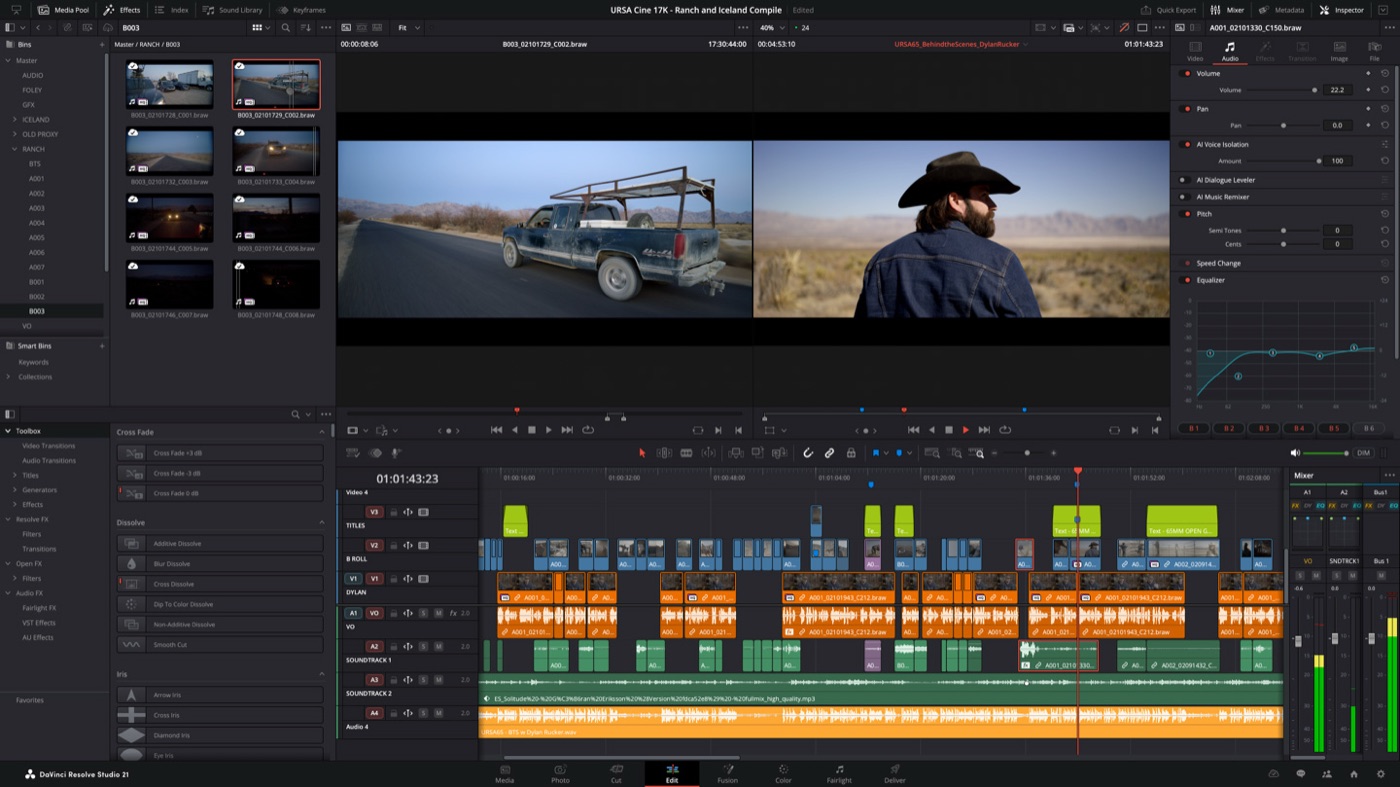
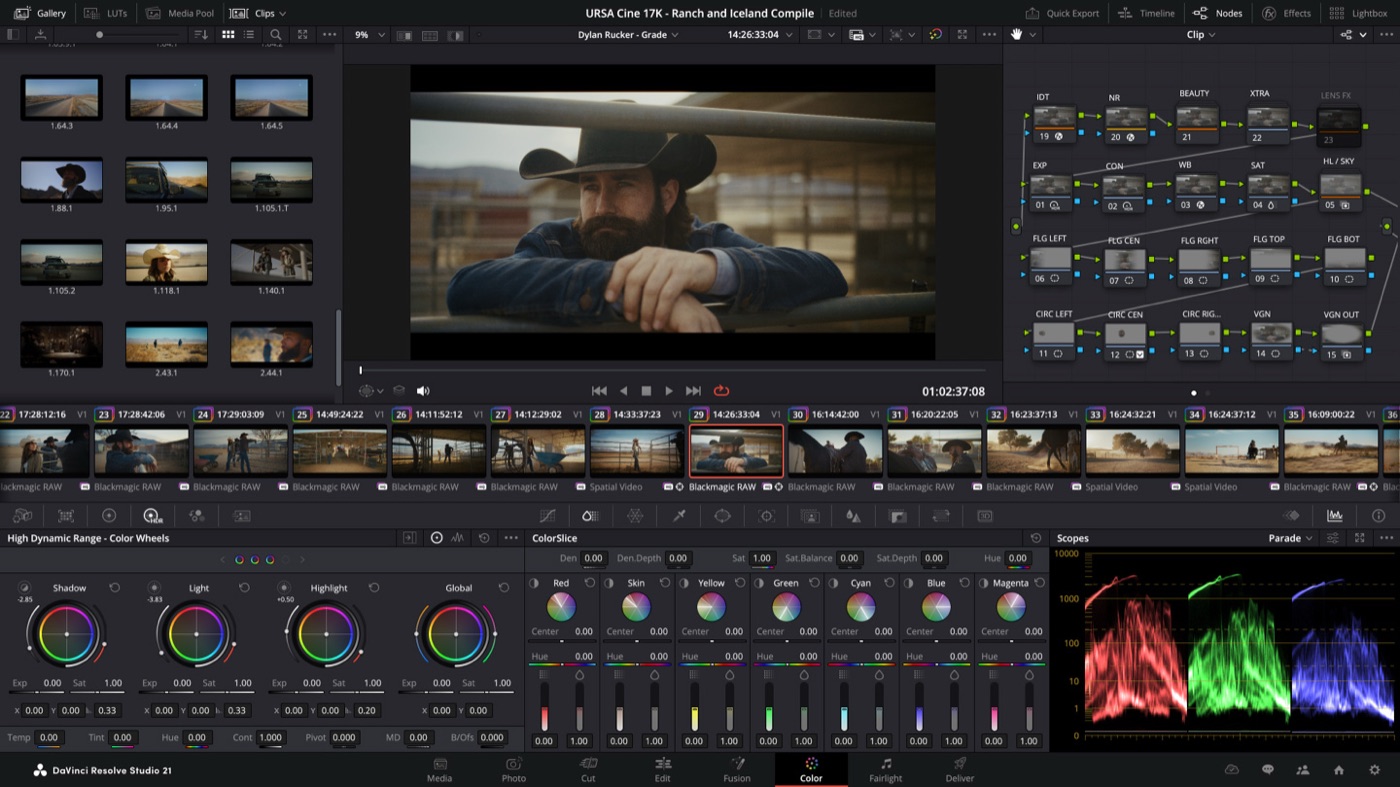
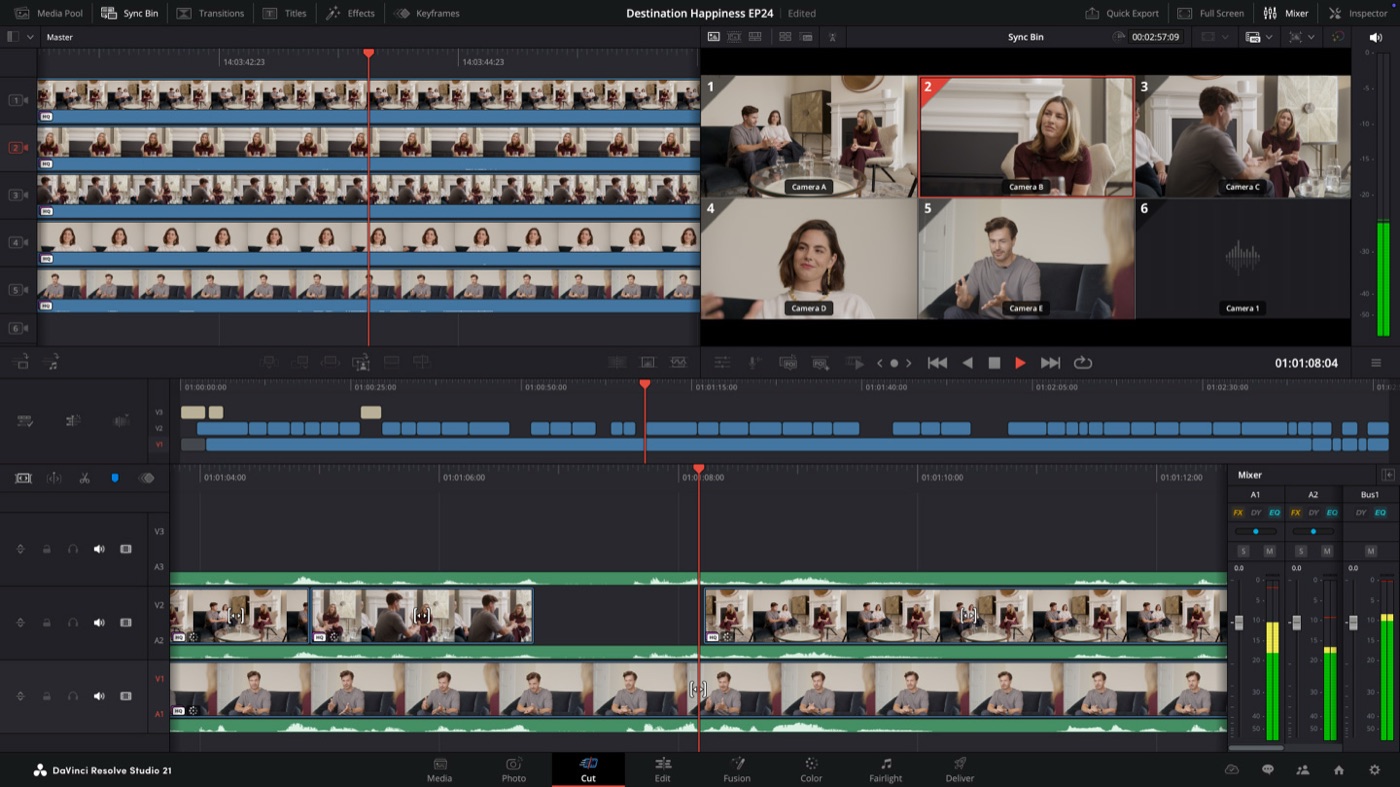
Our verdict
Choose the free version of DaVinci Resolve if you edit on a capable computer, deliver at Ultra HD and 60 fps or below, and want color grading and audio mixing without a subscription. Pay $295 for Studio when you need 10-bit camera formats, AI masking and noise reduction, or GPU-accelerated H.264 and H.265 on Windows. Skip it if you want to trim a short clip in minutes or your Windows PC has less than 16 GB of memory. The deciding fact is that the free version limits formats and AI tools, not how long you can use it.
Overview
DaVinci Resolve splits post-production into pages inside one program: Media, Photo, Cut, Edit, Fusion for effects, Color, Fairlight for audio, and Deliver. The desktop software runs on macOS, Windows, Windows on Arm and Linux, and a separate iPad app exists. Blackmagic Design says professionals on feature films and TV shows use it more than any other solution, which is the maker's own claim.
The current release is 21.2, dated November 4, 2026. Version 21 left beta in June 2026 with a Photo page, nine AI tools counted by Videomaker and the Krokodove graphics set in Fusion. Version 21.1 in September added an MCP server to Studio, so outside AI assistants can control the program, and also moved advanced scripting out of the free version. Version 21.2 added Generation 6 Color Science LUTs and, according to Blackmagic, up to 5x faster rendering on M5 Pro and M5 Max chips.
Studio is listed at $295 in the US as a one-time purchase, and the $236 promotional price recorded on this site in early November is no longer shown. The Mac App Store sells Studio at $299.99, while the iPad upgrade is a $94.99 in-app purchase. Blackmagic Cloud also rents Studio by the month, with each rental active on a single computer. Version 21 was free for Studio owners, but RedShark quotes CEO Grant Petty saying larger updates could carry a charge at some point.
Among the rivals on this site, Final Cut Pro is the closest paid match on a Mac: $299.99 once, or $12.99 a month as part of Apple Creator Studio. Kdenlive is free and open source, and also covers Windows, macOS and Linux. Microsoft Clipchamp exports 1080p free with no watermark and asks far less of a beginner. Descript edits by transcript from $16 per person a month on annual billing, while transcript editing in Resolve needs Studio.
The limits that matter are technical. Linux asks for 32 GB of memory and a discrete GPU, the free version there cannot decode H.264 or H.265 according to the codec list, and the Linux tables show no AAC decoding or encoding even in Studio. On Windows, the list reserves GPU-accelerated decoding of several common formats for Studio. Advanced AI tools call for 16 GB of VRAM on Windows or Linux, according to the requirements published by Videomaker.
How it scored
DaVinci Resolve offers the most editing power for $0, and the least gentle welcome. Its free version works with virtually all 8-bit formats at up to 60fps in Ultra HD, and includes HDR grading and shared projects. Version 21 also adds a Photo page. That breadth is split over eight pages, so someone trimming one holiday clip will meet color nodes, audio mixing and visual effects long before needing them. The sensible route is to stay on the Cut page until a project asks for more. Two free limits matter at home. Blackmagic lists 10-bit video and frame rates up to 120fps under Studio, and some newer phones record 10-bit footage. Studio is a one-time $295 on the page we opened on November 24, 2026. The $236 sale price this page showed earlier in the month has gone, so do not budget around it.
Who it is for
Patient learners with a strong computer who plan to keep going
Good fit if
- YouTubers and filmmakers who deliver Ultra HD at up to 60 fps and want no subscription
- Colorists and students learning the node-based grading tools used in film finishing
- Mac owners with Apple silicon and at least 8 GB of memory, or 16 GB for Fusion
- Small teams that need several people in one project, which the free version includes
- Photographers who also shoot video and want one set of color tools for both
Skip it if
- Phone-first creators making short template clips: CapCut runs on mobile, desktop and the web
- Beginners who only need simple 1080p exports: Microsoft Clipchamp does that free with no watermark
- Podcasters who want to edit by transcript without buying Studio: Descript starts at $16 per person a month on annual billing
- Linux users with H.264 or AAC footage and no Studio license: Kdenlive is a free, open source editor for Linux
Specifications
| Developer | Blackmagic Design | source |
|---|---|---|
| Current version | 21.2, released November 4, 2026 | source |
| Desktop platforms | macOS, Windows, Windows on Arm and Linux | source |
| Studio price | $295 one-time | source |
| Free version limit | Up to 60 fps and Ultra HD 3840 x 2160 | source |
| Studio limit | Up to 120 fps and 32K resolution | source |
| Color bit depth of formats | Free: virtually all 8-bit formats; Studio adds 10-bit video | source |
| Audio tracks | Up to 2,000 at a time through the Fairlight Audio Core | source |
| Mac requirements | macOS 15, Apple silicon, 8 GB memory or 16 GB with Fusion (21.1) | source |
| Windows requirements | Windows 10 Creators Update, 16 GB memory or 32 GB with Fusion, GPU with 4 GB VRAM if discrete (21.1) | source |
| Windows on Arm requirements | Windows 11, Snapdragon X Elite, 16 GB memory or 32 GB for 4K or Fusion (21.1) | source |
| Linux requirements | Rocky Linux 8.6, 32 GB memory, discrete GPU with 4 GB VRAM (21.1) | source |
| Linux H.264 and H.265 | Decoding and encoding in Studio only; encoding listed with Nvidia graphics (21.1) | source |
| iPad requirement | iPadOS 18.0 and A12 Bionic or later; iPad Pro M1 with 8 GB recommended | source |
| Speed Editor keyboard | $435, with a Studio activation key included | source |
Price
Free version with no subscription; DaVinci Resolve Studio is a one-time $295 purchase.
Buy Online Now $295
Quoted from the vendor pricing page on November 24, 2026.
Plans and pricing
| Plan | Price | What is included | Source |
|---|---|---|---|
| DaVinci Resolve (free) | $0No charge, no subscription | All eight pages, including Color, Fusion and Fairlight; Ultra HD at up to 60 fps; HDR grading tools; Multi-user collaboration | Checked Nov 24, 2026 |
| DaVinci Resolve Studio | $295One-time purchase from Blackmagic Design | DaVinci AI Neural Engine tools; 10-bit video, up to 120 fps and beyond 4K; Temporal and AI spatial noise reduction; Text based editing, magic mask and more than 45 extra Resolve FX; Dolby Vision and HDR10+ grading and rendering | Checked Nov 24, 2026 |
| DaVinci Resolve Studio (Mac App Store) | $299.99One-time purchase from Apple | Studio edition for Apple silicon Macs; No support for some external control panels; May not work with all third-party OpenFX or VST plug-ins | Checked Nov 24, 2026 |
| DaVinci Resolve Studio rental | Price not listed on the public pages checked; RedShark reported £25 a month in the UK at launch in 2025Monthly through Blackmagic Cloud | Studio features for as long as the rental runs; One active computer per license; License can be moved to another computer | Checked Nov 24, 2026 |
| DaVinci Resolve for iPad | $0, with Studio as a $94.99 in-app purchaseFree app; in-app purchase on the US App Store | Cut and color pages; Blackmagic Cloud collaboration; Studio adds magic mask, smart reframe and voice isolation | Checked Nov 24, 2026 |
Key features
Cut and Edit pages
The Cut page is the fast route, with source tape, dual timelines and a sync bin for multicam. The Edit page is a traditional track editor, and both got new keyframe easing and four-point Bezier retiming in version 21.
Color grading
The free version includes luma, HSL and 3D keyers, the color warper and HDR tools. Studio adds Dolby Vision and HDR10+ output and, since 21.1, separate MultiMaster trim passes for each HDR format.
Photo page
Version 21 brings the color tools to RAW stills from Canon, Fujifilm, Nikon and Sony cameras. Videomaker lists tethered capture as Studio-only, and TechRadar found the basic adjustments simple next to what the Color page offers.
AI tools
IntelliSearch finds people, objects or words in dialogue, while CineFocus changes the focal point after the shot. TechRadar reports that the AI tools are reserved for paying Studio users, with greyed-out menus or an upgrade prompt in the free version.
Fusion effects
Fusion is a node-based compositor with 2D and 3D tools, camera tracking and keying. Version 21 added more than 70 Krokodove graphics, and 21.1 added over 25 more tools.
Fairlight audio
The Fairlight page handles up to 2,000 tracks with real-time effects, plus 5.1, 7.1 and immersive formats. Studio adds AI voice isolation, music remixer and dialogue separator.
Collaboration
The free version lets several people work in one project at once, and Blackmagic Cloud can host project libraries. Version 21.1 added subtitles, annotation sharing and comment replies to Cloud Presentations.
Strengths and weaknesses
What we like
- The free version covers editing, color, effects and audio up to Ultra HD at 60 fps with no subscription
- Studio is $295 once, against $12.99 a month for Final Cut Pro through Apple Creator Studio
- Version 21 and 21.1 were free updates for existing Studio owners
- Runs on macOS, Windows, Windows on Arm and Linux, while Final Cut Pro for the desktop is Mac only
- Frequent updates: 21.1 in September, 21.1.1 and 21.1.2 in October, and 21.2 on November 4, 2026
- Fairlight supports up to 2,000 audio tracks with real-time effects
- The Speed Editor at $435 and Editor Keyboard at $669 each include a Studio activation key
What could be better
- AI tools, magic mask and text based editing require the $295 Studio edition
- The free version stops at 60 fps and Ultra HD, and 10-bit video support is a Studio feature
- Windows needs 16 GB of memory, or 32 GB with Fusion
- On Linux the codec list makes H.264 and H.265 decoding Studio-only and shows no AAC support
- Version 21.1 moved advanced scripting to Studio, so free users lost Python automation
- Technical support for the free version is only through Blackmagic's community forums
Key facts
- Platforms: Mac, Windows and Linux
- Free export limit: Ultra HD at 60fps
- Current version: DaVinci Resolve 21
- Paid upgrade: Studio, $295 one time
- Free video formats: Virtually all 8-bit formats
Where it ranks
DaVinci Resolve is No. 4 in our Best Free Video Editing Software verdict.
Alternatives to consider
- Final Cut Pro: Better for Mac editors who prefer Apple's Magnetic Timeline: $299.99 once or $12.99 a month with other Apple creative apps.
- Kdenlive: Better for people who want an open source editor: free on Linux, Windows and macOS.
- Microsoft Clipchamp: Better for quick, simple edits: free 1080p exports with no watermark.
- CapCut: Better for short social videos made across phone, desktop and web with templates.
- Descript: Better for transcript-led podcasts and interviews, from $16 per person a month on annual billing.
Questions readers ask
Is DaVinci Resolve really free?
Yes, DaVinci Resolve has a $0 version that edits and exports at up to Ultra HD and 60 fps. Studio adds 10-bit formats, AI tools and more effects for $295.
How much does DaVinci Resolve Studio cost?
DaVinci Resolve Studio costs $295 as a one-time purchase on Blackmagic Design's US page, checked November 24, 2026. The Mac App Store lists it at $299.99 and the iPad upgrade at $94.99.
Is DaVinci Resolve Studio worth it?
Studio is worth $295 if you use 10-bit footage, magic mask, AI noise reduction, voice isolation or output above Ultra HD. If your footage is 8-bit and you deliver at 60 fps or below, start with the free version.
Can DaVinci Resolve run with 8 GB of RAM?
Yes on an Apple silicon Mac, where 8 GB is the stated minimum and Fusion needs 16 GB. Windows requires 16 GB and Linux requires 32 GB in the 21.1 release notes.
DaVinci Resolve vs Final Cut Pro: which is better?
DaVinci Resolve is the better value for most people starting out because its free version costs $0, while Final Cut Pro is $299.99 or $12.99 a month. Final Cut Pro suits Mac editors who want its Magnetic Timeline and Apple's other creative apps.
Is DaVinci Resolve hard to learn?
Yes, the full program takes time: Videomaker says its learning curve is real and points to nodes, media management and delivery settings. The Cut page is the simpler starting point.
Can you use DaVinci Resolve on an iPad?
Yes, the iPad app is free and requires iPadOS 18.0 and an A12 Bionic chip or later. Blackmagic recommends an iPad Pro M1 or newer with at least 8 GB of memory, and older models may be restricted to HD.
Are DaVinci Resolve Studio updates free?
Yes so far: version 21 and version 21.1 were free to existing Studio owners. CEO Grant Petty said at NAB 2026 that larger updates could carry an upgrade charge at some point, according to RedShark.
Sources we checked
- DaVinci Resolve, checked November 24, 2026
- DaVinci Resolve Studio, checked November 24, 2026
- What's new in DaVinci Resolve 21, checked November 24, 2026
- DaVinci Resolve hardware tech specs, checked November 24, 2026
- Blackmagic Design support center, DaVinci Resolve downloads, checked November 24, 2026
- DaVinci Resolve 21 supported formats and codecs (September 2026), checked November 24, 2026
- DaVinci Resolve on the Mac App Store, checked November 24, 2026
- DaVinci Resolve Studio on the Mac App Store, checked November 24, 2026
- DaVinci Resolve for iPad on the US App Store, checked November 24, 2026
- Blackmagic Cloud License Manager guide, checked November 24, 2026
- Logging in to DaVinci Resolve with a rental license, checked November 24, 2026
- ProVideo Coalition on DaVinci Resolve 21.1, checked November 24, 2026
- CG Channel on DaVinci Resolve 21.1, checked November 24, 2026
- CG Channel on DaVinci Resolve 21.0, checked November 24, 2026
- TechRadar review of DaVinci Resolve 21, checked November 24, 2026
- Videomaker review of DaVinci Resolve 21, checked November 24, 2026
- RedShark on Studio monthly rental, checked November 24, 2026
- RedShark on free Studio updates, checked November 24, 2026
- Final Cut Pro, checked November 24, 2026
- Final Cut Pro on the Mac App Store, checked November 24, 2026
- Microsoft Clipchamp pricing, checked November 24, 2026
- Descript pricing, checked November 24, 2026
- Kdenlive, checked November 24, 2026
- CapCut Terms of Service, checked November 24, 2026
Deep review last updated November 24, 2026. We recheck prices and specs against these pages; send corrections to the address below.
Alternatives we scored
- Adobe Premiere (mobile)8.9
- Edits8.8
- iMovie8.8
- OpenShot8.5
Cite this page
HearSmart. DaVinci Resolve review. Updated November 24, 2026. https://hearsmart.org/review/davinci-resolve
Visit blackmagicdesign.com · Questions or corrections: editorial@hearsmart.org