Review · Music & creators
 iMovie review
Apple's editor for iPhone, iPad and Mac, with no subscription and guided templates.
By the HearSmart research desk · Updated November 24, 2026
The short answer
iMovie is Apple's free video editor for iPhone, iPad and Mac, and it suits home movies, school projects and simple horizontal videos. The price is $0, with no paid tier on its US App Store pages when checked in November 2026. The main catch is frame rate on the Mac: Apple's support page puts 4K projects at 30 fps and 60 fps projects at 1080p.
- Performance (40%)
- 7.2
- Ease of use (25%)
- 9.6
- Value (35%)
- 10.0
What it looks like
Our verdict
iMovie is the sensible first editor for anyone who already owns a recent iPhone, iPad or Mac and wants a finished family video at no cost. People who need automatic captions, several stacked video layers or a Windows or Android version should choose something else. The deciding fact is that iMovie costs $0 and its projects open in Final Cut Pro, so starting here does not lock up later work.
Overview
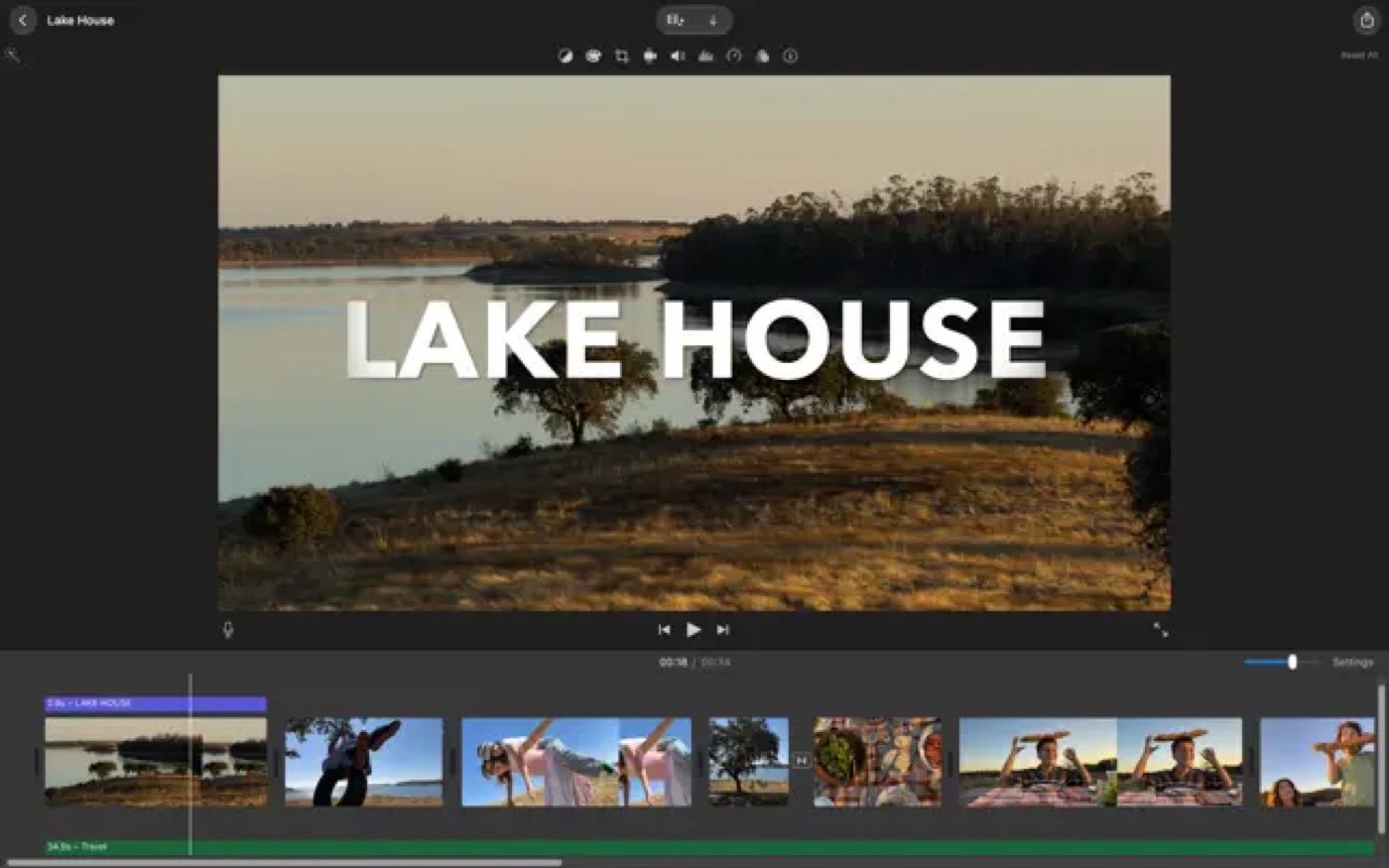
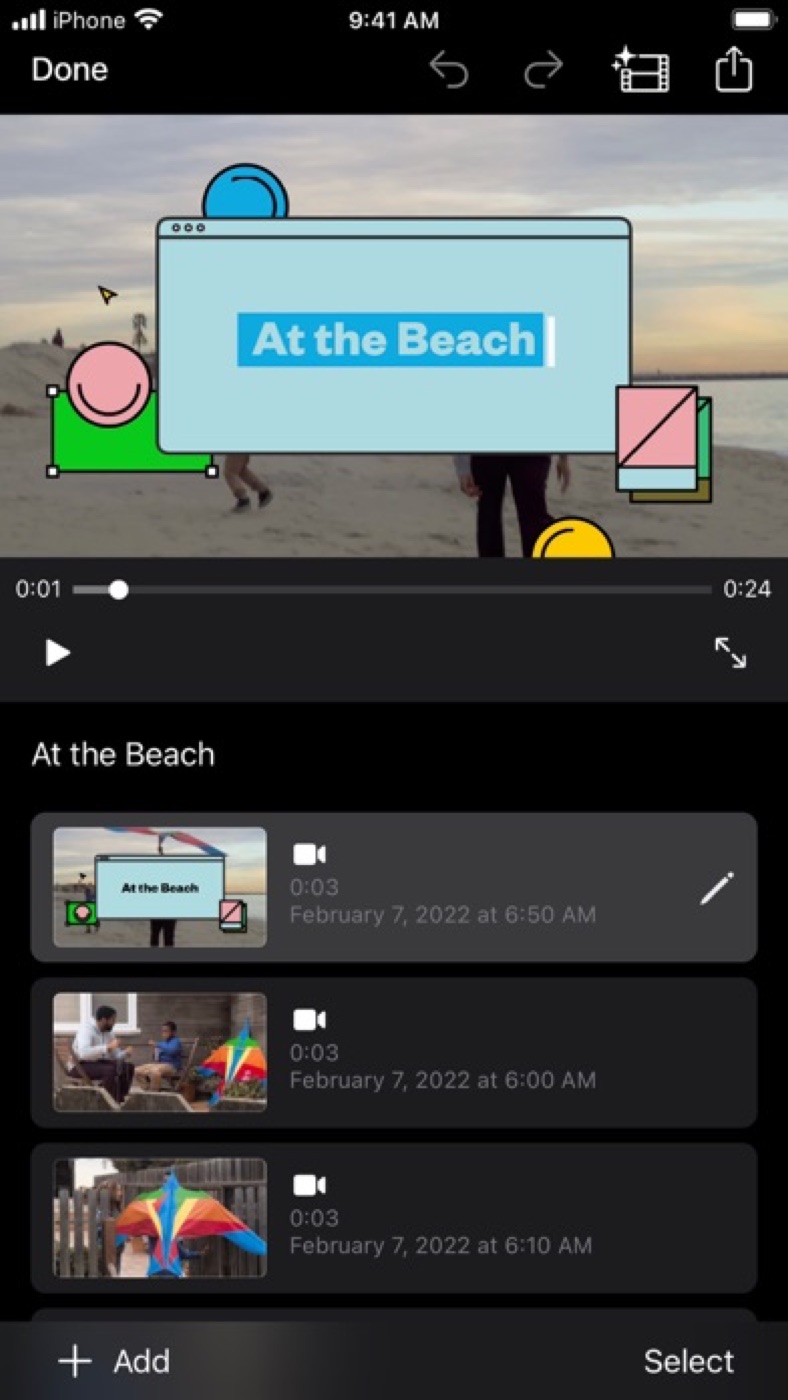
iMovie comes as two separate apps that share a name. The iPhone and iPad app builds automatic Magic Movies, guided Storyboards, trailers and timeline projects. The Mac app works with a desktop timeline, 29 trailer templates and 48 video and audio effects. Both are free in the US App Store and published by Apple.
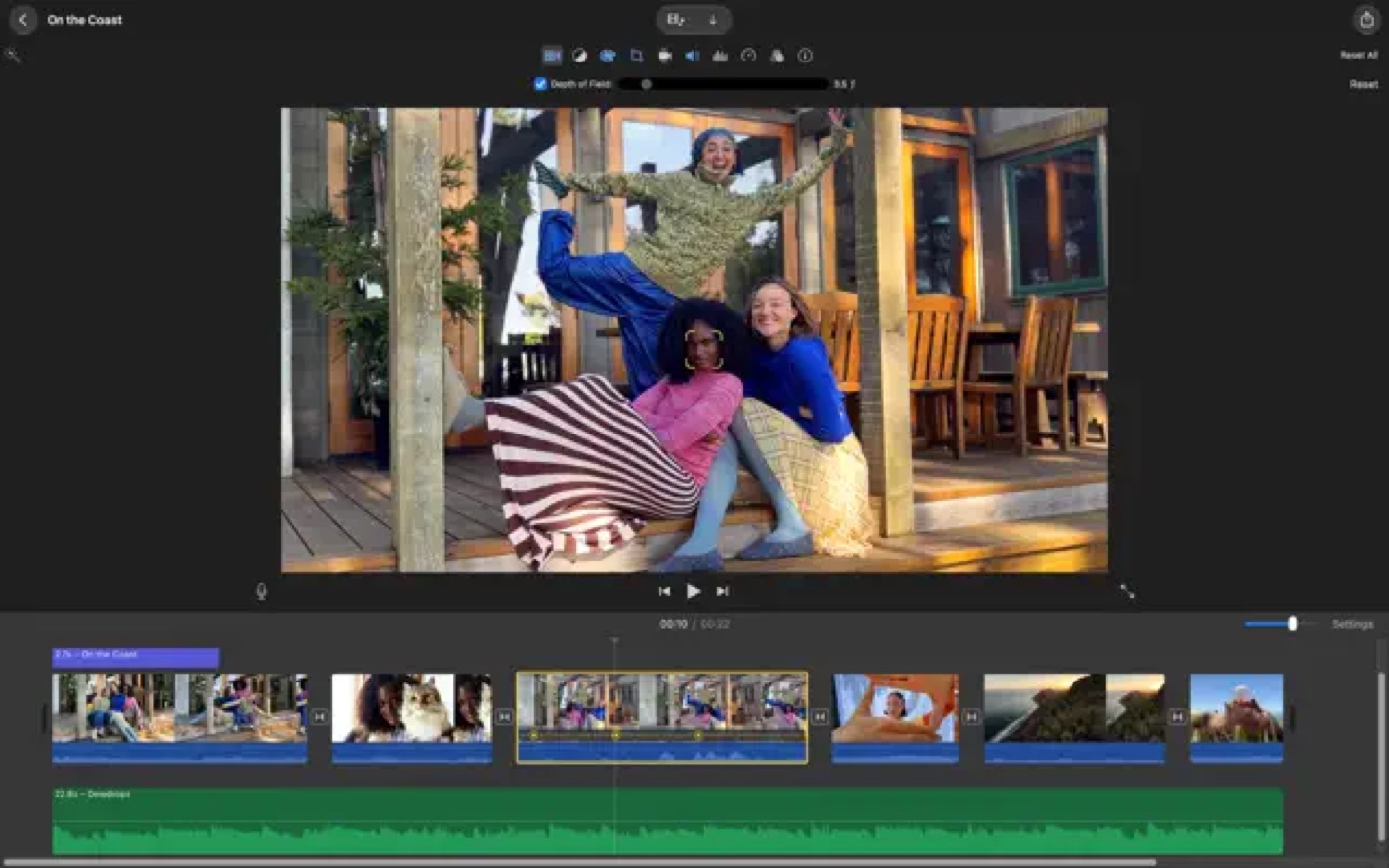
Recent updates have been small. Mac version 10.4.6 arrived on November 18, 2026 with stability fixes. Version 10.4.5, dated September 29, added focus and depth editing for Cinematic footage recorded in Final Cut Camera, which needs macOS 27. On iPhone and iPad, version 3.0.6 of October 22, 2026 lists only stability fixes and follows 3.0.5 of December 16, 2024, a gap of about 22 months.
System requirements matter more than the price. The current Mac version requires macOS 26.6 or later and the current mobile version requires iOS 27 or iPadOS 27. The US App Store page shows a 702.6 MB app on iPhone and iPad. The Mac app is listed at 3.6 GB, and Apple asks for 4 GB of memory and 3.5 GB of available disk space.
Apple's own pages disagree about 4K at 60 fps. The iPhone and iPad listing says movies save to Photos at up to 4K at 60 fps on supported devices. A support article dated May 27, 2026 says iMovie shares 4K projects at 30 fps and 60 fps projects at 1920 x 1080. The Mac listing also ties 60 fps to 1080p, so Mac users should plan on 4K at 30 fps or 1080p at 60 fps.
Against the other editors on this site, iMovie trades depth for a short learning curve. DaVinci Resolve is also free and adds Windows and Linux, with Studio at $295. Microsoft Clipchamp includes AI subtitles and watermark-free 1080p exports for free, but reserves 4K for premium. Final Cut Pro adds Generate Captions and costs $299.99 once on the Mac, or comes with Apple Creator Studio at $12.99 a month.
The limits show up in output and layering. On the Mac, the first clip sets the format for the whole project, and the export guide says one item can be exported at a time. An iPhone or iPad project has to go through a Mac to become an MP4. Neither App Store listing names automatic captions, and the overlay tools are four fixed types on iPhone.
How it scored
iMovie asks for the fewest decisions of any editor here. Pick an album, and Magic Movie assembles the clips with titles, transitions and music, leaving a simple shot list to rearrange. If you would rather film to a plan, 20 Storyboards and 14 trailer templates on iPhone and iPad show what to shoot next, and the Mac version raises the trailer count to 29. More than 130 soundtracks adjust to the length of the movie. There is no upgrade prompt because the listing shows no in-app purchases at all. Its weak spot is age of device. The release on sale on November 24, 2026 requires iOS 27.0 or macOS 26.6, so a hand-me-down iPad may not run it. The export itself reaches 4K at 60 frames per second on supported hardware. Neither App Store feature list mentions automatic captions, which is the main reason to choose Premiere or Edits instead.
Who it is for
Apple households making family movies and school projects
Good fit if
- Families who want a trip album turned into a video: Magic Movie builds one from chosen clips or a whole album
- Students following a template: 20 Storyboards on iPhone and iPad come with step-by-step shot lists
- Mac owners making horizontal YouTube videos in 4K at 30 fps or 1080p at 60 fps
- iPhone 13 and later owners who want to change focus points in Cinematic footage
- Beginners who may move up later, since iMovie projects import into Final Cut Pro
Skip it if
- Windows, Linux or Android users: DaVinci Resolve covers Windows and Linux, and CapCut covers Android
- Creators who need captions made for them: Microsoft Clipchamp includes AI subtitles in its free plan, and Final Cut Pro has Generate Captions
- Editors who stack many layers: LumaFusion lists six video, audio or graphic tracks plus six audio tracks for $29.99
- Owners of devices that cannot run iOS 27, iPadOS 27 or macOS 26.6: check CapCut or DaVinci Resolve requirements before replacing hardware
Specifications
| Developer | Apple | source |
|---|---|---|
| Platforms | iPhone, iPad and Mac | source |
| Price | Free | source |
| Mac version | 10.4.6, November 18, 2026 | source |
| iPhone and iPad version | 3.0.6, October 22, 2026 | source |
| Mac requirement | macOS 26.6 or later, 4 GB memory, 3.5 GB available disk space | source |
| Mobile requirement | iOS 27.0 or iPadOS 27.0 or later | source |
| App size | 702.6 MB on iPhone and iPad | source |
| Mac app size | 3.6 GB | source |
| 4K output in the support article | 3840 x 2160 at 30 fps | source |
| 60 fps output in the support article | 1920 x 1080 at 60 fps | source |
| 4K output in the mobile listing | Up to 4K at 60 fps on supported devices | source |
| Trailer templates on Mac | 29 | source |
| Trailer templates on iPhone and iPad | 14 | source |
| Soundtracks on iPhone and iPad | More than 130 | source |
| US App Store rating | 4.4 out of 5 from 324K ratings (iPhone and iPad) | source |
Price
Free on iPhone, iPad and Mac, with no paid tier listed.
iMovie Turn videos into movie magic Free
Quoted from the vendor pricing page on November 24, 2026.
Plans and pricing
| Plan | Price | What is included | Source |
|---|---|---|---|
| iMovie for iPhone and iPad | $0Free download, no in-app purchases listed | Magic Movies and 20 Storyboards; 14 trailer templates; 8 themes and 13 video filters; More than 130 soundtracks; Export up to 4K at 60 fps on supported devices, per the listing | Checked Nov 24, 2026 |
| iMovie for Mac | $0Free download, no in-app purchases listed | 29 trailer templates; 48 video and audio effects; Editing at up to 4K and 1080p at 60 fps; Green screen, picture in picture and side by side effects; Send projects to Final Cut Pro | Checked Nov 24, 2026 |
Key features
Magic Movie
On iPhone and iPad, choose clips or an album and iMovie assembles a movie with titles, transitions and music. Apple's guide says a whole album is added in chronological order, and the shot list can be edited afterward.
Storyboards and trailers
The mobile app has 20 Storyboards with placeholder clips and 14 trailer templates. The Mac app has 29 trailer templates, and its guide includes a way to convert a trailer into a movie.
Four overlay types
The iPhone guide lists cutaway, picture in picture, split screen and green or blue screen. On the Mac, a picture in picture window can be resized, given a border and set to dissolve, zoom or swap.
Cinematic mode edits
Both apps can change focus points and depth in Cinematic video. On the Mac, changing the speed of such a clip removes the ability to adjust its focus, although depth of field stays editable.
Export controls on Mac
The file export dialog sets format, resolution, quality or a custom bit rate, and shows an estimated file size. Simultaneous segment export is offered for projects of about 3 minutes or longer on the M1 Max, M1 Ultra, M2 Max, M2 Ultra and M3 Max chips named in the guide.
Project hand-off
Projects move between iPhone and iPad by AirDrop or iCloud Drive, then to iMovie or Final Cut Pro on a Mac. The mobile version history also says projects open in Final Cut Pro for iPad.
Built-in audio
The mobile listing counts more than 130 soundtracks that adjust to the length of the movie. Apple says the included music and sound effects are free to use in iMovie projects.
Strengths and weaknesses
What we like
- Costs $0 on all three device types, with no paid tier listed
- Magic Movie needs only a set of clips, and 20 Storyboards guide people who want more structure
- 4K editing is included at no charge, while Microsoft Clipchamp reserves 4K for its premium plan
- More than 130 length-matching soundtracks on iPhone and iPad, free to use in iMovie projects
- Opens Apple ProRes footage on iPhone, iPad and Mac, according to Apple's ProRes page
- Projects carry on to Final Cut Pro, so an edit started for free can be finished with professional tools
- Age rating of 4+ on the US App Store, useful for school projects
What could be better
- Apple devices only, and current versions need iOS 27, iPadOS 27 or macOS 26.6
- Apple's support article limits 4K projects to 30 fps and 60 fps projects to 1080p, while the mobile listing claims 4K at 60 fps on supported devices
- Neither App Store listing mentions automatic captions
- On the Mac the first clip fixes the project format, and the project settings guide lists no aspect ratio control
- iPhone and iPad projects must be imported into iMovie on a Mac to export as MP4
- Slow feature pace: the October 2026 mobile update brought only stability fixes, about 22 months after the one before
Key facts
- Platforms: iPhone, iPad and Mac
- Max export on iPhone: 4K at 60fps on supported devices
- iPhone requirement: iOS 27.0 or later
- Mac requirement: macOS 26.6 or later, 4GB memory, 3.5GB disk space
- Age rating: 4+
Where it ranks
iMovie is No. 3 in our Best Free Video Editing Software verdict and No. 2 in Best Video Editing Software.
Alternatives to consider
- DaVinci Resolve: Better for long edits with color and audio post work: free on Mac, Windows and Linux, with Studio listed at $295.
- CapCut: Better for short social videos across phone, desktop and web, with a free plan and Pro at $19.99 a month in the US App Store.
- Final Cut Pro: Better for Mac owners who have outgrown iMovie: it imports iMovie projects and costs $299.99 once or $12.99 a month with Apple Creator Studio.
- Microsoft Clipchamp: Better for free browser or Windows editing with AI subtitles, capped at 1080p on the free plan.
- Adobe Premiere (mobile): Better for free 4K phone exports with a fuller editor: its listing promises no ads or watermarks.
Questions readers ask
Is iMovie free?
Yes, iMovie is free on iPhone, iPad and Mac. Neither US App Store page listed an in-app purchase or subscription when checked on November 24, 2026.
Is iMovie worth it in 2026?
Yes for simple videos on recent Apple devices, because it costs $0 and edits 4K. It is a poor fit for automatic captions, many layers or work that must move to Windows.
Can iMovie export 4K at 60 fps?
On a Mac, plan on no: Apple's support article lists 4K at 30 fps and 60 fps at 1080p. The iPhone and iPad listing says supported devices can save 4K at 60 fps, which conflicts with that article.
Is iMovie available for Windows or Android?
No, Apple's listings cover only iPhone, iPad and Mac. DaVinci Resolve is free on Windows and Linux, and CapCut is available on Android.
iMovie vs Final Cut Pro: what is the difference?
iMovie is free, and Final Cut Pro is $299.99 once on the Mac or part of Apple Creator Studio at $12.99 a month. Final Cut Pro adds tools such as Generate Captions and multicam, and it can import iMovie projects.
iMovie vs CapCut: which is better?
iMovie is better for free home movies on Apple devices, and CapCut is better for social clips across phone, desktop and web. CapCut has a free plan but sells Pro at $19.99 a month in the US App Store, while iMovie has no paid tier.
Can iMovie make vertical videos?
Yes, with a workaround on the Mac rather than an aspect ratio setting. A MacMost tutorial, several years old, uses File, then New App Preview to edit and export vertical clips, because a normal movie project there is horizontal.
Does iMovie export MP4?
Yes, iMovie on the Mac can export an MP4 file. Apple says an iPhone or iPad project must first be imported into iMovie on a Mac.
Sources we checked
- iMovie for iPhone and iPad on the US App Store, checked November 24, 2026
- iMovie for Mac on the US App Store, checked November 24, 2026
- Use 4K and 60 fps video in iMovie, checked November 24, 2026
- Share or export your iMovie video, checked November 24, 2026
- iMovie for Mac: export as a file, checked November 24, 2026
- iMovie for Mac: project settings, checked November 24, 2026
- iMovie for Mac: clip speed, checked November 24, 2026
- iMovie for Mac: picture in picture, checked November 24, 2026
- iMovie for Mac User Guide, checked November 24, 2026
- iMovie for iPhone: video overlays, checked November 24, 2026
- iMovie for iPhone: Magic Movie, checked November 24, 2026
- iMovie for iPhone User Guide, checked November 24, 2026
- iMovie soundtracks and sound effects, checked November 24, 2026
- About Apple ProRes on iPhone, checked November 24, 2026
- Final Cut Pro, checked November 24, 2026
- Apple Creator Studio, checked November 24, 2026
- DaVinci Resolve, checked November 24, 2026
- Microsoft Clipchamp pricing, checked November 24, 2026
- Adobe Premiere on the US App Store, checked November 24, 2026
- LumaFusion on the US App Store, checked November 24, 2026
- CapCut on the US App Store, checked November 24, 2026
- CapCut on Google Play, checked November 24, 2026
- MacMost: vertical video in iMovie on a Mac, checked November 24, 2026
Deep review last updated November 24, 2026. We recheck prices and specs against these pages; send corrections to the address below.
Alternatives we scored
Cite this page
HearSmart. iMovie review. Updated November 24, 2026. https://hearsmart.org/review/imovie
Visit apple.com · Questions or corrections: editorial@hearsmart.org