Review · Music & creators
 Adobe Premiere (mobile) review
Adobe's phone and tablet editor for iPhone, iPad and Android, with unlimited tracks and free 4K export.
By the HearSmart research desk · Updated November 24, 2026
The short answer
Adobe Premiere on mobile is a free multi-track video editor for iPhone, iPad and Android with 4K exports, no ads and no watermarks, checked in November 2026. An optional subscription costs $7.99 a month or $69.99 a year in the US App Store and is mainly relevant to generative AI. It suits people making Shorts, Reels and TikToks on a phone, and the iPhone version is ahead of the Android one.
- Performance (40%)
- 8.4
- Ease of use (25%)
- 9.0
- Value (35%)
- 9.4
What it looks like

Our verdict
Choose Adobe Premiere on mobile if you want to layer, caption and export 4K video from a recent iPhone without paying or removing a watermark. Android users on version 13 or later with at least 5 GB of RAM get the same free 4K promise, but should check for keyframes, cropping and desktop handoff first, because Adobe listed all three as coming soon at launch in September 2026. Skip it if you need one project to open on a phone and a free desktop program. The deciding fact is that Adobe puts unlimited 4K exports in the free version and charges for generative AI credits and extra storage.
Overview
Adobe Premiere on mobile is a standalone app, separate from the paid Premiere program for computers. It reached iPhone and iPad on September 30, 2025 and Android on September 22, 2026. On November 24, 2026 the US App Store showed version 26.24.0, dated November 13, with a 4.8 rating from about 28,000 ratings. Google Play showed 4.7 stars from 30,800 reviews and more than 10 million downloads.
The iPhone app has gained a lot recently. The latest App Store release notes list licensed popular music in select regions, rounded clip corners and captions for imported audio. Changes from the month before include chroma key, 2K export, redesigned text editing, storage management and a choice of over 5,000 free and 30,000 paid Adobe Fonts.
Android follows behind. Adobe's launch post listed Adobe Fonts, better captions, keyframes, cropping, beat detection and continued editing on desktop as coming soon. Google Play's current description covers frame-accurate trims, unlimited tracks, speed changes, Lightroom color presets, Enhance Speech and 4K export, and still does not name auto captions or keyframes. That is a listing check and does not prove that a given feature is missing from today's build.
The free and paid line is simple in principle and vague in detail. Adobe says exports and editing features are free and that generative AI uses credits. The US App Store lists Premiere Mobile Monthly at $7.99 and Premiere Mobile Yearly at $69.99, but it does not print the number of credits or the amount of storage beside those prices. TechRepublic, citing Ars Technica, reported 250 free Firefly credits a month at the Android launch; Adobe's Firefly plans page instead describes limited free daily generations. Check the allowance shown in the app before subscribing.
Compared with rivals on this site, the advantage is free 4K on a phone. CapCut covers phones, desktop and the web, but its Pro plan is $19.99 a month in the US App Store. Microsoft Clipchamp exports 1080p free without a watermark and keeps 4K for Microsoft 365 subscribers. iMovie is free but Apple-only. LumaFusion costs $29.99 in the US App Store and gives iPad editors six video or graphic tracks plus six audio tracks. DaVinci Resolve is the stronger free choice for long edits on a computer.
Longer projects deserve caution. One App Store review dated October 19 says a 25-minute edit on a recent iPad Pro froze for about 20 seconds on each change, and a Google Play review dated November 22, 2026 says exports restart after leaving the app. These are individual reports, not measured failure rates. Adobe replied to both, asking the iPad user for more detail and telling the Android user to update and restart.
How it scored
Adobe Premiere on mobile comes first because it removes the two daily annoyances of free editors: ads while you work and a logo on the finished clip. Both store listings promise neither, and both list 4K export at no charge. Adobe also draws its paywall clearly. Everything needed to edit is free, and money comes in only for Firefly generative AI credits, with Premiere Mobile sold at $7.99 a month or $69.99 a year on the US App Store. The timeline takes unlimited tracks, so a birthday clip can carry a photo overlay, music and a voiceover together. Check your device first. Apple users need version 18.0 of iOS or iPadOS, and Android phones need 5GB of RAM. The two versions also differ: auto captions are named in the iPhone listing, while the Android listing does not mention them. Anyone editing on a Mac or PC should look lower down this list.
Who it is for
People who film on a phone and want clean exports without ads
Good fit if
- Shorts, Reels and TikTok makers who want free 4K exports with no watermark
- iPhone and iPad users on version 18 or later who need auto captions, keyframes and chroma key in one app
- Android 13 or later users with at least 5 GB of RAM who want a multi-track editor without ads
- Paying Premiere desktop users who want to rough-cut on an iPhone and finish on a computer
- People recording voiceovers or interviews on a phone who need noise reduction
Skip it if
- Anyone editing long films on a computer without a subscription: DaVinci Resolve has a free version for Mac, Windows and Linux
- People who want a phone, desktop and web editor under one account: CapCut covers all three
- Browser or Windows users who only need 1080p: Microsoft Clipchamp exports it free with no watermark
- iPad editors who want a one-time purchase with color scopes and LUTs: LumaFusion is $29.99 in the US App Store
Specifications
| Developer | Adobe Inc. | source |
|---|---|---|
| Platforms | iPhone, iPad, Apple Vision and Android | source |
| Apple requirement | iOS 18.0 or iPadOS 18.0 or later; visionOS 26.0 or later | source |
| Android requirement | Android 13 or later and at least 5 GB of RAM | source |
| Base price | Free | source |
| Optional US subscription | $7.99 a month or $69.99 a year | source |
| Maximum export resolution | 4K, unlimited number of exports in the free version | source |
| HDR | 4K HDR export reported for the iPhone and iPad launch | source |
| Watermark and ads | No watermarks and no pop-up ads | source |
| Timeline tracks | Unlimited | source |
| Captions | Auto captions from AI speech-to-text in the iOS listing; unlimited and free per Adobe's app page | source |
| iOS fonts | Over 5,000 free and 30,000 paid Adobe Fonts | source |
| Desktop import | Requires a paid Premiere desktop subscription | source |
| iOS download size | 243.6 MB | source |
| App Store languages | English and 27 more | source |
| Age rating | 13+ on the US App Store, Teen on Google Play | source |
Price
Free to edit and export with no ads or watermarks; Premiere Mobile is $7.99 per month or $69.99 per year on the US App Store.
Premiere Mobile Monthly $7.99 Premiere Mobile Yearly $69.99
Quoted from the vendor pricing page on November 24, 2026.
Plans and pricing
| Plan | Price | What is included | Source |
|---|---|---|---|
| Free | $0No charge | Core editing and unlimited tracks; Unlimited 4K exports without watermarks; No pop-up ads; Firefly allowance not stated on the store listing | Checked Nov 24, 2026 |
| Premiere Mobile Monthly | $7.99 a monthMonthly, US App Store in-app purchase | Adobe describes paid upgrades as extra generative credits and storage; Exact credits and storage not listed beside the price | Checked Nov 24, 2026 |
| Premiere Mobile Yearly | $69.99 a yearYearly, US App Store in-app purchase | Works out to about $5.83 a month; Exact credits and storage not listed beside the price | Checked Nov 24, 2026 |
| Premiere single app (desktop and mobile) | USD price not listed in the version checked; EUR 26.43 a month including VAT on the Latvian storefrontAnnual plan, billed monthly | Premiere on desktop and mobile; 25 monthly generative credits; 100 GB of cloud storage; 7-day trial | Checked Nov 24, 2026 |
Key features
Multi-track timeline
Both store listings promise unlimited tracks and frame-accurate edits. Video, music, voiceover, text and effects can be layered in one project, which suits short videos with B-roll and titles.
Free 4K export
Adobe says the free version exports an unlimited number of 4K videos with no watermarks. The iOS release notes also add a 2K option. The pages checked do not state a frame rate limit.
Captions and text
The iOS app makes captions from speech, including speech in imported audio files. Adobe's product page calls auto captions unlimited and free; its September Android post listed enhanced captions as coming soon.
Audio cleanup
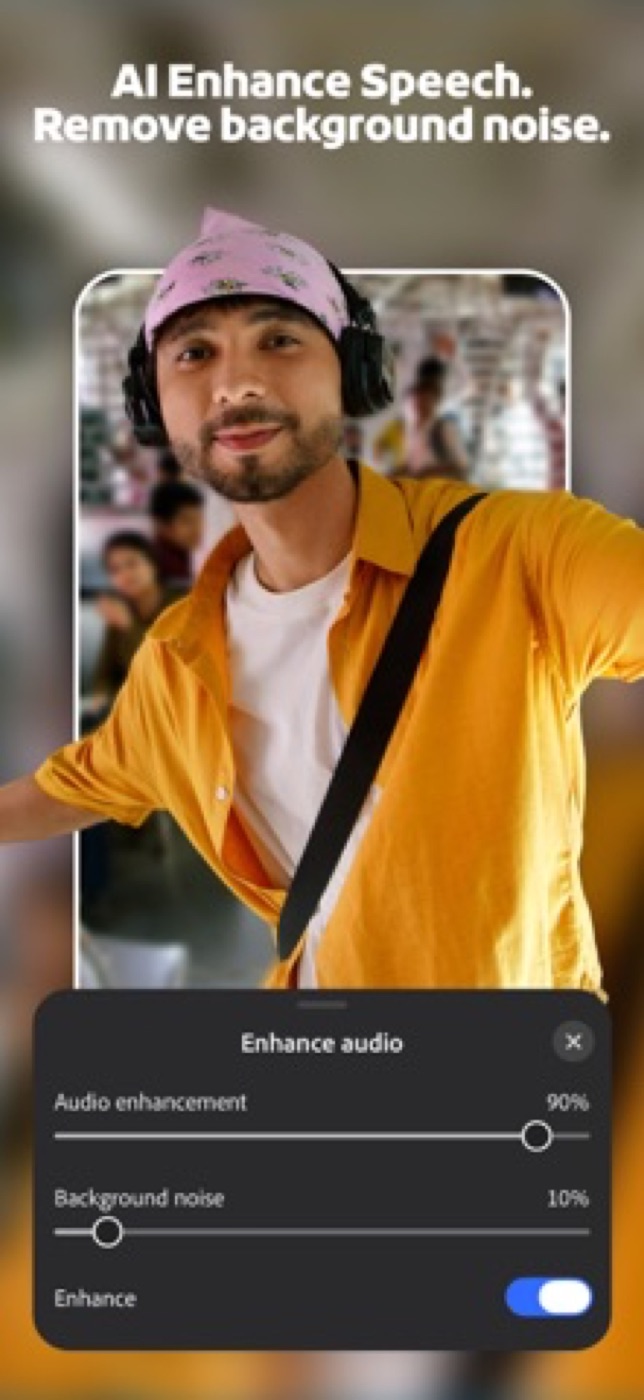
Enhance Audio reduces background noise and improves speech clarity on Android with one tap, according to Adobe. The iOS listing has the same tool for voiceovers.
YouTube Shorts templates
Both listings include YouTube Shorts templates. The Android listing describes them as remixable, and the iOS listing calls its Shorts templates exclusive.
Generative AI
Firefly tools create images, video and sound effects using credits. Adobe's own pages conflict: the product page says generative AI is iOS-only, while the Android launch post lists Generative Fill, Image-to-Video and Generate Sound Effects. TechRadar also found image-to-video and text-to-video shortcuts on Android.
Desktop handoff
Projects and media can move into Premiere on a computer if you pay for the desktop program. Adobe listed this as coming soon for Android in September 2026.
Strengths and weaknesses
What we like
- Unlimited 4K exports in the free version, where Clipchamp's free plan stops at 1080p
- No watermarks or pop-up ads, and no forced login or upgrade prompts on Android according to Adobe
- Unlimited tracks on both iOS and Android
- Optional plan costs $7.99 a month, $12 less than CapCut Pro's $19.99 in the US App Store
- The yearly plan at $69.99 saves $25.89 against 12 monthly payments
- iOS text tools offer over 5,000 free Adobe Fonts
- Rated 4.8 on the US App Store and 4.7 on Google Play on November 24, 2026
What could be better
- Android launched without keyframes, cropping, beat detection or desktop handoff
- Needs iOS 18 or Android 13 with 5 GB of RAM, so older phones are excluded
- Desktop import needs a paid Premiere subscription
- The App Store does not list credits or storage for its $7.99 and $69.99 plans
- Generative AI uses credits, and Adobe's pages disagree about whether it works on Android
- Store reviews include reports of lag on a 25-minute project and exports that restart after leaving the app
Key facts
- Platforms: iPhone, iPad, Apple Vision and Android
- Free export: 4K, no watermark
- iPhone requirement: iOS 18.0 or later
- Android requirement: 5GB RAM or more
- App Store age rating: 13+
Where it ranks
Adobe Premiere (mobile) is No. 1 in our Best Free Video Editing Software verdict and No. 1 in Best Video Editing Software.
Alternatives to consider
- CapCut: Better for moving between phone, desktop and web, with Standard at $9.99 and Pro at $19.99 a month in the US App Store.
- DaVinci Resolve: Better for long projects on a computer: free on Mac, Windows and Linux, with Studio listed at $295.
- iMovie: Better for simple Apple family videos, with Magic Movies, 20 storyboards and 14 trailer templates for free.
- LumaFusion: Better for detailed iPad edits with scopes, LUTs and a stabilizer, at $29.99 in the US App Store.
- Microsoft Clipchamp: Better for free 1080p edits in a browser, with AI subtitles and silence removal included.
Questions readers ask
Is Adobe Premiere on mobile free?
Yes, the mobile app is free and includes unlimited 4K exports with no watermarks, according to Adobe. Generative AI credits and extra storage are the paid upgrades.
How much does Adobe Premiere mobile cost?
The optional subscription is $7.99 a month or $69.99 a year in the US App Store, checked November 24, 2026. The yearly price works out to about $5.83 a month.
Is Adobe Premiere available on Android?
Yes, Adobe Premiere launched on Android on September 22, 2026. It needs Android 13 or later and at least 5 GB of RAM.
Does Adobe Premiere mobile add a watermark?
No, Adobe says exports have no watermark in the free version. The app also has no pop-up ads.
Is Adobe Premiere mobile worth it?
Adobe Premiere mobile is worth choosing for short phone edits because 4K export costs $0. Paying $7.99 a month makes sense only if you need more generative AI or storage, and you should check the allowance in the app first.
Adobe Premiere mobile vs CapCut: which is better?
Adobe Premiere is better for free 4K phone exports without a watermark, while CapCut is better for working across phone, desktop and web. CapCut Pro costs $19.99 a month in the US App Store, against $7.99 for Premiere's optional plan.
Can Premiere mobile projects open in Premiere on desktop?
Yes, if you have a paid Premiere desktop subscription. Adobe listed continued desktop editing as coming soon for Android at its September 2026 launch.
Did Adobe Premiere replace Premiere Rush?
Yes, the mobile app was positioned as the replacement for Premiere Rush. MacRumors reported that existing Rush users would keep access on installed devices until September 30, 2026.
Sources we checked
- Adobe Premiere on the US App Store, checked November 24, 2026
- Adobe Premiere on Google Play, checked November 24, 2026
- Adobe Premiere mobile product page, checked November 24, 2026
- Adobe blog: Premiere expands to Android, checked November 24, 2026
- Adobe Premiere plans (Latvian storefront), checked November 24, 2026
- Adobe Firefly plans, checked November 24, 2026
- MacRumors on the iPhone and iPad launch, checked November 24, 2026
- TechRepublic on the Android launch, checked November 24, 2026
- TechRadar on the Android app, checked November 24, 2026
- RedShark News on the Android launch, checked November 24, 2026
- 9to5Google on the Android launch, checked November 24, 2026
- CapCut on the US App Store, checked November 24, 2026
- Microsoft Clipchamp pricing, checked November 24, 2026
- DaVinci Resolve, checked November 24, 2026
- iMovie on the US App Store, checked November 24, 2026
- LumaFusion on the US App Store, checked November 24, 2026
Deep review last updated November 24, 2026. We recheck prices and specs against these pages; send corrections to the address below.
Alternatives we scored
- Edits8.8
- iMovie8.8
- DaVinci Resolve8.7
- OpenShot8.5
Cite this page
HearSmart. Adobe Premiere (mobile) review. Updated November 24, 2026. https://hearsmart.org/review/adobe-premiere-mobile
Visit adobe.com · Questions or corrections: editorial@hearsmart.org