Review · Software & apps
 Microsoft OneDrive review
Microsoft's cloud storage, built into Windows and bundled with Microsoft 365 plans.
By the HearSmart research desk · Updated November 29, 2026
The short answer
Microsoft OneDrive is Microsoft's cloud storage and photo backup service, built into Windows 11 and sold mainly through Microsoft 365 plans. It is the best value storage pick for people who also want Word, Excel and PowerPoint: Microsoft 365 Personal lists 1 TB plus the desktop apps at $99.99 a year, while storage-only Microsoft 365 Basic gives 100 GB for $1.99 a month or $19.99 a year, as checked on Microsoft's US pages in November 2026. The free tier is only 5 GB, so it suits Windows and Office users far more than people who just want free space.
- Performance (40%)
- 8.8
- Ease of use (25%)
- 8.6
- Value (35%)
- 9.0
What it looks like

Our verdict
Buy OneDrive through Microsoft 365 Personal or Family if you already pay for Office or would use it, because the 1 TB (Personal) or 2 TB shared (Family) of storage comes bundled with the desktop apps, ransomware detection and Files Restore. Buy Microsoft 365 Basic if 100 GB is enough, since at $19.99 a year it matches Google's 100 GB price. Skip it if you want lots of free space, where Google Drive gives 15 GB against OneDrive's 5 GB, or if you want 2 TB without paying for Office, where Google's and Apple's 2 TB plans cost $9.99 a month. The deciding fact is that Microsoft sells no storage-only plan above 100 GB on its US plan pages, so beyond 100 GB you are buying the Office bundle.
Overview
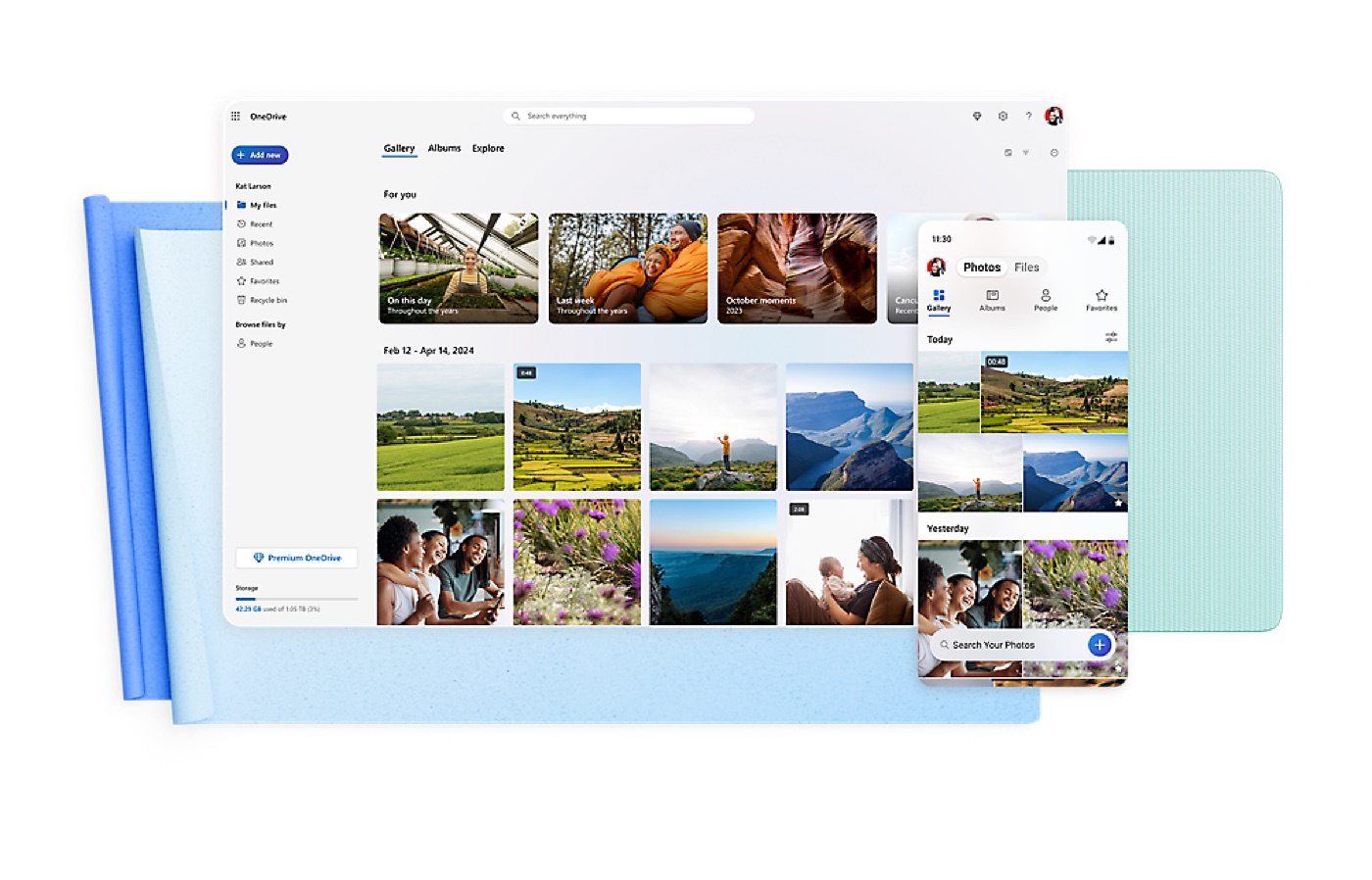
OneDrive is the personal cloud drive attached to every Microsoft account. It syncs files between Windows PCs, Macs, iPhones, iPads, Android phones and the web, backs up phone photos through Camera Upload, and is where Word, Excel and PowerPoint save documents by default. On Windows 11 the sync app is already installed, according to Microsoft's Microsoft 365 Basic setup guide. On the US App Store the iPhone app holds a 4.7 rating from 488K ratings, and on Google Play the Android app shows 4.6 stars, 7.43M reviews and 5B+ downloads.
The consumer line-up as listed on Microsoft's US compare page in November 2026 has four tiers. A free Microsoft account includes 5 GB. Microsoft 365 Basic costs $19.99 a year or $1.99 a month for 100 GB, an ad-free Outlook inbox and Personal Vault without the 3-file cap, but no desktop Office apps and no Copilot AI. Microsoft 365 Personal costs $99.99 a year or $9.99 a month for 1 TB plus the Word, Excel, PowerPoint, Outlook and OneNote desktop apps, and was on offer at $69.99 for the first year when checked. Microsoft 365 Family costs $129.99 a year or $12.99 a month for 1 to 6 people, and Microsoft 365 Premium costs $199.99 a year or $19.99 a month, adding extensive Copilot usage.
The biggest recent change is Family storage. Microsoft's compare page and App Store listing now describe Family as "2 TB of shared" storage for up to six people, and the compare table lists 2 TB for both Family and Premium. Microsoft's older Microsoft 365 Basic guide page still shows Family as "Up to 6 TB (1 TB per person)", so a family that needs more than 2 TB in total should confirm the allowance at checkout. Copilot AI features in Personal, Family and Premium are limited to the subscription owner and are not available in Basic.
Against the other storage services on HearSmart, OneDrive wins on bundle value and Windows integration and loses on free space and storage-only choice. Google Drive starts with 15 GB free and also charges $1.99 a month for 100 GB, then offers 2 TB for $9.99 a month without requiring an office suite. iCloud+ starts with 5 GB free like OneDrive but sells 50 GB, 200 GB, 2 TB, 6 TB and 12 TB tiers, which suits iPhone owners better. Proton Drive offers end-to-end encryption for all files, something OneDrive does not provide outside Personal Vault.
There are real limits. The single-file limit is 250 GB, and Microsoft advises using the sync app rather than the website for files larger than a few GB. Deleted files can be restored for 30 days on personal accounts, and rolling back the whole OneDrive to an earlier point, also up to 30 days, is a subscriber feature. Password-protected and expiring sharing links, offline folders on mobile and ransomware detection require Microsoft 365 Personal or Family, according to the App Store listing. Free accounts can keep only three files in Personal Vault. The current iPhone app requires iOS 26 or later, and the desktop sync app needs Windows 10 22H2, Windows 11 or macOS 15.8 or newer. An account that stays over its storage allowance for three months can be frozen, with files turned read-only.
How it scored
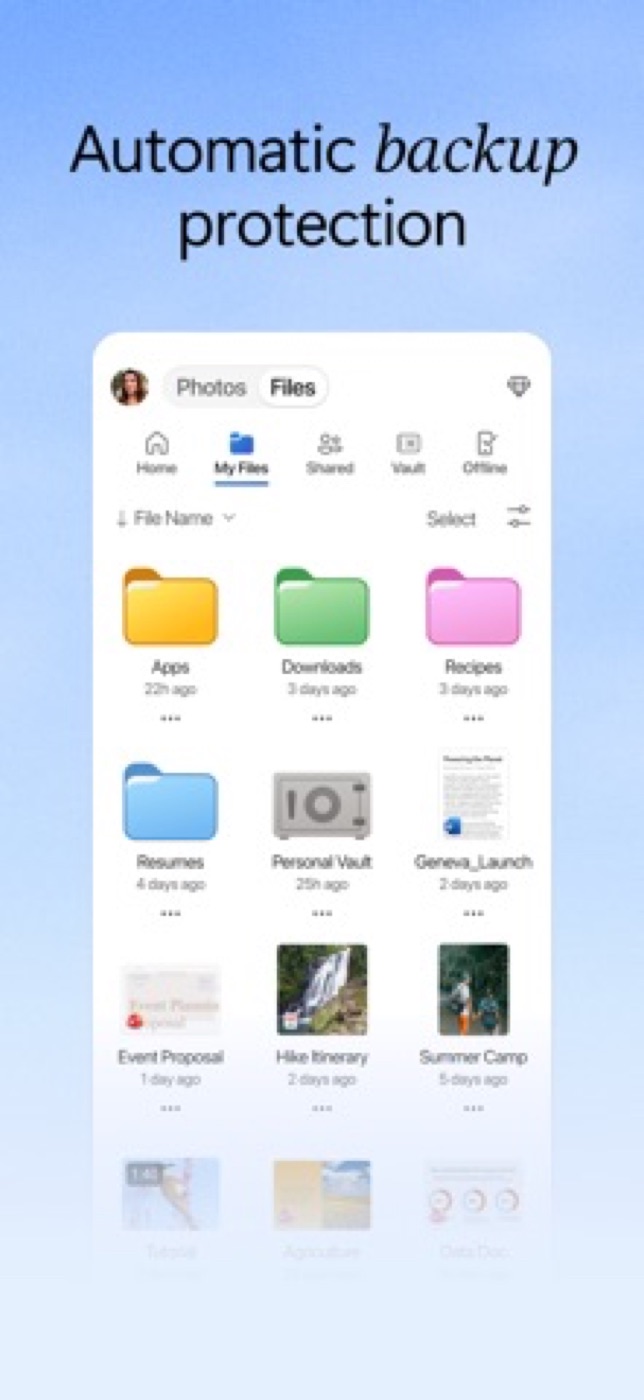
OneDrive is the right pick for people who live on a Windows PC or already pay for Office. It can back up your Windows PC folders, and the mobile app uploads your camera roll, tags photos automatically and lets you search them by what is in the picture, such as beach or snow. Microsoft 365 Basic gives 100 GB for $1.99 a month or $19.99 a year in the US. Microsoft 365 Personal costs $99.99 a year and raises storage to 1 TB while adding the Word, Excel, PowerPoint, Outlook and OneNote desktop apps, and Family covers up to six people for $129.99 a year. Security features include Personal Vault for sensitive files, ransomware detection with file restore, and version history. The free tier is only 5 GB, and if you want more than 100 GB without Office you have no standalone option, so the bundle is great value only if you will use the apps.
Who it is for
Windows PC users and Office users who want backup plus Word, Excel and PowerPoint in one subscription.
Good fit if
- Microsoft 365 Personal subscribers who want 1 TB of storage without a second bill, since the storage comes with the Word, Excel, PowerPoint, Outlook and OneNote desktop apps for $99.99 a year
- Households of up to six people who want Office apps and 2 TB of shared storage on one Microsoft 365 Family plan at $129.99 a year
- Windows 11 users who want their PC files and phone photos in one place, using the sync app that ships with Windows and Camera Upload on iPhone or Android
- Light users who need only 100 GB, for whom Microsoft 365 Basic at $19.99 a year adds an ad-free Outlook inbox and an unlimited Personal Vault
- People storing scans of IDs, passports or tax papers who want a second identity check before those files open, using Personal Vault, which locks after 20 minutes of inactivity on the web
Skip it if
- People who want the most free space: Google Drive includes 15 GB free per Google account, three times OneDrive's 5 GB
- Anyone who needs 2 TB for one person without paying for Office: Google's 2 TB plan and iCloud+ 2 TB both cost $9.99 a month
- Users who want end-to-end encryption on every file: Proton Drive encrypts all files, while OneDrive's extra protection covers only Personal Vault
- iPhone owners who never use Office: iCloud+ starts at $0.99 a month for 50 GB and is built into iOS photo and device backup
Specifications
| Free storage | 5 GB with a Microsoft account | source |
|---|---|---|
| Microsoft 365 Basic storage | 100 GB | source |
| Microsoft 365 Personal storage | 1 TB for 1 person | source |
| Microsoft 365 Family and Premium storage | 2 TB shared, for 1 to 6 people | source |
| Maximum file size | 250 GB per file for upload, download and sync | source |
| Deleted file recovery | 30 days for personal accounts, 93 days for work or school accounts by default | source |
| Whole-drive rollback | Any point in the last 30 days, Microsoft 365 subscribers | source |
| Version history | Retained for 30 days | source |
| Personal Vault | Up to 3 files on free accounts; unlimited up to storage limit with a subscription; locks after 20 minutes idle on the web | source |
| Desktop sync app | Windows 10 22H2 or Windows 11; macOS 15.8 or newer | source |
| Devices | Up to 5 devices at once per person on Personal, Family and Premium; Basic on web, iOS and Android | source |
| iPhone and iPad app | Requires iOS 26.0 or later; 373.6 MB; 4.7 from 488K ratings | source |
| Android app | 4.6 stars from 7.43M reviews; 5B+ downloads | source |
| Built-in scanner | Documents, business cards, receipts and whiteboards in the mobile app | source |
Price
5 GB free; Microsoft 365 Basic 100 GB $1.99 per month or $19.99 a year; Personal 1 TB $99.99 a year; Family $129.99 a year for up to six people.
Microsoft 365 Basic Online protection and cloud storage for one person $1.99 /month
Quoted from the vendor pricing page on November 29, 2026.
Plans and pricing
| Plan | Price | What is included | Source |
|---|---|---|---|
| Free (Microsoft account) | $0Free | 5 GB of OneDrive storage; Camera Upload photo and video backup; Version history on all files; Personal Vault limited to 3 files; Word, Excel, PowerPoint and OneNote free on web, iOS and Android | Checked Nov 18, 2026 |
| Microsoft 365 Basic | $19.99 a year, or $1.99 a monthAnnual or monthly | 100 GB of OneDrive storage for 1 person; Ad-free Outlook inbox; Personal Vault without the 3-file limit; Ongoing technical support; No desktop Office apps and no Copilot AI features | Checked Nov 18, 2026 |
| Microsoft 365 Personal | $99.99 a year or $9.99 a month; offer of $69.99 for the first year or $6.99 for the first month when checkedAnnual or monthly; renews at the regular price | 1 TB of OneDrive storage for 1 person; Word, Excel, PowerPoint, Outlook and OneNote desktop apps with Copilot; OneDrive ransomware protection and Microsoft Defender; Use on up to 5 devices at once; 1-month free trial | Checked Nov 18, 2026 |
| Microsoft 365 Family | $129.99 a year, or $12.99 a monthAnnual or monthly | 2 TB of shared OneDrive storage; 1 to 6 people, each on up to 5 devices at once; Everything in Personal; AI features for the subscription owner only; 1-month free trial | Checked Nov 18, 2026 |
| Microsoft 365 Premium | $199.99 a year or $19.99 a month; offer of $139.99 for the first year or $13.99 for the first month when checkedAnnual or monthly; renews at the regular price | 2 TB of OneDrive storage, 1 to 6 people; Everything in Family; Extensive Copilot usage and agentic AI features for the subscription owner; 1-month free trial | Checked Nov 18, 2026 |
Key features
Camera Upload and photo search
The mobile app backs up photos and videos automatically once Camera Upload is on, tags them automatically and lets you search by what is in a photo, such as beach or snow. A recent iOS release made iCloud-optimized photo and Live Photo backup available to all consumer users, including the free tier.
Personal Vault
A protected folder that needs a second identity check, such as a fingerprint, face, PIN or a code sent by email or SMS, before it opens. It locks after 20 minutes of inactivity on the web. Free accounts can store three files in it; Basic, Personal and Family subscribers can store as many as their storage allows.
Recycle bin, version history and Files Restore
Deleted files stay recoverable for 30 days on personal accounts, and file version history is retained for 30 days. Microsoft 365 subscribers can also roll back the entire OneDrive to any point in the last 30 days after ransomware, mass deletion or corruption; free users can restore individual files only.
Ransomware detection and protected sharing
With Microsoft 365 Personal or Family, OneDrive adds ransomware detection and recovery, password-protected or expiring sharing links, and whole folders available offline in the mobile app, according to the App Store listing.
Office integration
Word, Excel, PowerPoint and OneNote save to OneDrive and support real-time co-editing of files stored there. Copilot in Excel requires AutoSave, which means the file must be saved to OneDrive.
Built-in document scanner
The iPhone and Android apps scan documents, business cards, receipts and whiteboards, and let you mark up, sign and send documents. Scans can also be saved to the phone's photo library or files storage instead of, or as well as, OneDrive.
Files On-Demand on Windows
The Windows sync app shows every file in OneDrive without downloading it, marking cloud-only files with a blue cloud icon, so a 1 TB library does not fill a small laptop drive. Microsoft says it is on by default from OneDrive build 23.066.
Strengths and weaknesses
What we like
- Microsoft 365 Personal bundles 1 TB of storage with the Office desktop apps for $99.99 a year, less than many rivals charge for 1 TB to 2 TB of storage alone over a year
- Microsoft 365 Basic costs $19.99 a year for 100 GB, the same as Google's 100 GB plan
- Family covers 1 to 6 people, each on up to 5 devices, with 2 TB shared for $129.99 a year
- Files up to 250 GB each can be uploaded and synced
- Subscribers can roll back the whole drive to any point in the last 30 days after ransomware or mass deletion
- Built into Windows 11 and available on Mac, iPhone, iPad, Android and the web, with 5B+ Android downloads
- Personal Vault adds a second identity check for sensitive files, unlimited on paid plans
What could be better
- Only 5 GB free, against 15 GB on Google Drive
- No storage-only plan above 100 GB on Microsoft's US plan pages, so 1 TB means paying $99.99 a year for the Office bundle
- Family storage is now listed as 2 TB shared across up to six people, which is less per person than the 1 TB each some older Microsoft pages still describe
- Expiring and password-protected links, offline mobile folders and ransomware detection need Personal or Family, not Basic
- No end-to-end encryption for ordinary files; extra protection applies only inside Personal Vault
- Going over quota for three months can freeze an account, leaving files read-only, and Microsoft says it might delete the OneDrive after six months over the limit
Key facts
- Free storage: 5 GB
- Cheapest paid plan: Microsoft 365 Basic, 100 GB, $1.99 per month
- 1 TB plan: Microsoft 365 Personal, $99.99 a year
- Family plan: Microsoft 365 Family, up to six people, $129.99 a year
- Expandable storage: Up to 10 TB
Where it ranks
Microsoft OneDrive is No. 3 in our Best Cloud Storage verdict and No. 5 in Best Photo Storage Apps and No. 8 in Best Scanner Apps.
Alternatives to consider
- Google Drive: 15 GB free instead of 5 GB, 100 GB at the same $1.99 a month, and a 2 TB plan for $9.99 a month without an office suite.
- iCloud+: Better for iPhone owners who do not use Office, with tiers from 50 GB at $0.99 a month up to 12 TB and built-in iOS device backup.
- Proton Drive: End-to-end encryption on every file, for people who care more about privacy than Office integration.
- Dropbox: Storage-focused plans that do not depend on an office bundle, with Plus at $11.99 a month on the US App Store.
- Google Photos: Stronger photo browsing and editing tools if phone photos are the main thing you store.
Questions readers ask
Is Microsoft OneDrive free?
Yes, every Microsoft account includes 5 GB of OneDrive storage for free. That covers documents and a modest photo library, but phone photo backup usually outgrows it, and the cheapest paid step is Microsoft 365 Basic with 100 GB for $1.99 a month or $19.99 a year.
How much does OneDrive cost?
On Microsoft's US pages in November 2026, Microsoft 365 Basic costs $19.99 a year for 100 GB, Personal $99.99 a year for 1 TB, Family $129.99 a year for 2 TB shared by up to six people, and Premium $199.99 a year. Monthly billing is $1.99, $9.99, $12.99 and $19.99, and Personal and Premium had first-year discounts when checked.
Is OneDrive worth it?
It is worth it if you use Word, Excel or PowerPoint, because Microsoft 365 Personal includes 1 TB of storage and the desktop apps for $99.99 a year. If you only need storage beyond 100 GB, Google's or Apple's 2 TB plans at $9.99 a month are a closer fit, since Microsoft has no storage-only plan above 100 GB.
OneDrive vs Google Drive: which is better?
Google Drive gives more free space, 15 GB against 5 GB, and sells 2 TB without an office suite. OneDrive is better value for Office users, since 1 TB comes with the desktop apps, and it is built into Windows 11. Both charge $1.99 a month for 100 GB.
How much storage does Microsoft 365 Family get?
Microsoft's compare page and App Store listing describe Microsoft 365 Family as 2 TB of shared storage for 1 to 6 people. An older Microsoft guide page still lists up to 6 TB at 1 TB per person, so check the figure at checkout if your household needs more than 2 TB.
What is the largest file OneDrive can store?
OneDrive accepts individual files up to 250 GB for upload, download and sync, according to Microsoft's limits page. Microsoft recommends using the sync app rather than the website for files larger than a few GB.
How long does OneDrive keep deleted files?
Personal accounts can restore deleted files for 30 days, and work or school accounts for 93 days unless an admin changes it. Microsoft 365 subscribers can also restore the whole OneDrive to any point in the last 30 days.
Does OneDrive protect against ransomware?
Yes. When Microsoft 365 detects a ransomware attack it sends a device notification and an email, and subscribers to Personal, Family or Premium can roll the whole drive back up to 30 days. Non-subscribers get their first notification and recovery free, according to Microsoft Support.
Sources we checked
- Compare Microsoft 365 Plans and Pricing (Microsoft Store, US), checked November 18, 2026
- Microsoft 365 for Individuals User Guide: Microsoft 365 Basic, checked November 18, 2026
- Microsoft OneDrive on the US App Store, checked November 18, 2026
- Microsoft OneDrive on Google Play, checked November 18, 2026
- Restrictions and limitations in OneDrive and SharePoint (Microsoft Support), checked November 18, 2026
- Protect your OneDrive files in Personal Vault (Microsoft Support), checked November 18, 2026
- Restore files deleted from your OneDrive (Microsoft Support), checked November 18, 2026
- OneDrive system requirements (Microsoft Support), checked November 18, 2026
- How to detect ransomware and recover files using OneDrive (Microsoft Support), checked November 18, 2026
- Restore a previous version of a file stored in OneDrive (Microsoft Support), checked November 18, 2026
- Restore your OneDrive (Microsoft Support), checked November 18, 2026
- Save disk space with OneDrive Files On-Demand for Windows (Microsoft Support), checked November 18, 2026
- What does it mean when your OneDrive account is frozen (Microsoft Support), checked November 18, 2026
Deep review last updated November 18, 2026. We recheck prices and specs against these pages; send corrections to the address below.
Alternatives we scored
- Google Drive9.1
- iCloud+9.1
- pCloud8.5
- Proton Drive8.5
Cite this page
HearSmart. Microsoft OneDrive review. Updated November 29, 2026. https://hearsmart.org/review/microsoft-onedrive
Visit microsoft.com · Questions or corrections: editorial@hearsmart.org