Review · Software & apps
 TurboScribe review
A Whisper-powered web service for uploading audio and video files and getting transcripts back, with an unlimited plan for one person.
By the HearSmart research desk · Updated November 26, 2026
The short answer
TurboScribe is a web-based AI transcription service, built on OpenAI's Whisper model, that turns uploaded audio and video files into text with no cap on total minutes. It is the best value on this site for anyone with a large backlog of recordings: the Unlimited plan costs $10 a month billed yearly ($120) or $20 month to month, and the free plan gives 3 files a day of up to 30 minutes each. It suits journalists, researchers, students and podcasters who record first and transcribe later, not teams that need live meeting notes. Prices and limits checked in November 2026.
- Performance (40%)
- 8.0
- Ease of use (25%)
- 9.2
- Value (35%)
- 9.5
What it looks like
Our verdict
Buy TurboScribe Unlimited if you transcribe recorded files in volume, such as interviews, lectures, field recordings or podcast episodes, and want one flat price instead of counting minutes. Skip it if you need live captions or a bot that joins Zoom and Teams calls (Otter.ai or Fireflies.ai), a human-checked transcript you can quote in court or print (Rev), or audio that never leaves your own computer (MacWhisper). The deciding fact is the limit structure: $10 a month on a yearly plan buys files of up to 10 hours or 5 GB each, 50 uploads at a time, and a stated design target of at least 720 hours of transcription a month for one person.
Overview
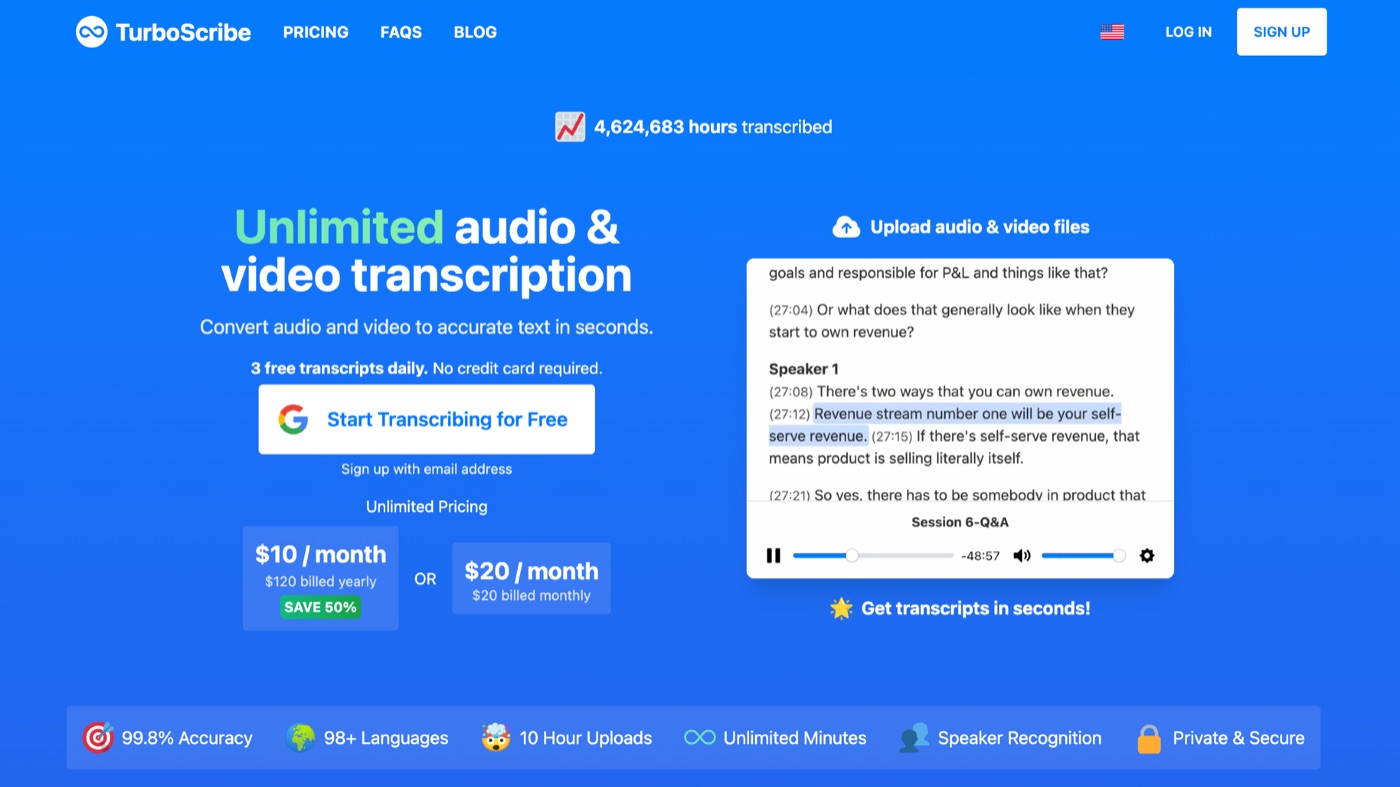
TurboScribe is a browser-only transcription service at turboscribe.ai. You upload an audio or video file, pick the spoken language and a transcription mode, and get back a transcript you can read, edit, translate and export. Its home page says it is powered by Whisper, the open speech recognition model released by OpenAI, and the company states that it runs all transcription in-house on machines it owns or controls rather than calling third-party transcription APIs. The service was founded by Leif Foged, who describes almost a decade building AI systems at companies including Meta.
The line-up is simple. TurboScribe Free gives 3 transcripts a day, each up to 30 minutes long, one upload at a time and a lower-priority queue. TurboScribe Unlimited costs $10 a month billed yearly ($120) or $20 billed monthly and raises the limits to 10 hour or 5 GB files, 50 uploads at a time, all three transcription modes, translation to 134+ languages, bulk exports, unlimited storage and the highest queue priority. In December 2025 the company added TurboScribe Unlimited Max at $200 a month or $2,000 a year, which reserves 10 times the dedicated GPU capacity for one account. A Teams option lets one admin buy several Unlimited seats at $120 per user per year on a single invoice.
The free plan is generous enough to test real files, but the paid plan is where the value sits. TurboScribe's FAQ says there are no caps on overall usage and that its systems are designed to let one subscriber transcribe at least 720 hours a month, the equivalent of 24 hours a day. Above that level, accounts move into a High Volume Mode that processes files one at a time and may return a 'Try again later' message on upload. The only usage rule stated in the FAQ is that a login cannot be shared with other people.
Against the other transcription tools on this site, TurboScribe wins on price per hour for heavy users. Otter.ai Pro starts at $8.33 a month billed annually and Notta Pro at $8.17, but both meter minutes and are built around live meetings. Fireflies.ai Pro starts at $10 per seat a month billed annually and also focuses on meeting bots. Descript (from $16 a month billed annually) adds audio and video editing on top of the transcript. Sonix charges $10 per hour pay as you go, so 12 hours of audio there costs the same $120 as a full year of TurboScribe Unlimited. Rev is the option for human-verified transcripts, at $1.99 per minute.
The limits are real. There is no live transcription, no meeting bot, no mobile recording app and, according to its own help center, no API: every file goes through the web interface. Accuracy is the company's own claim (it advertises 99.8%) rather than an independent lab result, and the help center notes that accuracy varies by language and audio quality, with English and about 21 other languages getting the best results. Speaker recognition is optional and the help center warns that automatic speaker detection can overestimate the number of speakers.
How it scored
TurboScribe does one job simply: you upload a file and get a transcript back. Its pricing page lists unlimited transcriptions for one person on the Unlimited plan at $10 a month billed yearly, or $120 a year, with files up to 10 hours long or 5 GB and 50 uploads at a time. That makes it the cheapest way here to clear a pile of recorded interviews, church services or recorded classes, because you never count minutes. The free plan is useful for testing: 3 files a day, each up to 30 minutes, processed at lower priority. The trade-offs are clear. There is no live transcription, so it will not help you follow a conversation as it happens, and the plan covers one person only. The pricing page also does not say how to reach support or how quickly it answers, so if reliable support matters to you, Sonix and Descript publish more detail.
Who it is for
People with long recordings to upload, such as interviews, sermons or recorded classes.
Good fit if
- Journalists and podcasters with dozens of long interviews or episodes who want a flat monthly price instead of per-minute billing
- Graduate students and academic researchers transcribing hours of field recordings, focus groups or lectures, including non-English audio in 98+ languages
- Video creators who need SRT or VTT subtitle files with adjustable words and characters per line, plus translation into 134+ languages
- Small organizations that want several unlimited seats on one yearly invoice through TurboScribe for Teams at $120 per user per year
- Light users who only need a few short files a week and can stay on the free plan of 3 files a day up to 30 minutes each
Skip it if
- Teams that want a bot to join Zoom, Google Meet or Microsoft Teams calls and write notes live: Otter.ai or Fireflies.ai are built for that
- Legal, medical or publishing work that needs a human-verified transcript: Rev offers human transcription from $1.99 per minute
- People whose recordings must never leave their own computer: MacWhisper runs transcription locally on a Mac
- Podcasters and video editors who want to cut audio or video by editing the transcript: Descript combines transcription with an editor
Specifications
| Price (Unlimited, yearly) | $10 per month, $120 billed yearly | source |
|---|---|---|
| Price (Unlimited, monthly) | $20 per month billed monthly | source |
| Free plan | 3 transcripts a day, each up to 30 minutes, 1 upload at a time, lower priority | source |
| Max file length and size (paid) | 10 hours or 5 GB per file | source |
| Files per upload batch (paid) | 50 | source |
| Monthly volume | No overall cap; designed for at least 720 hours a month per user | source |
| Speech engine | Whisper, run in-house on TurboScribe's own or controlled machines | source |
| Transcription languages | 98+ | source |
| Translation | Transcripts and subtitles to 134+ languages; any language directly to English | source |
| Transcription modes | Cheetah (fastest), Dolphin (balanced), Whale (most accurate) | source |
| Input formats | MP3, M4A, MP4, MOV, AAC, WAV, OGG, OPUS, MPEG, WMA, WMV, AVI, FLAC, AIFF, ALAC, 3GP, MKV, WEBM and more | source |
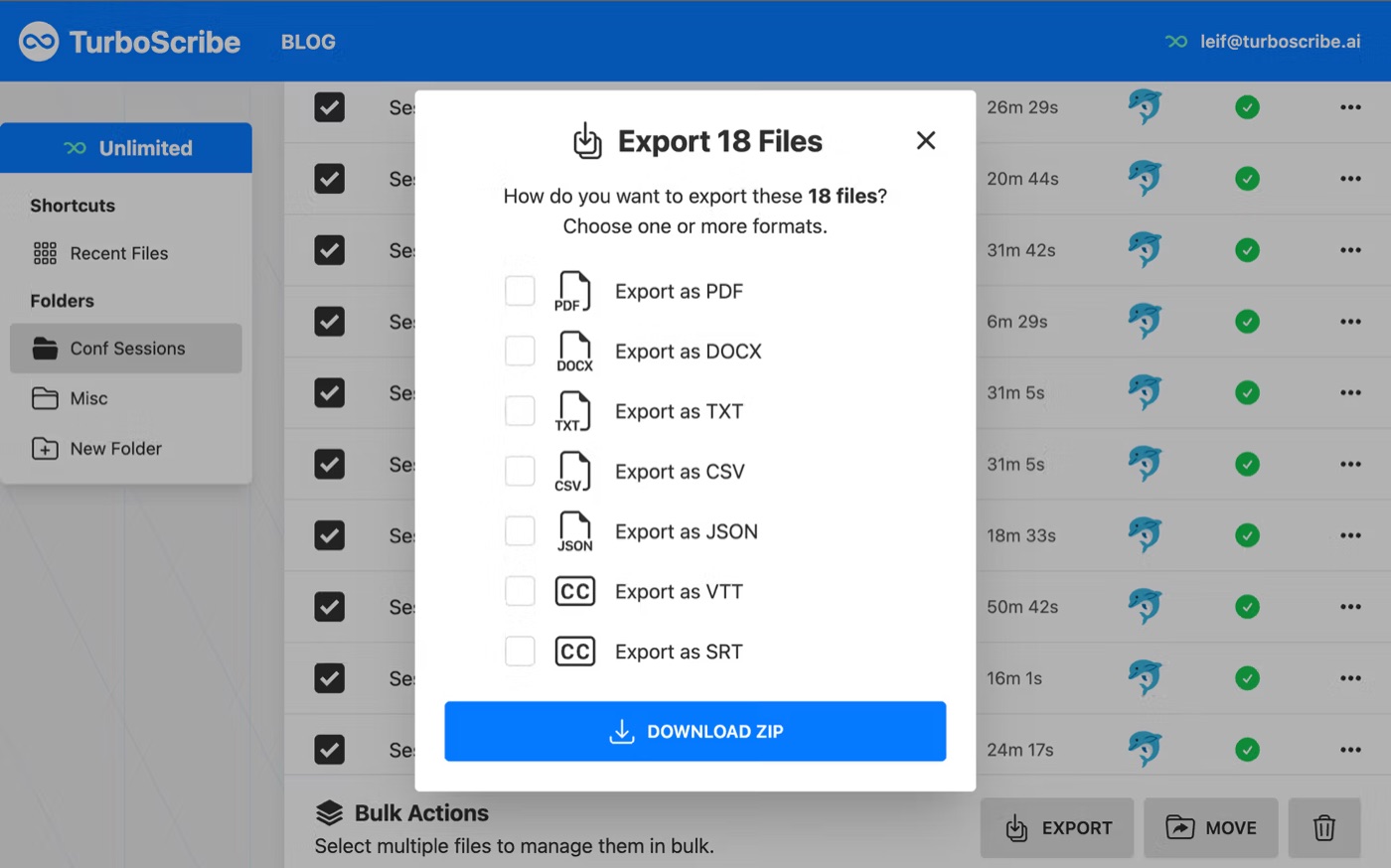
| Export formats | PDF, DOCX, TXT, CSV, SRT and VTT; bulk export of up to 1,000 transcripts per folder | source |
| Encryption | HTTPS in transit; AES-256 at rest | source |
| Data location | Primary infrastructure in the United States | source |
| API | None; uploads only through the web interface | source |
| Advertised accuracy | 99.8% (maker's claim, no independent test published) | source |
Price
Free plan with 3 transcripts a day; Unlimited from $10 per month billed yearly or $20 monthly.
TurboScribe Unlimited $10 / month $120 billed yearly
Quoted from the vendor pricing page on November 26, 2026.
Plans and pricing
| Plan | Price | What is included | Source |
|---|---|---|---|
| TurboScribe Free | $0free | 3 transcripts a day; Files up to 30 minutes long; 1 upload at a time; Lower priority queue; No credit card required | Checked Nov 23, 2026 |
| TurboScribe Unlimited (yearly) | $10 per month$120 billed yearly | Unlimited transcriptions for one person; Files up to 10 hours or 5 GB; 50 files per upload batch; Translation to 134+ languages; Bulk exports; All transcription modes; Unlimited storage; Highest priority | Checked Nov 23, 2026 |
| TurboScribe Unlimited (monthly) | $20 per monthbilled monthly | Same features as the yearly Unlimited plan; Cancel at any time with access until the end of the billing period | Checked Nov 23, 2026 |
| TurboScribe for Teams | $120 per user per yearbilled yearly | One TurboScribe Unlimited subscription per user; Single annual payment for all seats; Add or remove users at any time from Account Settings | Checked Nov 23, 2026 |
| TurboScribe Unlimited Max | $200 per monthmonthly, or $2,000 billed yearly | 10x dedicated transcription GPU capacity reserved for the account; No upload limits or soft limits at very high volume; Own dedicated transcription queue; Every TurboScribe Unlimited feature | Checked Nov 23, 2026 |
Key features
Three transcription modes
Each upload can run on Cheetah (fastest), Dolphin (balanced) or Whale (most accurate). The help center says most users choose Whale and suggests re-running a difficult file on the other two modes, since they can produce different results.
Speaker recognition
An optional setting labels each section of the transcript by speaker. You can enter the number of speakers or choose Detect Automatically, which the help center says can improve separation but sometimes overestimates the count. It adds about a minute or two per hour of audio.
Restore Audio
An AI noise removal and speech enhancement step for poor recordings, recommended by TurboScribe only as a last resort. The FAQ says it adds 2 to 3 minutes of processing per hour of audio or video.
Translation and Transcribe to English
A Translation Tool converts finished transcripts or subtitles into 134+ languages, and a Transcribe to English option turns speech in any supported language directly into an English transcript without a separate translation step.
Subtitle controls
SRT downloads open a dialog for maximum words per segment, maximum duration and maximum characters per segment, with sentence-aware segmentation on by default. Edited or speaker-labeled transcripts need a Resegment step first.
Bulk export and folders
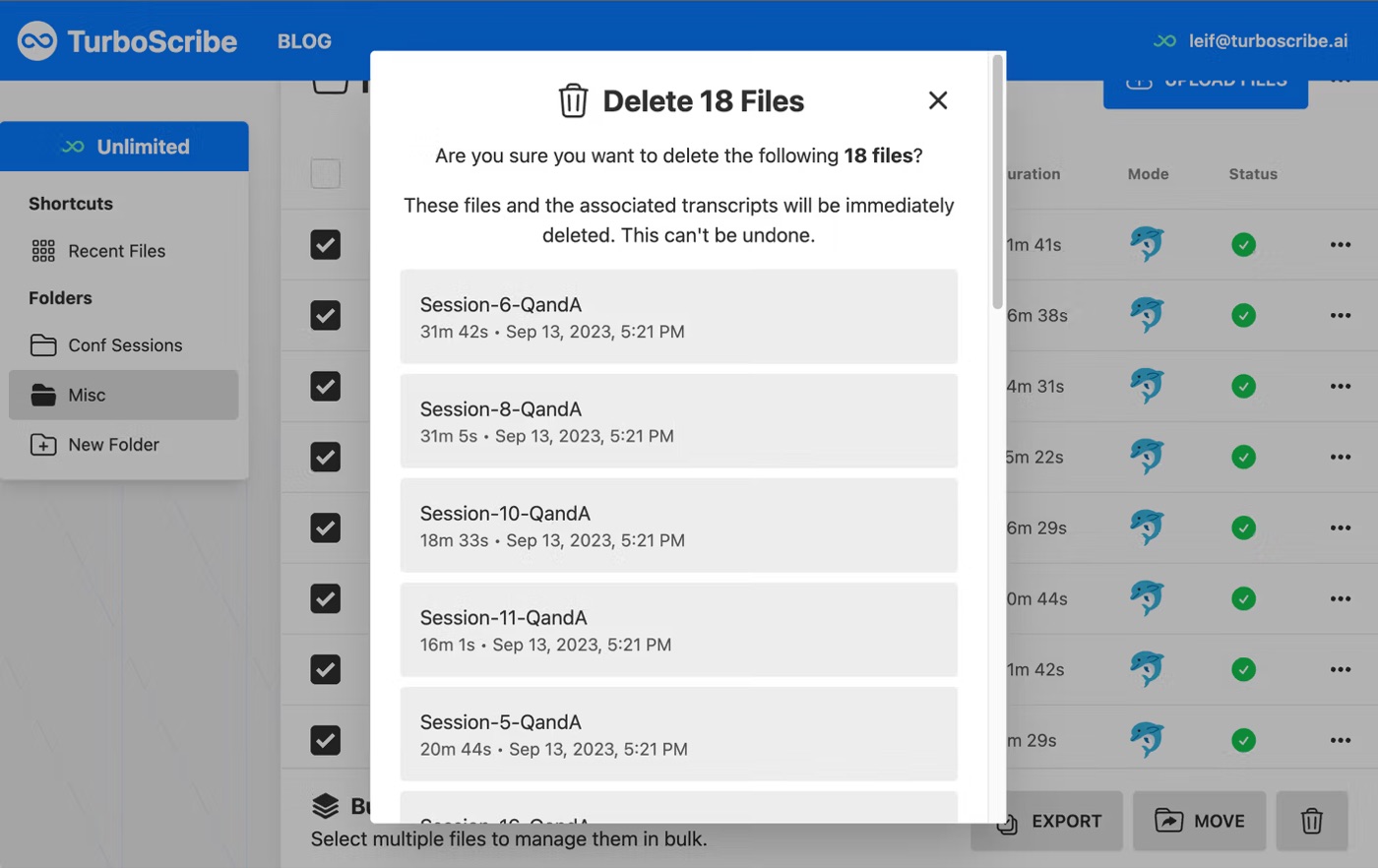
Paid users can select files and export up to 50 transcripts at once as a ZIP in PDF, DOCX, TXT, CSV, VTT or SRT, or export a whole folder of up to 1,000 transcripts.
Privacy handling
TurboScribe states that files and transcripts are encrypted at rest with AES-256, that it does not train AI models on customer media or transcripts, and that deleted files and accounts cannot be recovered.
Strengths and weaknesses
What we like
- Flat pricing: $10 a month billed yearly or $20 monthly covers unlimited transcription for one person, with a stated design target of at least 720 hours a month
- Large uploads: each paid file can be up to 10 hours long or 5 GB, and 50 files can go in one batch
- Usable free plan: 3 files a day of up to 30 minutes each, with no credit card required
- Wide language coverage: 98+ spoken languages, translation into 134+ languages and direct transcription to English
- Broad export options: PDF, DOCX, TXT, CSV, SRT and VTT, with bulk export of up to 1,000 transcripts from a folder
- Clear privacy statements: AES-256 encryption at rest, in-house processing with no third-party transcription APIs, and no model training on customer files
- Simple monthly to yearly switch, with unused days of the current month credited toward the annual plan
What could be better
- No live transcription, meeting bot or mobile recorder: every recording has to be made elsewhere and uploaded
- No API, so transcription cannot be automated from other apps or scripts
- Unlimited covers one person only, and the FAQ forbids sharing a login, so a team of 5 needs 5 seats at $120 each per year
- The 99.8% accuracy figure is the maker's own claim, and the help center says accuracy varies by language and audio quality
- Free files are capped at 30 minutes, run one at a time and wait in a lower-priority queue
- Above 720 hours a month, the account moves to High Volume Mode, which processes one file at a time unless you pay $200 a month for Unlimited Max
Key facts
- Free plan: 3 files a day, 30 minutes each
- Unlimited: $10 a month billed yearly ($120), $20 monthly
- Max file: 10 hours or 5 GB
- Translation: 134+ languages
- Seats: One person per Unlimited plan
Where it ranks
TurboScribe is No. 2 in our Best Transcription Software verdict.
Alternatives to consider
- Otter.ai: Live transcription of meetings and lectures on phone, web and desktop, with a free plan of 300 minutes a month and Pro from $8.33 per user a month billed annually.
- Rev: Human transcription from $1.99 per minute for transcripts that need to be checked by a person before they are quoted or filed.
- MacWhisper: Runs Whisper locally on a Mac, so sensitive recordings never leave the computer.
- Descript: Combines transcription with an audio and video editor, from $16 per person a month billed annually.
- Happy Scribe: Transcription and subtitles in many languages with a free plan and Basic from $8.50 a month billed annually, plus team features.
Questions readers ask
Is TurboScribe worth it?
For heavy users, yes: $10 a month on the yearly plan covers files up to 10 hours each with no overall usage cap. If you only transcribe a few short files a week, the free plan of 3 files a day up to 30 minutes each may be enough.
Does TurboScribe have a free plan?
Yes. TurboScribe Free gives 3 transcripts a day, each up to 30 minutes long, uploaded one at a time and processed with lower priority. No credit card is required to sign up.
How much does TurboScribe cost?
TurboScribe Unlimited costs $10 a month billed yearly ($120) or $20 billed monthly, as listed on its pricing page in November 2026. Unlimited Max for very high volumes costs $200 a month or $2,000 a year, and Teams seats cost $120 per user per year.
Is TurboScribe really unlimited?
TurboScribe says there are no caps on overall usage and that its systems are designed for at least 720 hours of transcription per user per month. Accounts above that move into High Volume Mode, which transcribes one file at a time, and a login may not be shared with others.
Is TurboScribe accurate?
TurboScribe advertises 99.8% accuracy and runs on OpenAI's Whisper model, but that figure is the maker's claim, not an independent test. Its help center says results vary by language and audio quality, and lists 22 languages, including English, Spanish, French and German, as giving the best results.
Is TurboScribe safe and private?
TurboScribe states that files and transcripts are encrypted at rest with AES-256, sent over HTTPS only and stored mainly in the United States. It says it runs all transcription in-house without third-party transcription APIs and does not train AI models on customer files.
TurboScribe vs Otter.ai: which should I pick?
Pick TurboScribe for uploaded recordings in bulk, since $10 a month on the yearly plan has no minute cap and accepts 10 hour files. Pick Otter.ai if you need live transcripts or a meeting assistant, which TurboScribe does not offer.
Does TurboScribe have an API or mobile app?
No API: its help center says all files are uploaded through the web interface and there is no automated access. It works in a mobile browser, but there is no separate recording app listed on its site.
Sources we checked
- TurboScribe: home page (features, formats, FAQ), checked November 23, 2026
- TurboScribe: Pricing, checked November 23, 2026
- TurboScribe: Help and Support, checked November 23, 2026
- TurboScribe: Security and Privacy FAQ, checked November 23, 2026
- TurboScribe: Tips for Transcribing (Extremely) Large Volumes, checked November 23, 2026
- TurboScribe: Introducing TurboScribe Unlimited Max, checked November 23, 2026
- TurboScribe: TurboScribe for Teams and Organizations, checked November 23, 2026
- TurboScribe: Export Transcripts and Manage Files in Bulk, checked November 23, 2026
- OpenAI: Introducing Whisper, checked November 23, 2026
- HearSmart: Best Transcription Software (rival prices), checked November 23, 2026
Deep review last updated November 23, 2026. We recheck prices and specs against these pages; send corrections to the address below.
Alternatives we scored
- Otter.ai8.9
- MacWhisper8.7
- Notta8.6
- Happy Scribe8.5
Cite this page
HearSmart. TurboScribe review. Updated November 26, 2026. https://hearsmart.org/review/turboscribe
Visit turboscribe.ai · Questions or corrections: editorial@hearsmart.org